
5KELET0NS - Minecraft Skins & Skin History
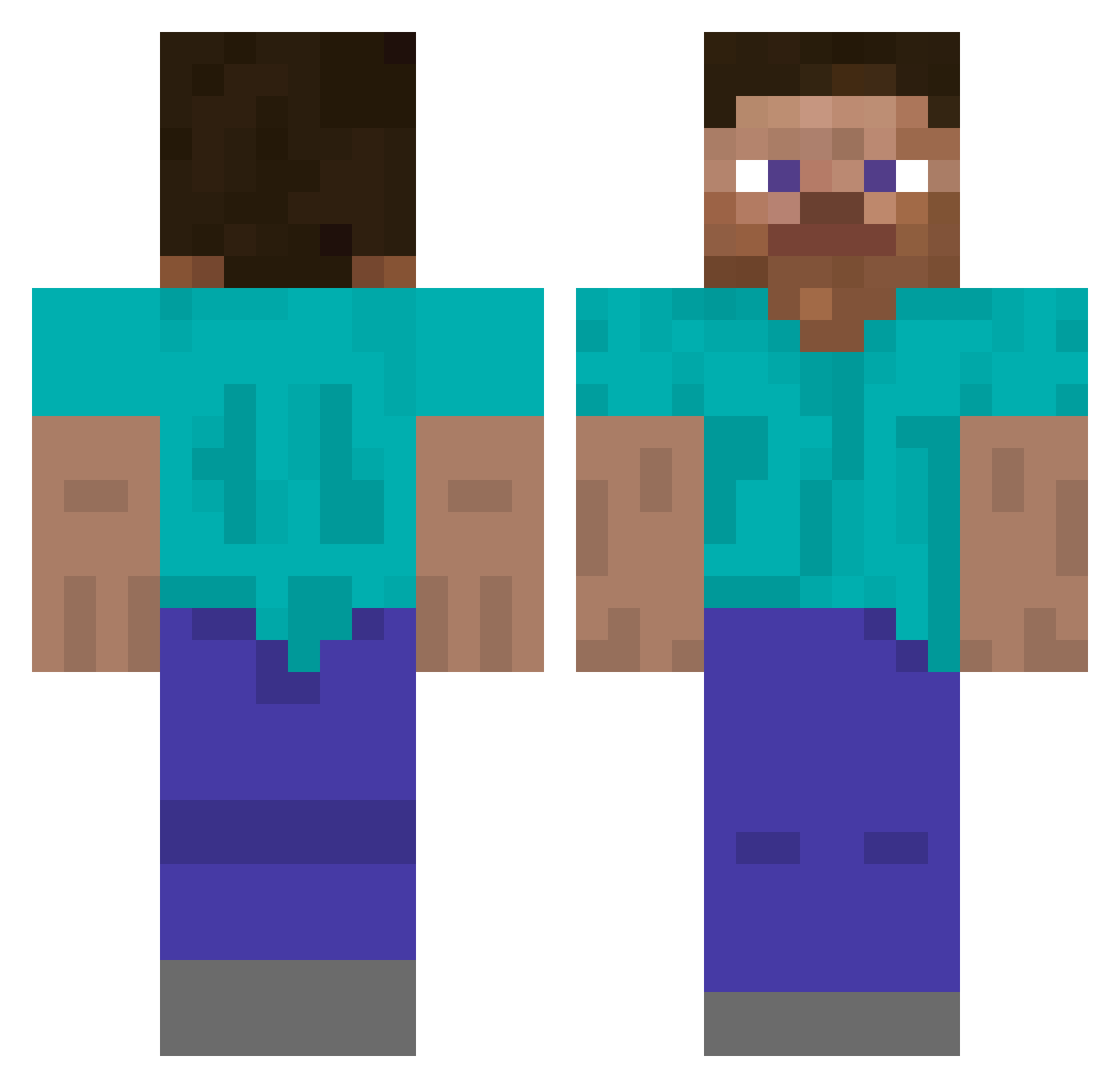
Current Minecraft skin of the player 5KELET0NS, loaded from the official Mojang API. Rotate the 3D model with your mouse or finger, then download the skin as a PNG file and use it in Minecraft: Bedrock Edition or Java Edition for free. When 5KELET0NS changes their skin, this page updates automatically and the old skin stays in the history below.
Other players with this skin (511)
5KELET0NS was the 356th player we have seen with this skin, first spotted on 30.09.2026. The same skin was seen on these players. Open a nickname to see their current skin and skin history.
 gg_bud Noyoungho kkkkhhhh Hwantar o9tion eodyd RinTDer_ fghja123 hxuanyu jlefsdk ghqkrrhrnak0802 MSA3DD Pzx_0 bonbenner bjreason C4KN mashedtateris8 WomboCombo777 Kordynarde MsTtt C95_Ir16_Dia_59 NUTJU1CE zuzu967 AsherIsGross lllacoc M4tSkU walter264 sanico aiai0712 GameSmasher14 abysmarl Tpycbl_19 hippopotachungus Kigggggggggg plihilo tkdrnqudtls Atomturbomaki Dr_monocycle wakutinta HibanaRush Capinha Mix0412 Axlr2014 8_d4 Limited_Impulse2 HoldenTudix_ TeitoZz KaluHaze TheLittleKinglet psychofreak19 shayting RRDS_GAMER m0nys3 LowQuality4k Speedet hik808 Hongjinho1 TheOnlyBoban kimochimaker1972 ShermanBoyd
How to install the 5KELET0NS skin
- Press the Download button above to save the skin as a PNG file.
- Minecraft: Bedrock Edition (PE): open the Dressing Room from the main menu (or tap your character → Edit Character), go to Classic Skins → Owned, press the + (new skin) button, choose the downloaded PNG and pick the Classic (Steve) model. Works on PC and mobile; consoles cannot import custom skins.
- Minecraft: Java Edition: open the Minecraft Launcher, go to the Skins tab, click New Skin, load the PNG, pick the Classic (Steve) model and press Save & Use. You can also upload it at minecraft.net → Profile → Change Skin.
The skin does not show up after import - what should I do?
Restart Minecraft and open the Dressing Room again - imported skins sometimes appear only after a restart. Also make sure you selected the imported skin and picked the Classic (Steve) model.
Which model should I choose, Classic or Slim?
This skin is designed for the Classic (Steve) model. If you pick the wrong model, the arms of the skin will look stretched or squeezed.
Is the skin of 5KELET0NS free to download?
Yes. Press Download, save the PNG file and use it in Minecraft: Bedrock Edition or Java Edition - no payment or registration needed. The skin also works on multiplayer servers and Realms.
More skins
Looking for more? Go back to all Minecraft skins and check the top skins of the week, month and all time, or find any player's skin by nickname.