
31aktrovao - Minecraft Skins & Skin History
Current Minecraft skin of the player 31aktrovao, loaded from the official Mojang API. Rotate the 3D model with your mouse or finger, then download the skin as a PNG file and use it in Minecraft: Bedrock Edition or Java Edition for free. When 31aktrovao changes their skin, this page updates automatically and the old skin stays in the history below.
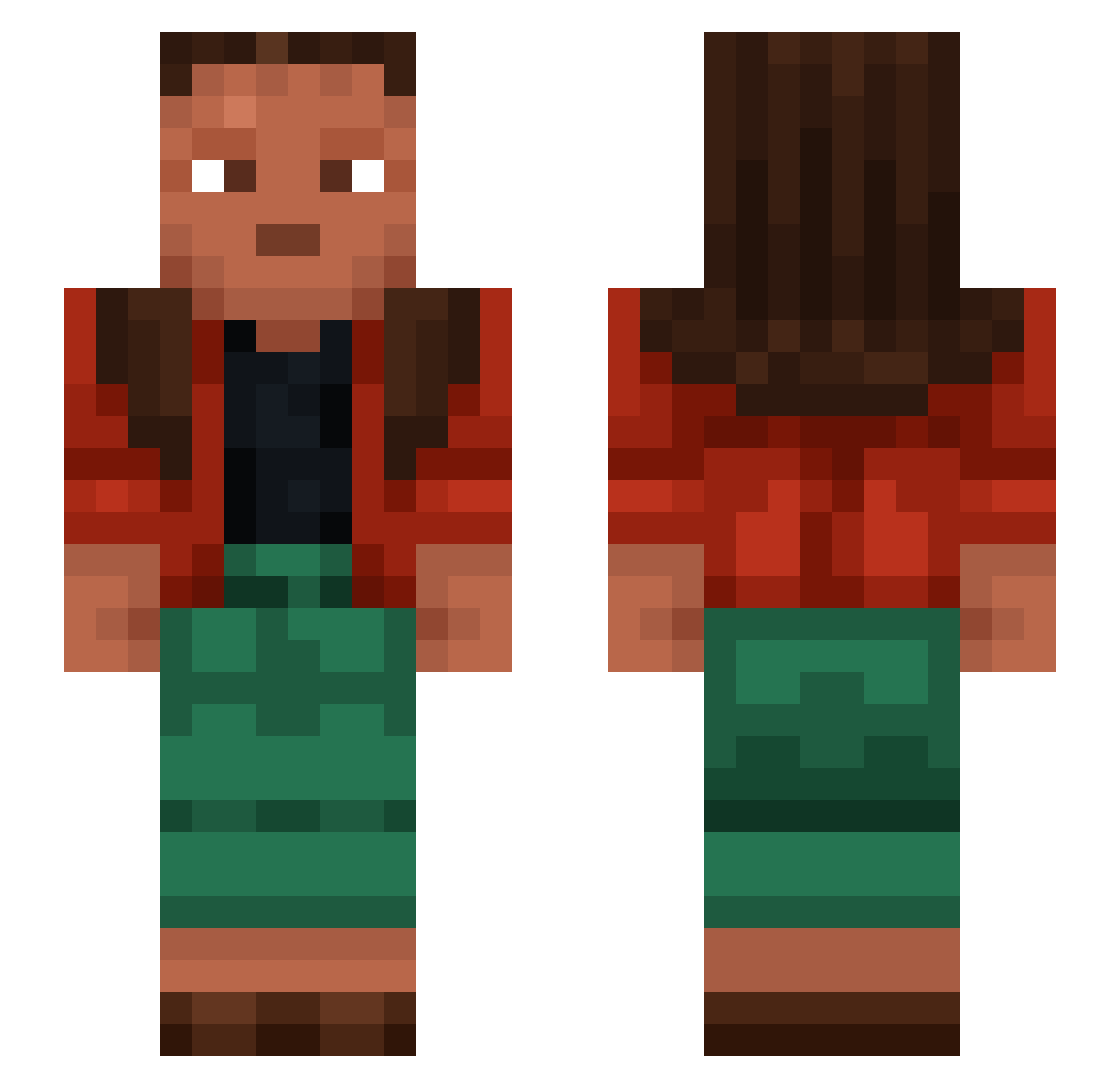
Other players with this skin (1073)
31aktrovao was the 54th player we have seen with this skin, first spotted on 29.07.2026. The same skin was seen on these players. Open a nickname to see their current skin and skin history.
 dualism ToxicBurn hecklers dopinez OMGItsFred porkchopie Gabbusan_Ichiban Lucy_na Heathenize Carragher iamLxnni ScarletSinon veniplex noghead
 iqBennu vIxA derdoof natplays1 PhD_Clem Stadda Chastener Nikujiru29 BoskiRoman69 DonKowalski BRAITSARA ReJleXuK _xSano Deister2010 dariussx000 Graphology NemoLoveBlue Ringblades Kraahh AlmaN Tamasic Postern Golan_Army aroids Jonteeee97 AnimeSensei3236 Pellucid GuthyRs Overprotecting rabidly sabensta MrVultax Sikkie123 KaneGIII Rusteeb jumpingpea Gwayne0123 unprovidable BigLui1994 Heling RaceMic Liquifier
 cicccio88 Spoonaay KatyaYa SturmGamerHD
How to install the 31aktrovao skin
- Press the Download button above to save the skin as a PNG file.
- Minecraft: Bedrock Edition (PE): open the Dressing Room from the main menu (or tap your character → Edit Character), go to Classic Skins → Owned, press the + (new skin) button, choose the downloaded PNG and pick the Slim (Alex) model. Works on PC and mobile; consoles cannot import custom skins.
- Minecraft: Java Edition: open the Minecraft Launcher, go to the Skins tab, click New Skin, load the PNG, pick the Slim (Alex) model and press Save & Use. You can also upload it at minecraft.net → Profile → Change Skin.
The skin does not show up after import - what should I do?
Restart Minecraft and open the Dressing Room again - imported skins sometimes appear only after a restart. Also make sure you selected the imported skin and picked the Slim (Alex) model.
Which model should I choose, Classic or Slim?
This skin is designed for the Slim (Alex) model. If you pick the wrong model, the arms of the skin will look stretched or squeezed.
Is the skin of 31aktrovao free to download?
Yes. Press Download, save the PNG file and use it in Minecraft: Bedrock Edition or Java Edition - no payment or registration needed. The skin also works on multiplayer servers and Realms.
More skins
Looking for more? Go back to all Minecraft skins and check the top skins of the week, month and all time, or find any player's skin by nickname.