
2qs_rely - Minecraft Skins & Skin History
Current Minecraft skin of the player 2qs_rely, loaded from the official Mojang API. Rotate the 3D model with your mouse or finger, then download the skin as a PNG file and use it in Minecraft: Bedrock Edition or Java Edition for free. When 2qs_rely changes their skin, this page updates automatically and the old skin stays in the history below.
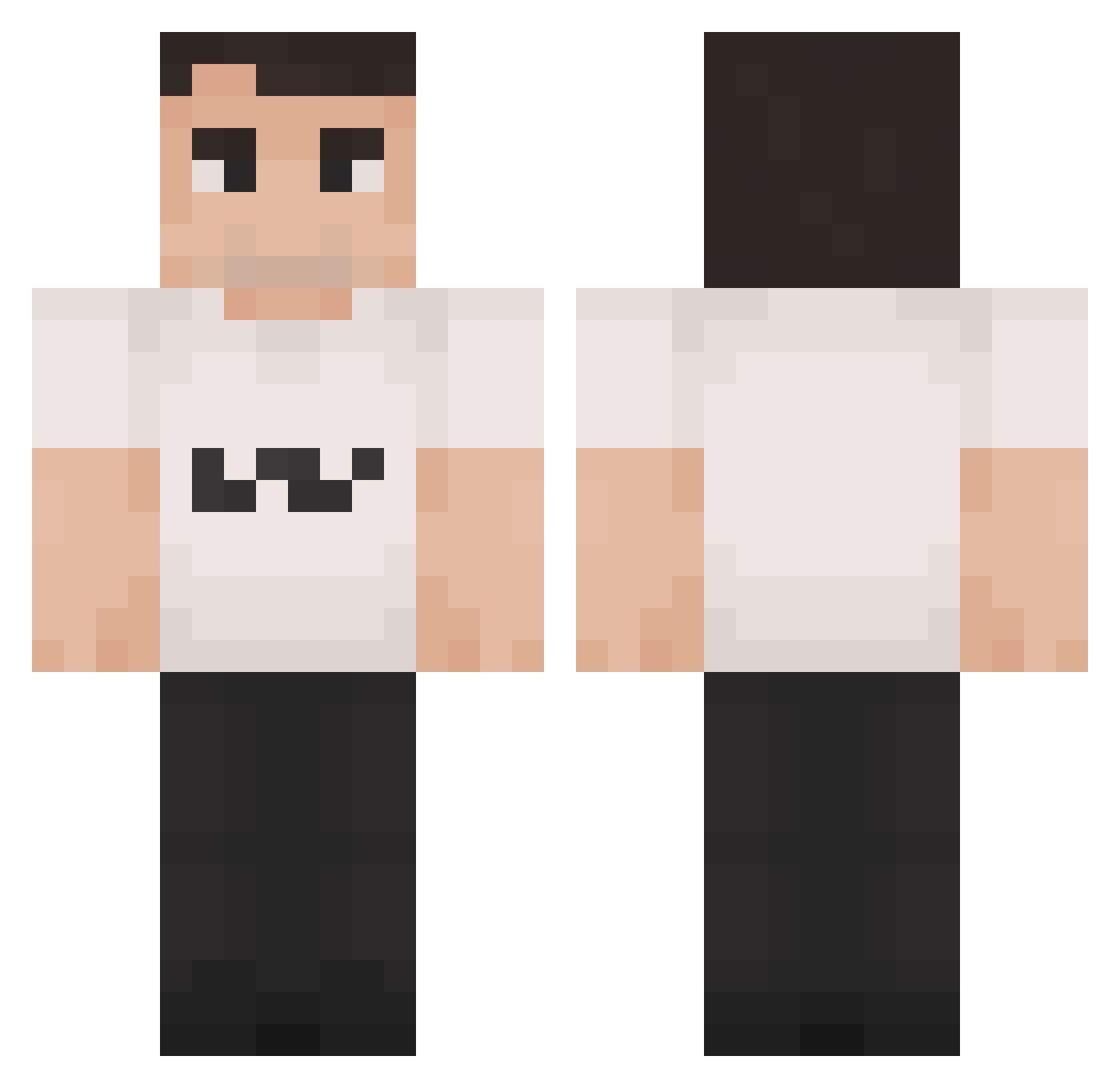
Other players with this skin (1190)
2qs_rely was the 191st player we have seen with this skin, first spotted on 07.08.2026. The same skin was seen on these players. Open a nickname to see their current skin and skin history.
 Red1x1x1x
 CharlieKirk_USA
 Marnaxs dersdude DRNRULES attackdog2877 Fruity_Riddle GroupInsider
 7pekgoat SkyWarsChamp01 Dramstan17 Ripple29 princesskirk67 Thelosingsheep lolsonny1 IsabellaLazaro Jaythecat8 kryptxcc
 ZoomersLULWS alanc_1004 Ansosh1 ceyhunbas cchamaa un_mec_ch3lou Fym_Ac3 gitanodefectuoso Sonkoh yairboy127
 NotNickgamer Biquettelacoste pikachu8956 jasmz BigClem09 YungBoogie ToxicDestroyer SirShmuel luhdripdrip Floppa4_Life kinderboekjes ObliviousYums
 1111999911119999 RlSTOOO chucholi ballsgaming123 renatowaza54
 thebestpotato27 supermeme2 chloex1_ Knightwolf2552 CharliErika PferdeSamurai G2_Caliste panzerpond p4p4no3l riftyzxd passaroDODO Cojam_17 cagueinacalca Isaachido282006 Itasamaa
More Schlatt Minecraft skins
How to install the 2qs_rely skin
- Press the Download button above to save the skin as a PNG file.
- Minecraft: Bedrock Edition (PE): open the Dressing Room from the main menu (or tap your character → Edit Character), go to Classic Skins → Owned, press the + (new skin) button, choose the downloaded PNG and pick the Classic (Steve) model. Works on PC and mobile; consoles cannot import custom skins.
- Minecraft: Java Edition: open the Minecraft Launcher, go to the Skins tab, click New Skin, load the PNG, pick the Classic (Steve) model and press Save & Use. You can also upload it at minecraft.net → Profile → Change Skin.
The skin does not show up after import - what should I do?
Restart Minecraft and open the Dressing Room again - imported skins sometimes appear only after a restart. Also make sure you selected the imported skin and picked the Classic (Steve) model.
Which model should I choose, Classic or Slim?
This skin is designed for the Classic (Steve) model. If you pick the wrong model, the arms of the skin will look stretched or squeezed.
Is the skin of 2qs_rely free to download?
Yes. Press Download, save the PNG file and use it in Minecraft: Bedrock Edition or Java Edition - no payment or registration needed. The skin also works on multiplayer servers and Realms.
More skins
Looking for more? Go back to all Minecraft skins and check the top skins of the week, month and all time, or find any player's skin by nickname.