
11mrawesome - Minecraft Skins & Skin History
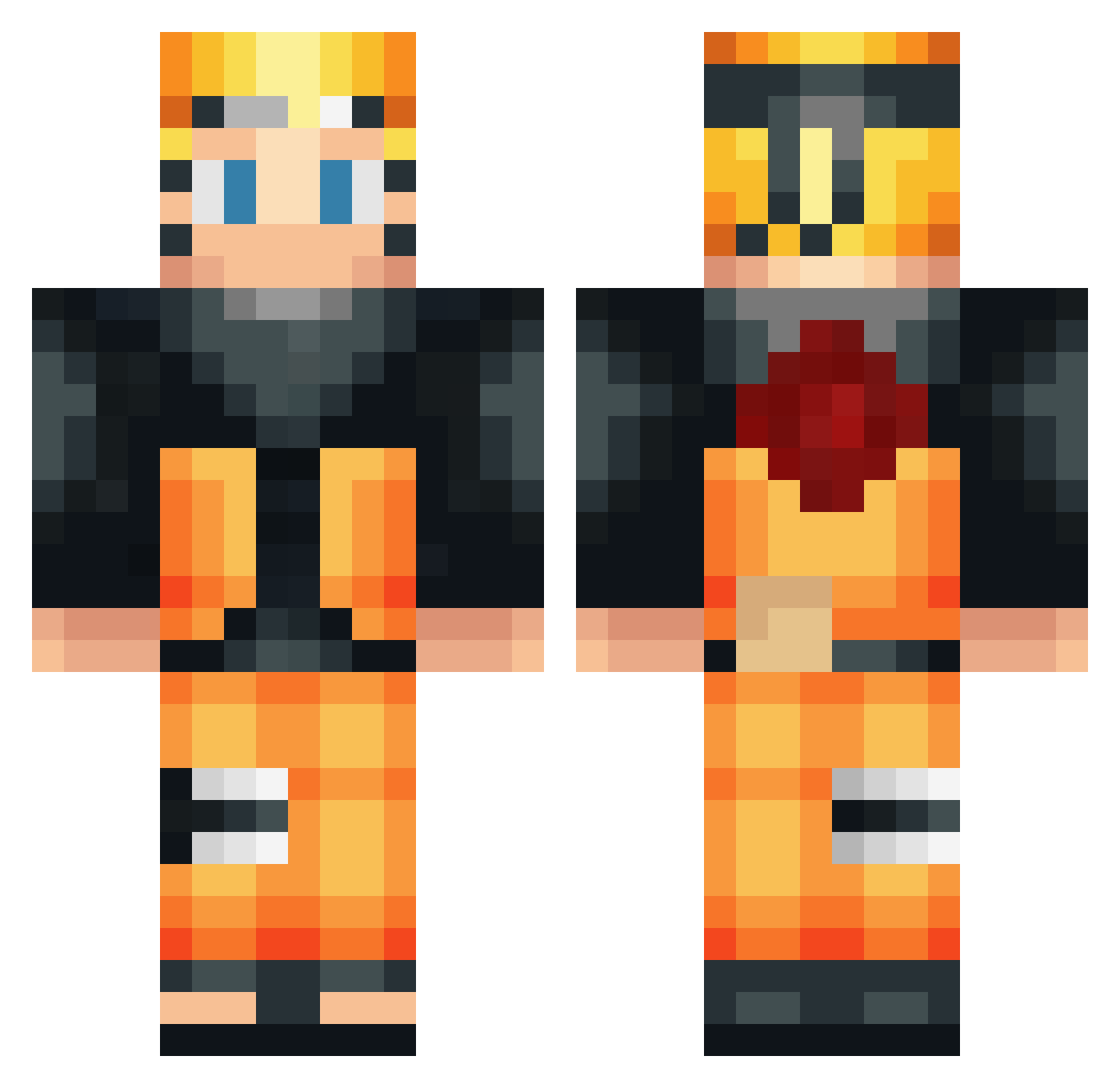
Current Minecraft skin of the player 11mrawesome, loaded from the official Mojang API. Rotate the 3D model with your mouse or finger, then download the skin as a PNG file and use it in Minecraft: Bedrock Edition or Java Edition for free. When 11mrawesome changes their skin, this page updates automatically and the old skin stays in the history below.
Other players with this skin (534)
11mrawesome was the 356th player we have seen with this skin, first spotted on 07.10.2026. The same skin was seen on these players. Open a nickname to see their current skin and skin history.
 Zevonn MusicFish234 Sanyabrilliant exoG21 HollaMobil MrcShark RakerTv Kmge711 Sergio_master SedoGGEZ KiDzO9 Turtrain JoaoGamer2308 FumblesMcCoy4 AnimeDudeThing slamnfatcooter itswhitepasta zPedrinho_craft minzo18 eli78 DeracGuzova Narutodroole Shadow_boi1 NathanRgd afromojo_ bolbolattack guigs10mil cluckes Shooock10 slazie_69 MifTeq Master_Rice13 Ubiraj Innosca TreyVDW nyan_cat25 lilze215 warm_my_soul TropikalRecords 1319yusuf macelord ugoskii xxgamer_1132 Trainer_Lucas neunschwaenzig popocheng BenWolfFn St_ubidL Sahmot RedFish ReyHikaru Naruto_Omega trollmasteryak TommyDzp Bikibobo HaRuMaJi SwiftShade_IR ripark9 Shiumaster88 Xixtor
More Naruto Uzumaki Minecraft skins
See all 473 Naruto Uzumaki skins
How to install the 11mrawesome skin
- Press the Download button above to save the skin as a PNG file.
- Minecraft: Bedrock Edition (PE): open the Dressing Room from the main menu (or tap your character → Edit Character), go to Classic Skins → Owned, press the + (new skin) button, choose the downloaded PNG and pick the Classic (Steve) model. Works on PC and mobile; consoles cannot import custom skins.
- Minecraft: Java Edition: open the Minecraft Launcher, go to the Skins tab, click New Skin, load the PNG, pick the Classic (Steve) model and press Save & Use. You can also upload it at minecraft.net → Profile → Change Skin.
The skin does not show up after import - what should I do?
Restart Minecraft and open the Dressing Room again - imported skins sometimes appear only after a restart. Also make sure you selected the imported skin and picked the Classic (Steve) model.
Which model should I choose, Classic or Slim?
This skin is designed for the Classic (Steve) model. If you pick the wrong model, the arms of the skin will look stretched or squeezed.
Is the skin of 11mrawesome free to download?
Yes. Press Download, save the PNG file and use it in Minecraft: Bedrock Edition or Java Edition - no payment or registration needed. The skin also works on multiplayer servers and Realms.
More skins
Looking for more? Go back to all Minecraft skins and check the top skins of the week, month and all time, or find any player's skin by nickname.