
zbtgub26 - Minecraft Skins & Skin History
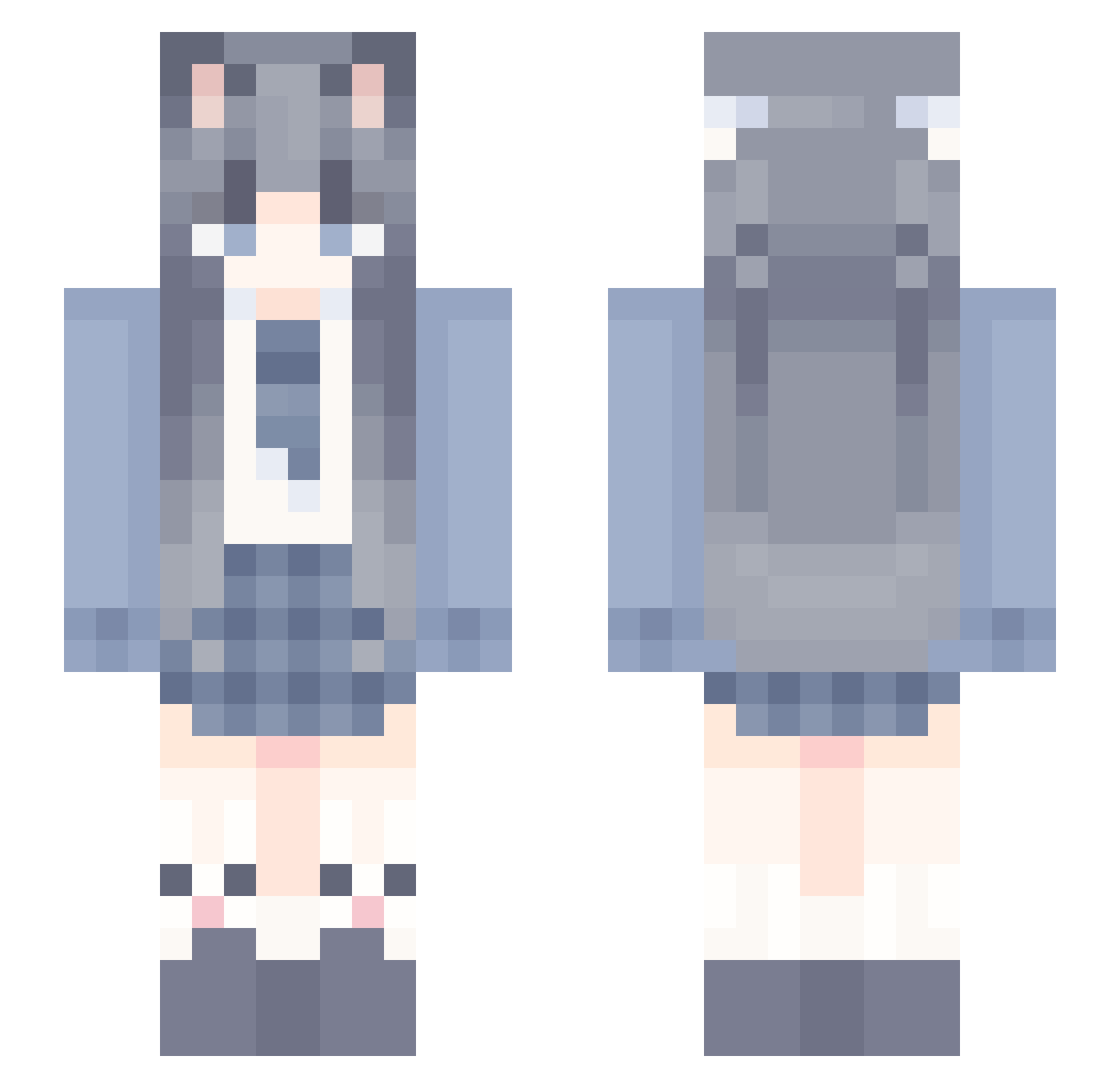
Current Minecraft skin of the player zbtgub26, loaded from the official Mojang API. Rotate the 3D model with your mouse or finger, then download the skin as a PNG file and use it in Minecraft: Bedrock Edition or Java Edition for free. When zbtgub26 changes their skin, this page updates automatically and the old skin stays in the history below.
Other players with this skin (1147)
zbtgub26 was the 1137th player we have seen with this skin, first spotted on 02.11.2026. The same skin was seen on these players. Open a nickname to see their current skin and skin history.
 Raindrop_BY liangan900981 simmon666 Qin_Yui_ KindlyElf XIMUNE quagmireo Qing_Kong rraviel zzc13312 HecklerGK shuobin Cherrysoda_XD NeutralPlayz seenyerw_21309 xxxxiaoyi tuimao66 kumori707 Wuli_HX ZiiYi TangHongyu jthlg CuiEnXian MotDoiLiemKhiett wodal Starry_sky_Dream wu_kee2 beifang46 tear_qwq Msa9999 Dawuuuuu Floating_Light Abuspzz_688 lhFZ666 FinYing MINGLN FINIA6 TANGMOYAN qingfong123 byz111 hfgdmbh qing_huan_du AALYRAE Mercurius_879691 Moliiii_ fw17 Zerovo_ XMEEE evanhei PedeDenFede Sunflower70 gaodonglin Floating_Star ZuoYouQoQ mc_wangIe rainthing JaysDa1 ESL20 pxme hua_001
More School Uniform Minecraft skins
See all 6768 School Uniform skins
How to install the zbtgub26 skin
- Press the Download button above to save the skin as a PNG file.
- Minecraft: Bedrock Edition (PE): open the Dressing Room from the main menu (or tap your character → Edit Character), go to Classic Skins → Owned, press the + (new skin) button, choose the downloaded PNG and pick the Slim (Alex) model. Works on PC and mobile; consoles cannot import custom skins.
- Minecraft: Java Edition: open the Minecraft Launcher, go to the Skins tab, click New Skin, load the PNG, pick the Slim (Alex) model and press Save & Use. You can also upload it at minecraft.net → Profile → Change Skin.
The skin does not show up after import - what should I do?
Restart Minecraft and open the Dressing Room again - imported skins sometimes appear only after a restart. Also make sure you selected the imported skin and picked the Slim (Alex) model.
Which model should I choose, Classic or Slim?
This skin is designed for the Slim (Alex) model. If you pick the wrong model, the arms of the skin will look stretched or squeezed.
Is the skin of zbtgub26 free to download?
Yes. Press Download, save the PNG file and use it in Minecraft: Bedrock Edition or Java Edition - no payment or registration needed. The skin also works on multiplayer servers and Realms.
More skins
Looking for more? Go back to all Minecraft skins and check the top skins of the week, month and all time, or find any player's skin by nickname.