
up2y - Minecraft Skins & Skin History
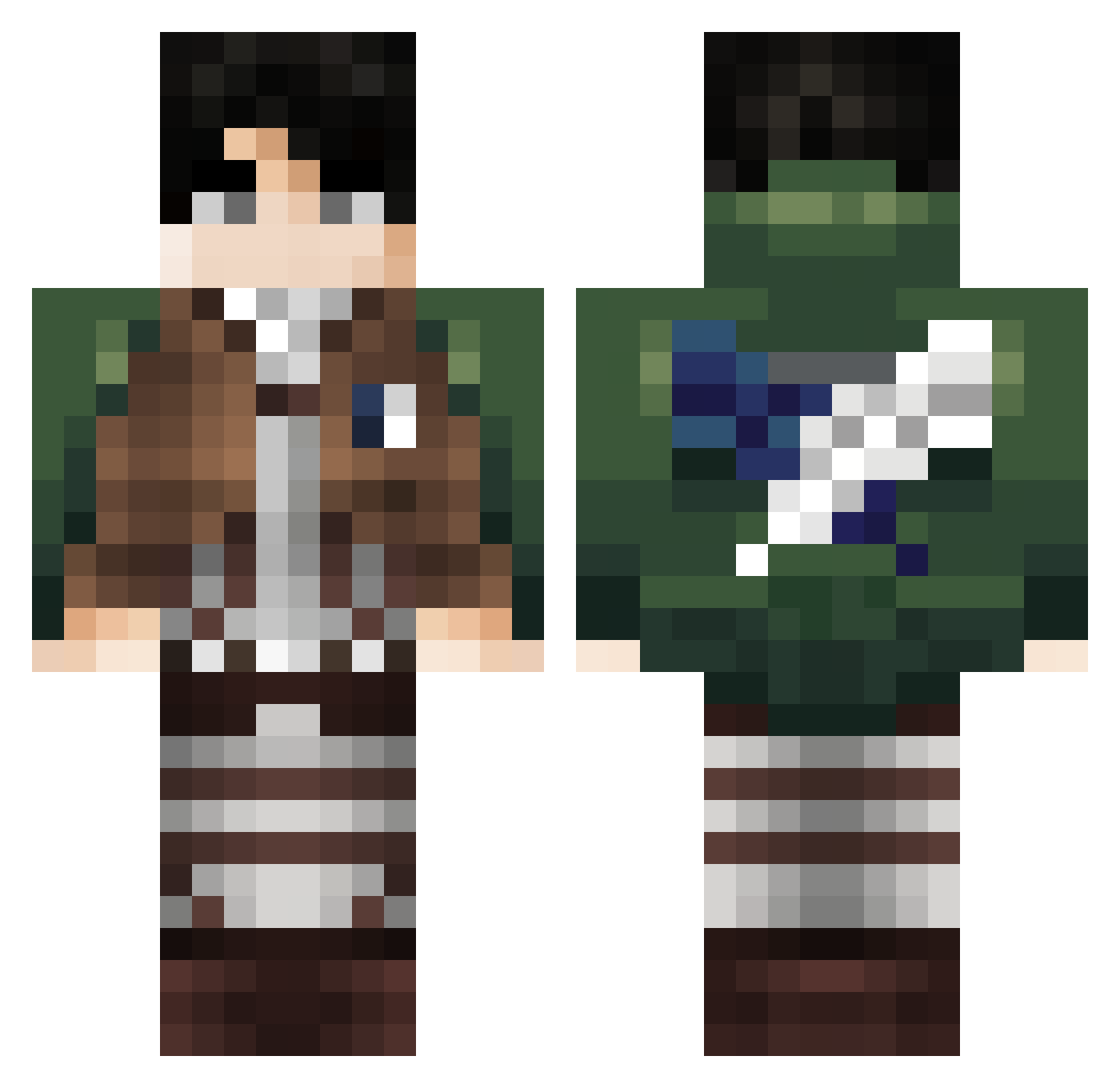
Current Minecraft skin of the player up2y, loaded from the official Mojang API. Rotate the 3D model with your mouse or finger, then download the skin as a PNG file and use it in Minecraft: Bedrock Edition or Java Edition for free. When up2y changes their skin, this page updates automatically and the old skin stays in the history below.
Other players with this skin (99)
up2y was the 61st player we have seen with this skin, first spotted on 02.10.2026. The same skin was seen on these players. Open a nickname to see their current skin and skin history.
 Nqruto01 KrenKo12 LoTi_pd Fubehxd Levikov fisherpriceisgod Capoditutti26 Neyoung SrMaxi321 Dony16 Alexlbaec Happygamer66 VladInok Flex_dama JuiceTheBox ch0ccomilkh ImFluke90 Gabnic11 ZakBodies Vicuber C4RLOST_ Sierra_44 EEKAAJ Krusty_Krab24 Lydorken Thomas__67 AFAHX Crota_mc onurL0L Point_God_ akumackerman Riisca Isaashy Mogar_257 Nicolas_chocolat Potatizgrisen BZH_PAULUX AnikiiSempai mainizmed Sangel114 MaRiO131 miruwuu Dazett GixTixLoh Pyzipmin17107 Razef96 Escupi09 LoolaaLand Merydia_M dsd_altair07 anggon_YT DRT_Artur grante36 beebsk Ziross Camataru81 Juniar1209 EnsignLake96999 Seal1909 Dav1d04
More Levi Ackerman Minecraft skins
See all 191 Levi Ackerman skins
How to install the up2y skin
- Press the Download button above to save the skin as a PNG file.
- Minecraft: Bedrock Edition (PE): open the Dressing Room from the main menu (or tap your character → Edit Character), go to Classic Skins → Owned, press the + (new skin) button, choose the downloaded PNG and pick the Classic (Steve) model. Works on PC and mobile; consoles cannot import custom skins.
- Minecraft: Java Edition: open the Minecraft Launcher, go to the Skins tab, click New Skin, load the PNG, pick the Classic (Steve) model and press Save & Use. You can also upload it at minecraft.net → Profile → Change Skin.
The skin does not show up after import - what should I do?
Restart Minecraft and open the Dressing Room again - imported skins sometimes appear only after a restart. Also make sure you selected the imported skin and picked the Classic (Steve) model.
Which model should I choose, Classic or Slim?
This skin is designed for the Classic (Steve) model. If you pick the wrong model, the arms of the skin will look stretched or squeezed.
Is the skin of up2y free to download?
Yes. Press Download, save the PNG file and use it in Minecraft: Bedrock Edition or Java Edition - no payment or registration needed. The skin also works on multiplayer servers and Realms.
More skins
Looking for more? Go back to all Minecraft skins and check the top skins of the week, month and all time, or find any player's skin by nickname.