
seven_bubbles - Minecraft Skins & Skin History
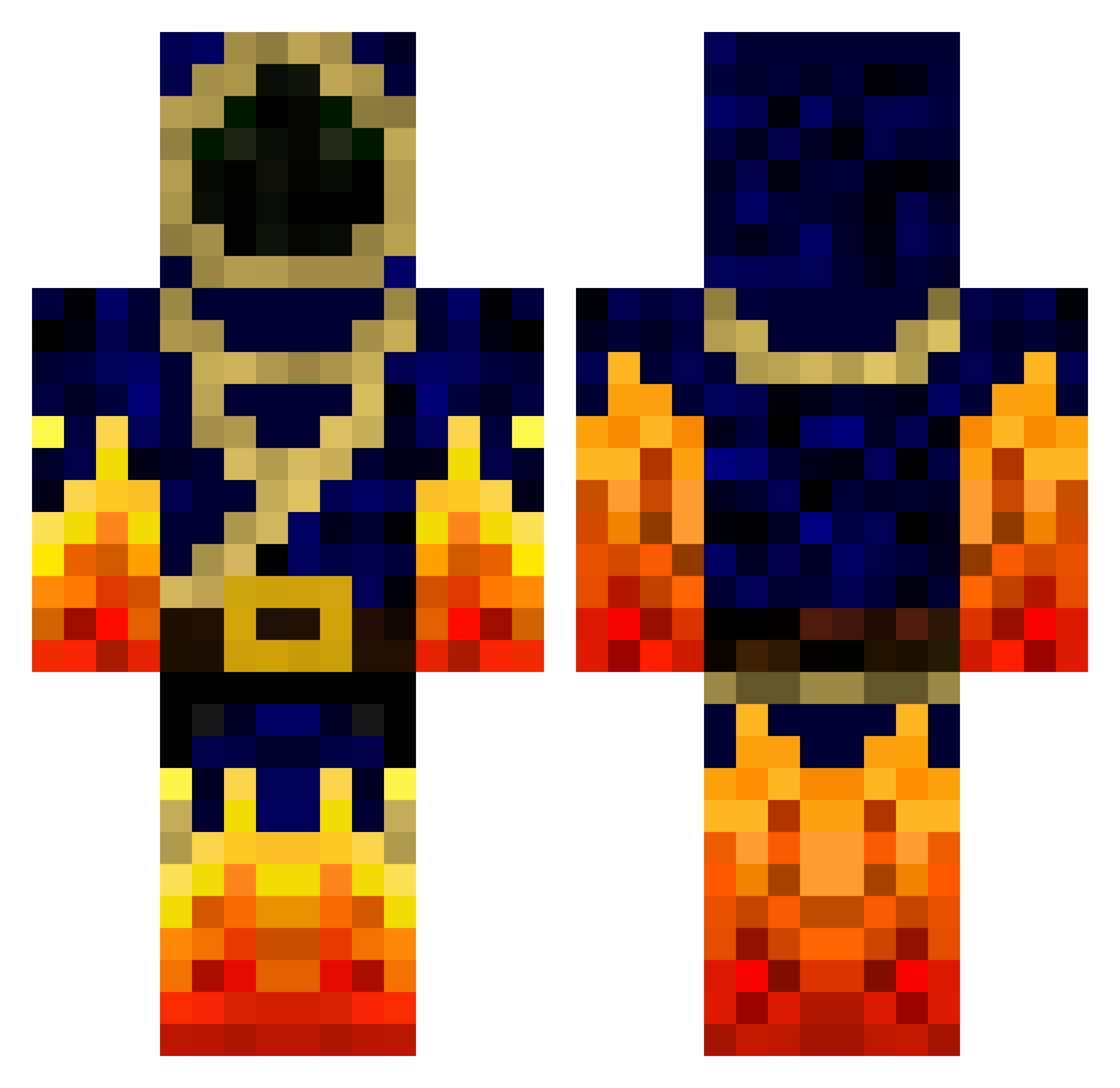
Current Minecraft skin of the player seven_bubbles, loaded from the official Mojang API. Rotate the 3D model with your mouse or finger, then download the skin as a PNG file and use it in Minecraft: Bedrock Edition or Java Edition for free. When seven_bubbles changes their skin, this page updates automatically and the old skin stays in the history below.
Other players with this skin (781)
seven_bubbles was the 718th player we have seen with this skin, first spotted on 29.10.2026. The same skin was seen on these players. Open a nickname to see their current skin and skin history.
 multikameli Azatot_21 Darknecroxa 2001zombiekiller darkknight4763 Sayan232 joshmcky TheSurfers thekingkoy Denowex tjh4687 TheEverydayGamer jono1t Campero512 Svennela EnderScientist epicgame1114 teleare Kuw139 666323 ausmeg24 speedv87 Crazie_lad123 KidDragonPhoenix BurnzieGaming CalvinAmerica philipthree HHsted jackswill001 SniperAlpay Brotherton2001 Spiderjockey15 Munkee_Spider Campbell_Soup Jackruleskk LRand hota_te GreenLuck HyperionTitan Eriggs64 Ceyrico mamepe123 vanburen12 DukeGlados CheeesyMelon Warzes minecraftboss7 Gucci_A_Clone PteJoker goldxxhunter iAssclown segoblast Indiana306 nathm01 9o9o7 tobiasb10 sura4ever wet_Beaver69 diamonddude872 Snareboy9
More Mage Minecraft skins
How to install the seven_bubbles skin
- Press the Download button above to save the skin as a PNG file.
- Minecraft: Bedrock Edition (PE): open the Dressing Room from the main menu (or tap your character → Edit Character), go to Classic Skins → Owned, press the + (new skin) button, choose the downloaded PNG and pick the Classic (Steve) model. Works on PC and mobile; consoles cannot import custom skins.
- Minecraft: Java Edition: open the Minecraft Launcher, go to the Skins tab, click New Skin, load the PNG, pick the Classic (Steve) model and press Save & Use. You can also upload it at minecraft.net → Profile → Change Skin.
The skin does not show up after import - what should I do?
Restart Minecraft and open the Dressing Room again - imported skins sometimes appear only after a restart. Also make sure you selected the imported skin and picked the Classic (Steve) model.
Which model should I choose, Classic or Slim?
This skin is designed for the Classic (Steve) model. If you pick the wrong model, the arms of the skin will look stretched or squeezed.
Is the skin of seven_bubbles free to download?
Yes. Press Download, save the PNG file and use it in Minecraft: Bedrock Edition or Java Edition - no payment or registration needed. The skin also works on multiplayer servers and Realms.
More skins
Looking for more? Go back to all Minecraft skins and check the top skins of the week, month and all time, or find any player's skin by nickname.