
knowlogik - Minecraft Skins & Skin History
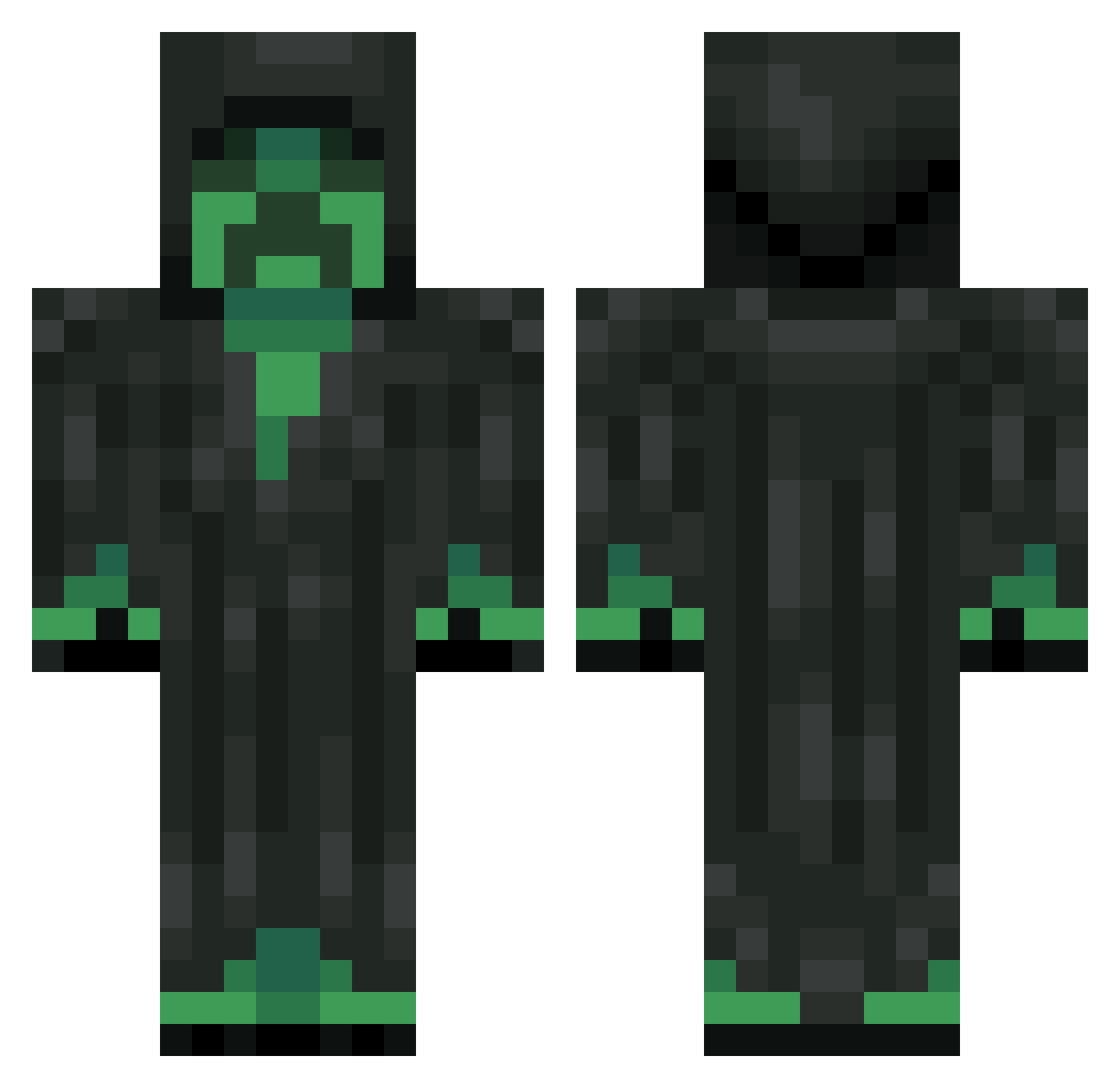
Current Minecraft skin of the player knowlogik, loaded from the official Mojang API. Rotate the 3D model with your mouse or finger, then download the skin as a PNG file and use it in Minecraft: Bedrock Edition or Java Edition for free. When knowlogik changes their skin, this page updates automatically and the old skin stays in the history below.
Other players with this skin (322)
knowlogik was the 261st player we have seen with this skin, first spotted on 18.10.2026. The same skin was seen on these players. Open a nickname to see their current skin and skin history.
 Defa17 Ciyper JanCoolBoy99 Magicredsox Tangled_Earpods YoHeFty GodMiner0513 thedukarddog Mad_lyfe truthytruth Takocky nnooooooooobbb ssshadow1995 noz9y G4bri31 DJ_Llama266 MaxaimTTV creeperfabi Finnem4nsie LewisTheCrafter 7LJ Sleazex harryhyhy CMParisFTW TunageTV FlashyFelix y1026 dynamoexpert NamelessHivemind tynnyri2002 mullvaden00 XVoxe1 bornsinner13 DiamondCreeper25 AJjosa JH_74 Drenski_ JokerYuan Blastradius SietseGrommen badmo0d madsen04 snake25250 crprBOSS47 Sumptary Egrimon Ragamafi420 ElNegrio ZiplocBoi RealHdGamer Reaper2013SW Vejii minemasternate shrededmoney rage_endpro BroStarTv BushIsFake kswnor Cookies_x3 iSoul95
More Grim Reaper Minecraft skins
How to install the knowlogik skin
- Press the Download button above to save the skin as a PNG file.
- Minecraft: Bedrock Edition (PE): open the Dressing Room from the main menu (or tap your character → Edit Character), go to Classic Skins → Owned, press the + (new skin) button, choose the downloaded PNG and pick the Classic (Steve) model. Works on PC and mobile; consoles cannot import custom skins.
- Minecraft: Java Edition: open the Minecraft Launcher, go to the Skins tab, click New Skin, load the PNG, pick the Classic (Steve) model and press Save & Use. You can also upload it at minecraft.net → Profile → Change Skin.
The skin does not show up after import - what should I do?
Restart Minecraft and open the Dressing Room again - imported skins sometimes appear only after a restart. Also make sure you selected the imported skin and picked the Classic (Steve) model.
Which model should I choose, Classic or Slim?
This skin is designed for the Classic (Steve) model. If you pick the wrong model, the arms of the skin will look stretched or squeezed.
Is the skin of knowlogik free to download?
Yes. Press Download, save the PNG file and use it in Minecraft: Bedrock Edition or Java Edition - no payment or registration needed. The skin also works on multiplayer servers and Realms.
More skins
Looking for more? Go back to all Minecraft skins and check the top skins of the week, month and all time, or find any player's skin by nickname.