
kidbas - Minecraft Skins & Skin History
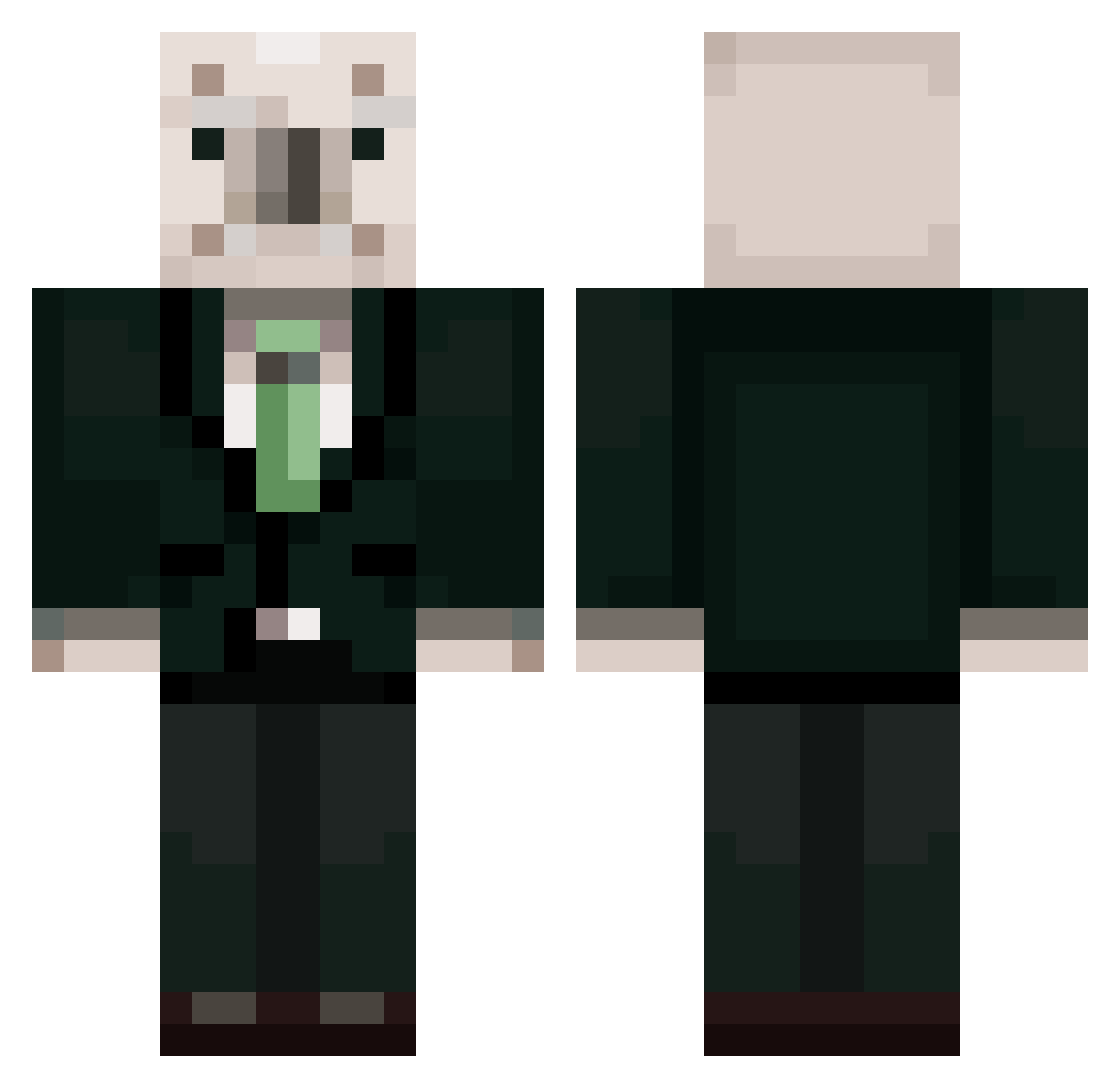
Current Minecraft skin of the player kidbas, loaded from the official Mojang API. Rotate the 3D model with your mouse or finger, then download the skin as a PNG file and use it in Minecraft: Bedrock Edition or Java Edition for free. When kidbas changes their skin, this page updates automatically and the old skin stays in the history below.
Other players with this skin (461)
kidbas was the 351st player we have seen with this skin, first spotted on 13.10.2026. The same skin was seen on these players. Open a nickname to see their current skin and skin history.
 yadon2416 OH_MY_ALLAH Keter_YT bangguppung babylemon15 iamevilcarrot BONGBAP rnjsdytpq Ddagjun RohMooHyun18 hjw0630 m1nzun0 hsw8016 Sohajun13 genzas123 WovenAnt6276169 kukuku830 Ito_Hirobumi woobin411 sakwno12 xxkosvt NoJJaang junggus sbemi coco_pigeon Im_LuckyGuy solsolhol tlqkfqudtlsrpdla Uni_1209 xxxyongmin koer2 zotmin jznhsxg1 Superghsh yeahs523 Guw7 jio12 Lotteyon choegang Chyo2 Keslip spentemperor606 megurmock IsThatEric WHY_AM_SO_VEDI goat_manje_god 46223342 jonjaldonggyu kangmin0725 baesubinn PokeDongHoLee kangwho0804 High_Zero_Silver pinkpig0512 hy1201 kyungmin719 bugiugi_ 1O_0 junhoe00 Park_Sorry
More Koala Minecraft skins
How to install the kidbas skin
- Press the Download button above to save the skin as a PNG file.
- Minecraft: Bedrock Edition (PE): open the Dressing Room from the main menu (or tap your character → Edit Character), go to Classic Skins → Owned, press the + (new skin) button, choose the downloaded PNG and pick the Classic (Steve) model. Works on PC and mobile; consoles cannot import custom skins.
- Minecraft: Java Edition: open the Minecraft Launcher, go to the Skins tab, click New Skin, load the PNG, pick the Classic (Steve) model and press Save & Use. You can also upload it at minecraft.net → Profile → Change Skin.
The skin does not show up after import - what should I do?
Restart Minecraft and open the Dressing Room again - imported skins sometimes appear only after a restart. Also make sure you selected the imported skin and picked the Classic (Steve) model.
Which model should I choose, Classic or Slim?
This skin is designed for the Classic (Steve) model. If you pick the wrong model, the arms of the skin will look stretched or squeezed.
Is the skin of kidbas free to download?
Yes. Press Download, save the PNG file and use it in Minecraft: Bedrock Edition or Java Edition - no payment or registration needed. The skin also works on multiplayer servers and Realms.
More skins
Looking for more? Go back to all Minecraft skins and check the top skins of the week, month and all time, or find any player's skin by nickname.