
RabbitHutch24 - Minecraft Skins & Skin History
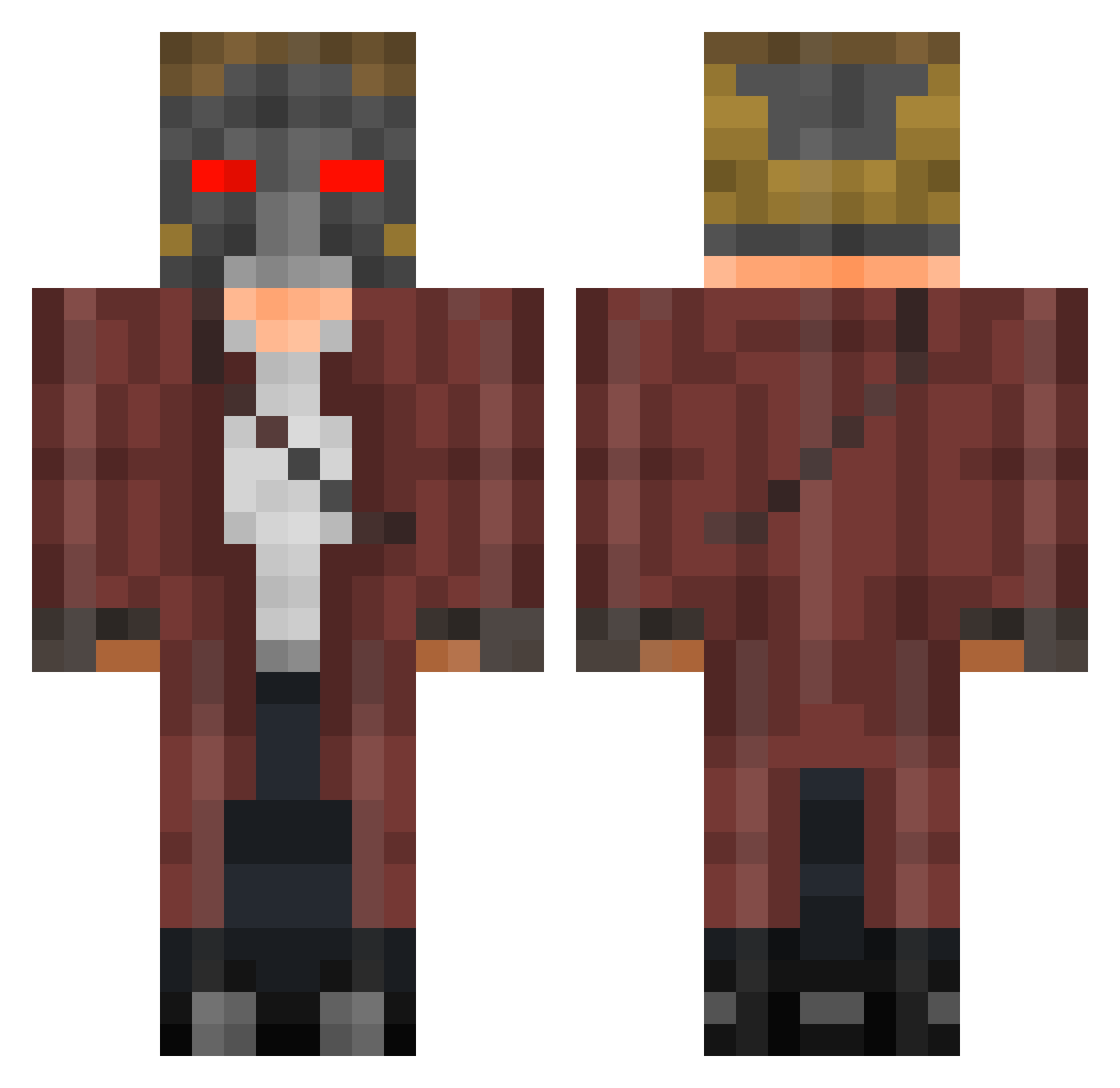
Current Minecraft skin of the player RabbitHutch24, loaded from the official Mojang API. Rotate the 3D model with your mouse or finger, then download the skin as a PNG file and use it in Minecraft: Bedrock Edition or Java Edition for free. When RabbitHutch24 changes their skin, this page updates automatically and the old skin stays in the history below.
Other players with this skin (281)
RabbitHutch24 was the 247th player we have seen with this skin, first spotted on 29.10.2026. The same skin was seen on these players. Open a nickname to see their current skin and skin history.
 tears4todd VirtualAssassin_ Comob24 ThePozzMan Realsnot bej_bej StarlordGuardian JAGM0n DatsJ Gabribbo Thibal_ MaweeS Powdude AsianTaxEvasion Kerryan11 PotDemielLOVEC P_moFumoFU GamboLydo S1ARL0RD StarPrince18 ArsL bbdoo Carlotakuutu CrimsonAceVortex aiueo0929 Mister_R43 KKKayaK Zioxx Treeman510 Taurnile AbdullahSB13 NCooke smartsidd Scrathew Badada404 TheWater0 IcyAneekYT Y1dwArd Eazymiles Thanos48 EvilDemond44 Crackumun mylannno CamLloydRich whipparn TheSven963 mertalbs16 Robin1711_ lukasalbornoz_ Baholop serafinnwm NapoliVesuvio Gxrski Chinturato elayas7 Silky__JH DawmTheBomb ahapajamas Daementia TheMuffinMan839
More Star Lord Minecraft skins
How to install the RabbitHutch24 skin
- Press the Download button above to save the skin as a PNG file.
- Minecraft: Bedrock Edition (PE): open the Dressing Room from the main menu (or tap your character → Edit Character), go to Classic Skins → Owned, press the + (new skin) button, choose the downloaded PNG and pick the Classic (Steve) model. Works on PC and mobile; consoles cannot import custom skins.
- Minecraft: Java Edition: open the Minecraft Launcher, go to the Skins tab, click New Skin, load the PNG, pick the Classic (Steve) model and press Save & Use. You can also upload it at minecraft.net → Profile → Change Skin.
The skin does not show up after import - what should I do?
Restart Minecraft and open the Dressing Room again - imported skins sometimes appear only after a restart. Also make sure you selected the imported skin and picked the Classic (Steve) model.
Which model should I choose, Classic or Slim?
This skin is designed for the Classic (Steve) model. If you pick the wrong model, the arms of the skin will look stretched or squeezed.
Is the skin of RabbitHutch24 free to download?
Yes. Press Download, save the PNG file and use it in Minecraft: Bedrock Edition or Java Edition - no payment or registration needed. The skin also works on multiplayer servers and Realms.
More skins
Looking for more? Go back to all Minecraft skins and check the top skins of the week, month and all time, or find any player's skin by nickname.