
PreViau - Minecraft Skins & Skin History
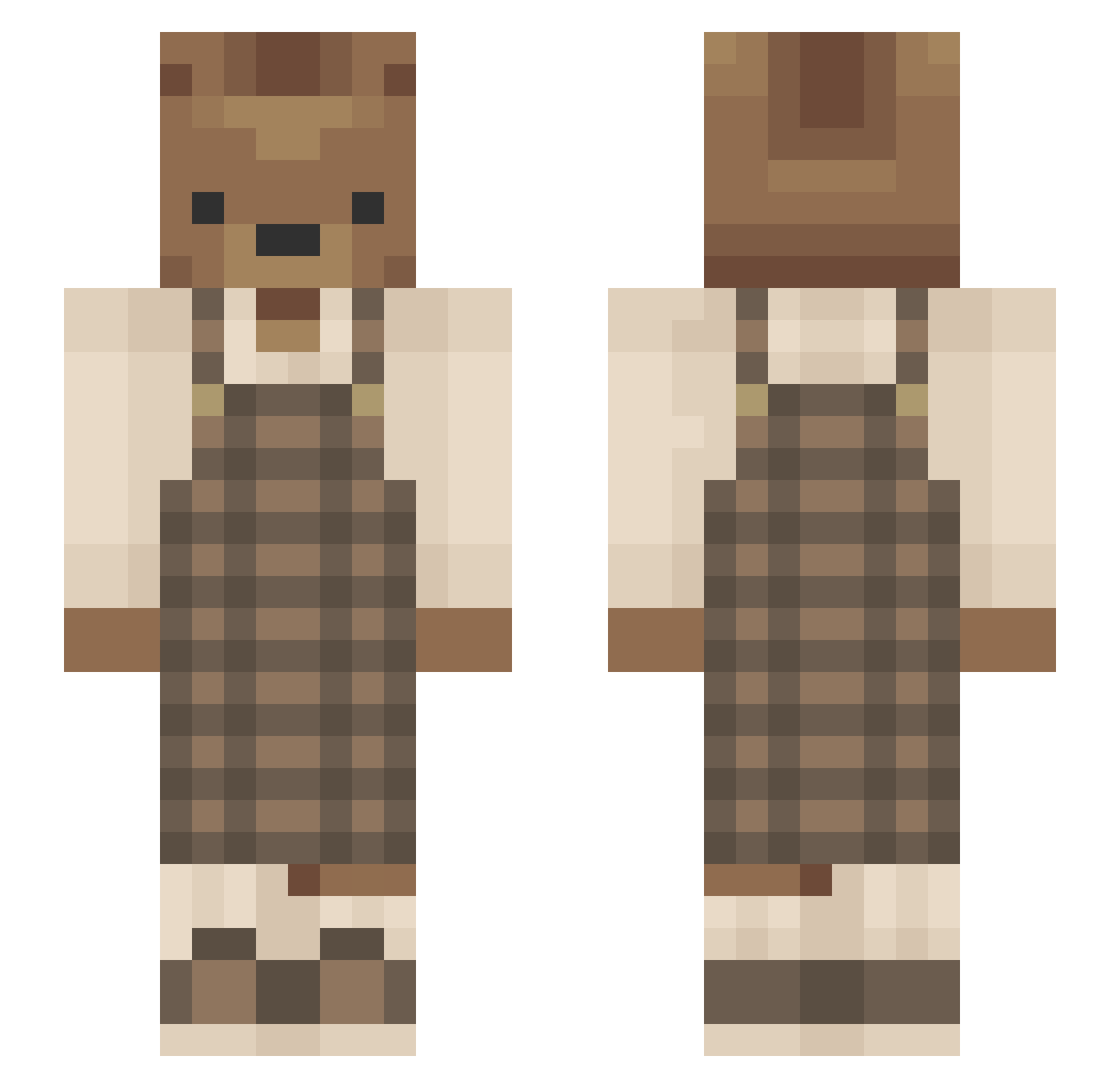
Current Minecraft skin of the player PreViau, loaded from the official Mojang API. Rotate the 3D model with your mouse or finger, then download the skin as a PNG file and use it in Minecraft: Bedrock Edition or Java Edition for free. When PreViau changes their skin, this page updates automatically and the old skin stays in the history below.
Other players with this skin (637)
PreViau was the 532nd player we have seen with this skin, first spotted on 23.10.2026. The same skin was seen on these players. Open a nickname to see their current skin and skin history.
 TCakeee Sandreira Simpanj21 _Alemoon_ adriadriadri JJthatonekid pau_lina Grizz_b FinButler big_m_18 b3rryana YerhiChan DangPinecone woobri Frejchu urmom_com33 suk731 ItsNimrod SandManTheMan_ nell1216 M3eraki cellarspiders Demona2007 AnAbsoluteWalnut Mheacelo Holomacult 99Sebastian hann9 DirtySouthBoy nomsik RabbitKun creampelt TirANNAA Gnohomomo eggome E_Lenders wvhsdavid lopickleo CCC992 SamJ12_ 77_An_Encore jamieherself Pinpairdu Ninkaninus cheesygai RaXna2010 Teary_bear_mc futumame ayatheefoe nevaeh9999 itsiamh RaezorRae420 PAWWWWS Sicrea SunflowerLuLu Sebastian52568 pasteleggies sevenn0531 nalboi gubiworm
More Bear Minecraft skins
How to install the PreViau skin
- Press the Download button above to save the skin as a PNG file.
- Minecraft: Bedrock Edition (PE): open the Dressing Room from the main menu (or tap your character → Edit Character), go to Classic Skins → Owned, press the + (new skin) button, choose the downloaded PNG and pick the Slim (Alex) model. Works on PC and mobile; consoles cannot import custom skins.
- Minecraft: Java Edition: open the Minecraft Launcher, go to the Skins tab, click New Skin, load the PNG, pick the Slim (Alex) model and press Save & Use. You can also upload it at minecraft.net → Profile → Change Skin.
The skin does not show up after import - what should I do?
Restart Minecraft and open the Dressing Room again - imported skins sometimes appear only after a restart. Also make sure you selected the imported skin and picked the Slim (Alex) model.
Which model should I choose, Classic or Slim?
This skin is designed for the Slim (Alex) model. If you pick the wrong model, the arms of the skin will look stretched or squeezed.
Is the skin of PreViau free to download?
Yes. Press Download, save the PNG file and use it in Minecraft: Bedrock Edition or Java Edition - no payment or registration needed. The skin also works on multiplayer servers and Realms.
More skins
Looking for more? Go back to all Minecraft skins and check the top skins of the week, month and all time, or find any player's skin by nickname.