
Phat_Underdog - Minecraft Skins & Skin History
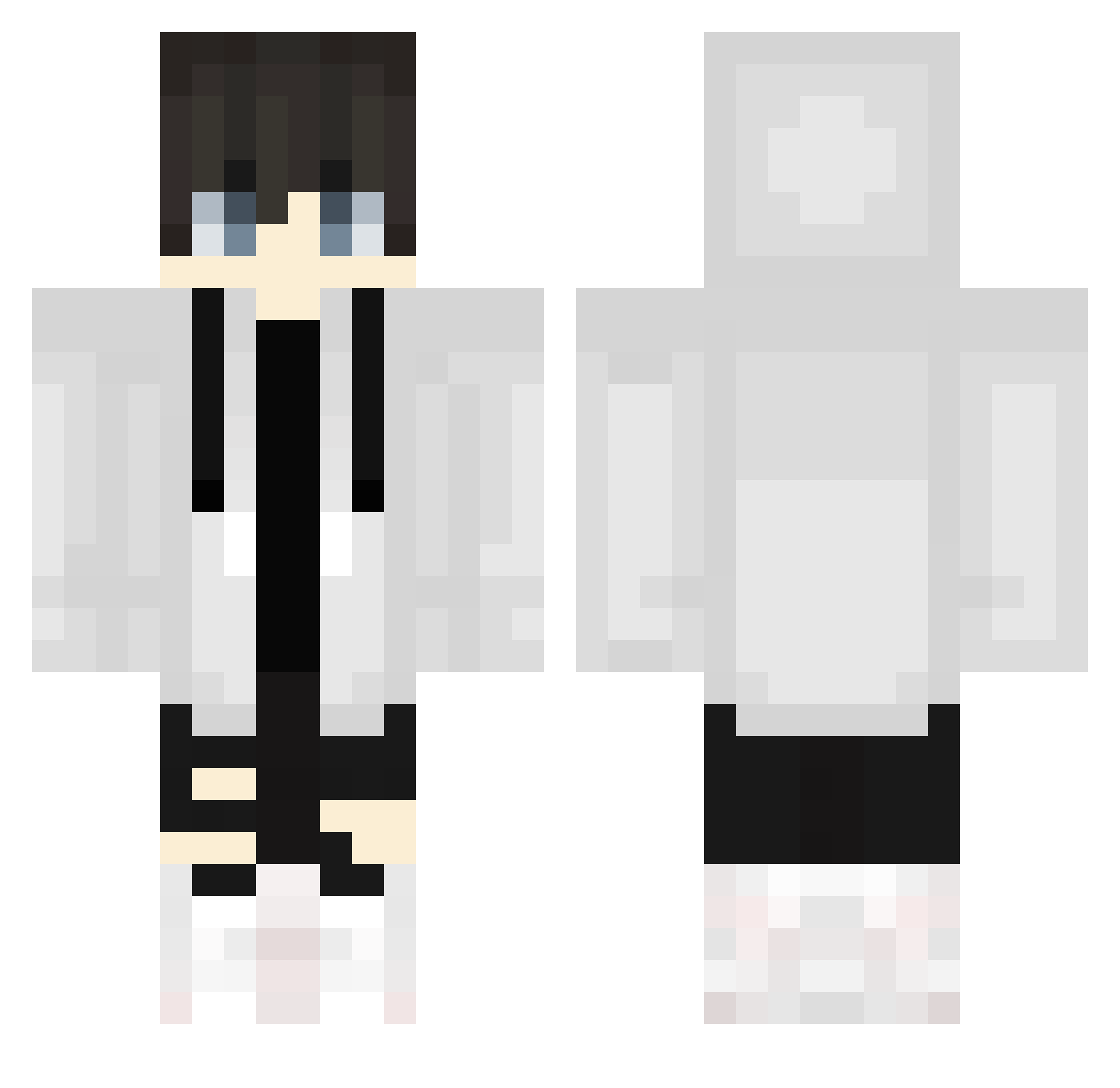
Current Minecraft skin of the player Phat_Underdog, loaded from the official Mojang API. Rotate the 3D model with your mouse or finger, then download the skin as a PNG file and use it in Minecraft: Bedrock Edition or Java Edition for free. When Phat_Underdog changes their skin, this page updates automatically and the old skin stays in the history below.
Other players with this skin (755)
Phat_Underdog was the 673rd player we have seen with this skin, first spotted on 30.10.2026. The same skin was seen on these players. Open a nickname to see their current skin and skin history.
 _Fletcher_ kill_crow CAILE111 AlvinH3H3 mogura614 _LZer0_ Eljaaaa TeenAidan Yasio69 asdwsxcd whitetyx ciechi ibuuun FeeWhale beru5488 kage20xx Ka_ein ibrahimkaram12 luluha0307 CJKBLOCK Duan_2_29_czi9yz VictoryFox7 KjBears Reze1610 maritori_3 skye_steel abomalak TurkuazKola PedoBabosa Swagap1no sassychickenlegs shadowgamerz1 Criticiize iNoahh_ P_hanjun Renoma1209 Noxeito yukimaru888 OPDramo123 liangming69 DragonYTGamez Twixxel Droxer07 thiagoaclx yojiosato gneshto cobbcobb Sneyder1090 steini739 parababa54 YamiiGN Ohchaehwan Csq1004 leesayshi __RNT__ cHER1B itsandresito MAUSERmike EckigerLuca HG77
More Streetwear Minecraft skins
How to install the Phat_Underdog skin
- Press the Download button above to save the skin as a PNG file.
- Minecraft: Bedrock Edition (PE): open the Dressing Room from the main menu (or tap your character → Edit Character), go to Classic Skins → Owned, press the + (new skin) button, choose the downloaded PNG and pick the Classic (Steve) model. Works on PC and mobile; consoles cannot import custom skins.
- Minecraft: Java Edition: open the Minecraft Launcher, go to the Skins tab, click New Skin, load the PNG, pick the Classic (Steve) model and press Save & Use. You can also upload it at minecraft.net → Profile → Change Skin.
The skin does not show up after import - what should I do?
Restart Minecraft and open the Dressing Room again - imported skins sometimes appear only after a restart. Also make sure you selected the imported skin and picked the Classic (Steve) model.
Which model should I choose, Classic or Slim?
This skin is designed for the Classic (Steve) model. If you pick the wrong model, the arms of the skin will look stretched or squeezed.
Is the skin of Phat_Underdog free to download?
Yes. Press Download, save the PNG file and use it in Minecraft: Bedrock Edition or Java Edition - no payment or registration needed. The skin also works on multiplayer servers and Realms.
More skins
Looking for more? Go back to all Minecraft skins and check the top skins of the week, month and all time, or find any player's skin by nickname.