
OldManSleeping - Minecraft Skins & Skin History
Current Minecraft skin of the player OldManSleeping, loaded from the official Mojang API. Rotate the 3D model with your mouse or finger, then download the skin as a PNG file and use it in Minecraft: Bedrock Edition or Java Edition for free. When OldManSleeping changes their skin, this page updates automatically and the old skin stays in the history below.
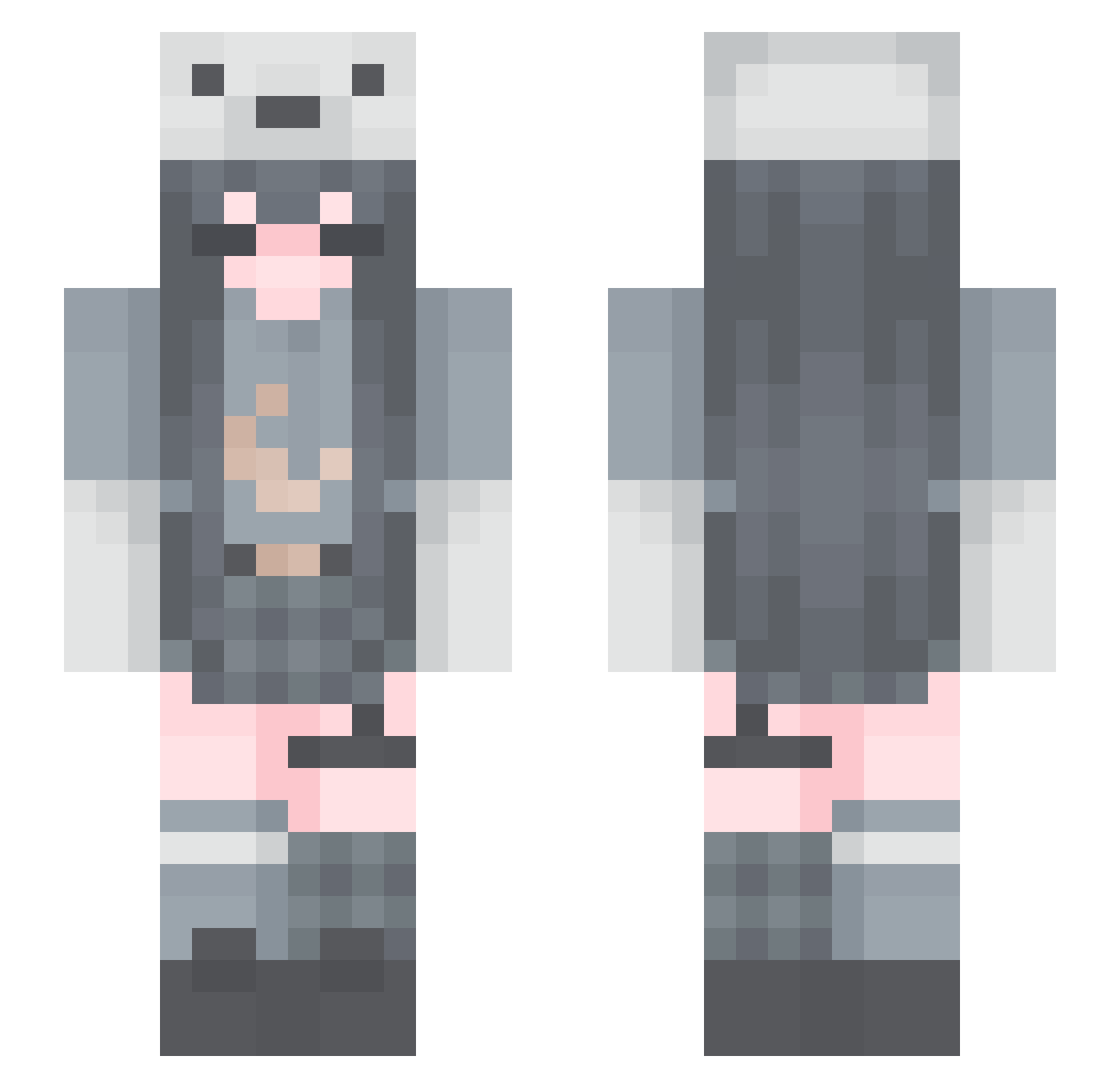
Other players with this skin (167)
OldManSleeping was the 137th player we have seen with this skin, first spotted on 21.10.2026. The same skin was seen on these players. Open a nickname to see their current skin and skin history.
 ki_be_ XIAOCHU_ Ph30n ahcee_ Core_xs REIDAESMERALDA lentobe orange245 Yoimiya_Zz charlie_aizawa nagidayo da__xiong 0verflowing Zercolee stooomified guri1111 irenehun slowzyext south_night 123CWS bbykaela sxnpau Tyrelityris Diamond_604 FruitWarrior12 popo1212 xiaoeeeeeyu qqwwwpp Cori1217 astronaut006 chuchuusagi sSleepyC hamnah Barney_x Menii_ kels2210 K4tr1Na_ Kaygirlee seaweedsidd MenaRiggs johnsmith135 ExoticEll ay0ojuli BelovedErin grim3aper22 mizlee808 The_Pandexi korrina__ Deltarios010 _Spikymetal_ CappuccinoBunny HAOLIYOUPAI iRaex SubmarineXD Fyipu Yan2M shwanu QinTong clouds_chan jiuling6522
More Polar Bear Hat Minecraft skins
See all 55 Polar Bear Hat skins
How to install the OldManSleeping skin
- Press the Download button above to save the skin as a PNG file.
- Minecraft: Bedrock Edition (PE): open the Dressing Room from the main menu (or tap your character → Edit Character), go to Classic Skins → Owned, press the + (new skin) button, choose the downloaded PNG and pick the Slim (Alex) model. Works on PC and mobile; consoles cannot import custom skins.
- Minecraft: Java Edition: open the Minecraft Launcher, go to the Skins tab, click New Skin, load the PNG, pick the Slim (Alex) model and press Save & Use. You can also upload it at minecraft.net → Profile → Change Skin.
The skin does not show up after import - what should I do?
Restart Minecraft and open the Dressing Room again - imported skins sometimes appear only after a restart. Also make sure you selected the imported skin and picked the Slim (Alex) model.
Which model should I choose, Classic or Slim?
This skin is designed for the Slim (Alex) model. If you pick the wrong model, the arms of the skin will look stretched or squeezed.
Is the skin of OldManSleeping free to download?
Yes. Press Download, save the PNG file and use it in Minecraft: Bedrock Edition or Java Edition - no payment or registration needed. The skin also works on multiplayer servers and Realms.
More skins
Looking for more? Go back to all Minecraft skins and check the top skins of the week, month and all time, or find any player's skin by nickname.