
NeyMar6666 - Minecraft Skins & Skin History
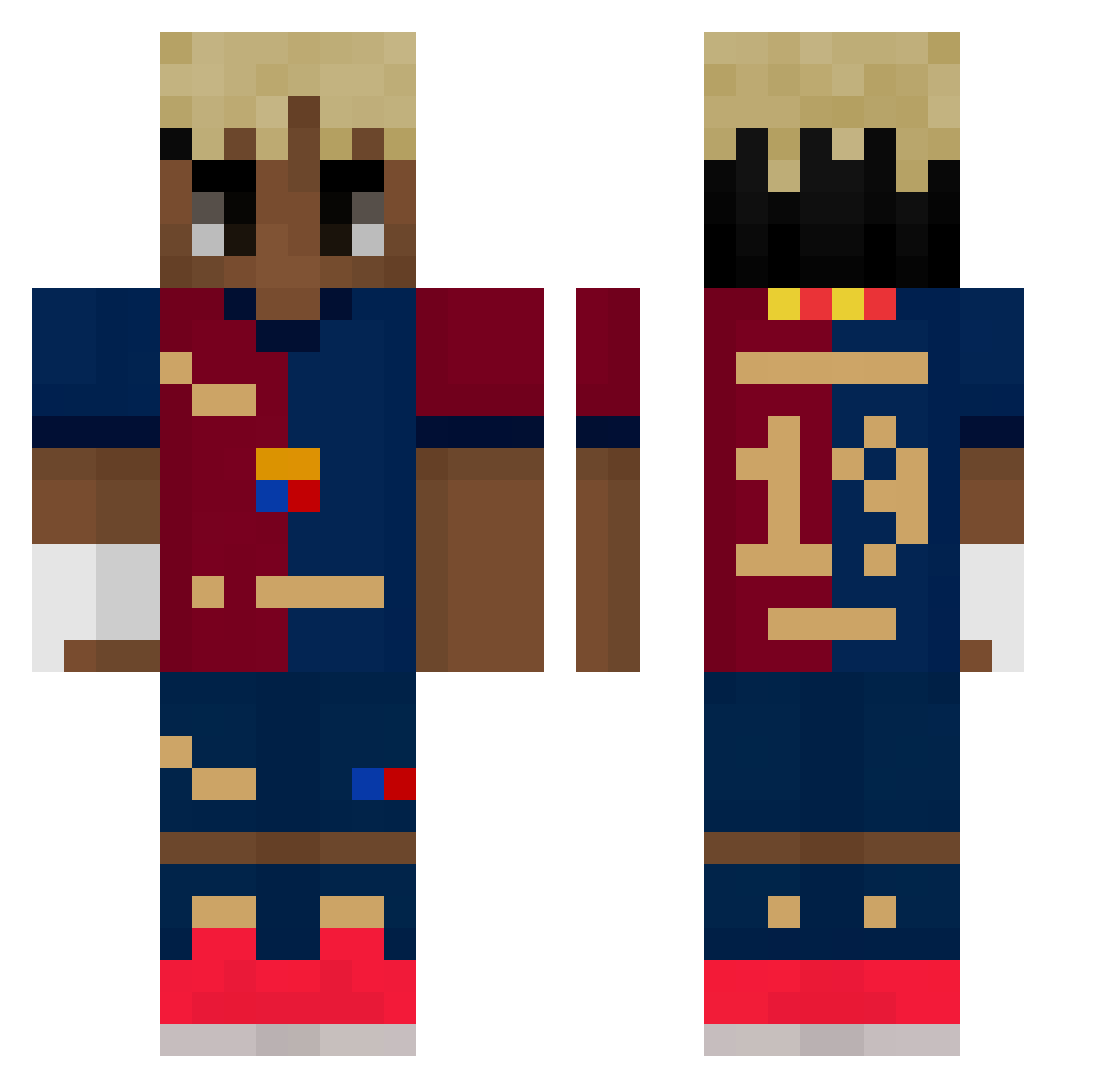
Current Minecraft skin of the player NeyMar6666, loaded from the official Mojang API. Rotate the 3D model with your mouse or finger, then download the skin as a PNG file and use it in Minecraft: Bedrock Edition or Java Edition for free. When NeyMar6666 changes their skin, this page updates automatically and the old skin stays in the history below.
Other players with this skin (521)
NeyMar6666 was the 386th player we have seen with this skin, first spotted on 14.10.2026. The same skin was seen on these players. Open a nickname to see their current skin and skin history.
 Kosic1 LaminYamal_ Adasll zyverk REBELPAPER joaoluizz9 Alejitoxx10 ReyPapaya ARMOS69 yusufbabus Fin_30 jonathanPRO99 Premuroso ELVRO555_MC MaXeTe19 TorenUp kramcioszef zuzkav DCMST RSMA_ALLESS ayyps jaaj2a carlosj15_ EL_Miqui Subwhi BLOXGODYT zzzzrrr Trix2117 dracsnuzi ComboStraffe aekkaiisus Si_Ghassen Goldouche LoPotitChatMiaou rkdxogus1231 kingarnacho k9mxn Badet73 G4Z4N anis_yt211 Youzinho myminecraftalt69 milhanee BaghrirMiel Parkgyeom doryan1418 Andreaa_euss Lilosek gorilaobeso ggochu03 Esc16 El_TioCo Shadow6787 King_C3to T0NY_G Korkmaza_ ReosYT prortk DarthNatalik ItsAdiii
More Soccer Kit Minecraft skins
How to install the NeyMar6666 skin
- Press the Download button above to save the skin as a PNG file.
- Minecraft: Bedrock Edition (PE): open the Dressing Room from the main menu (or tap your character → Edit Character), go to Classic Skins → Owned, press the + (new skin) button, choose the downloaded PNG and pick the Classic (Steve) model. Works on PC and mobile; consoles cannot import custom skins.
- Minecraft: Java Edition: open the Minecraft Launcher, go to the Skins tab, click New Skin, load the PNG, pick the Classic (Steve) model and press Save & Use. You can also upload it at minecraft.net → Profile → Change Skin.
The skin does not show up after import - what should I do?
Restart Minecraft and open the Dressing Room again - imported skins sometimes appear only after a restart. Also make sure you selected the imported skin and picked the Classic (Steve) model.
Which model should I choose, Classic or Slim?
This skin is designed for the Classic (Steve) model. If you pick the wrong model, the arms of the skin will look stretched or squeezed.
Is the skin of NeyMar6666 free to download?
Yes. Press Download, save the PNG file and use it in Minecraft: Bedrock Edition or Java Edition - no payment or registration needed. The skin also works on multiplayer servers and Realms.
More skins
Looking for more? Go back to all Minecraft skins and check the top skins of the week, month and all time, or find any player's skin by nickname.