
NITEFOR - Minecraft Skins & Skin History
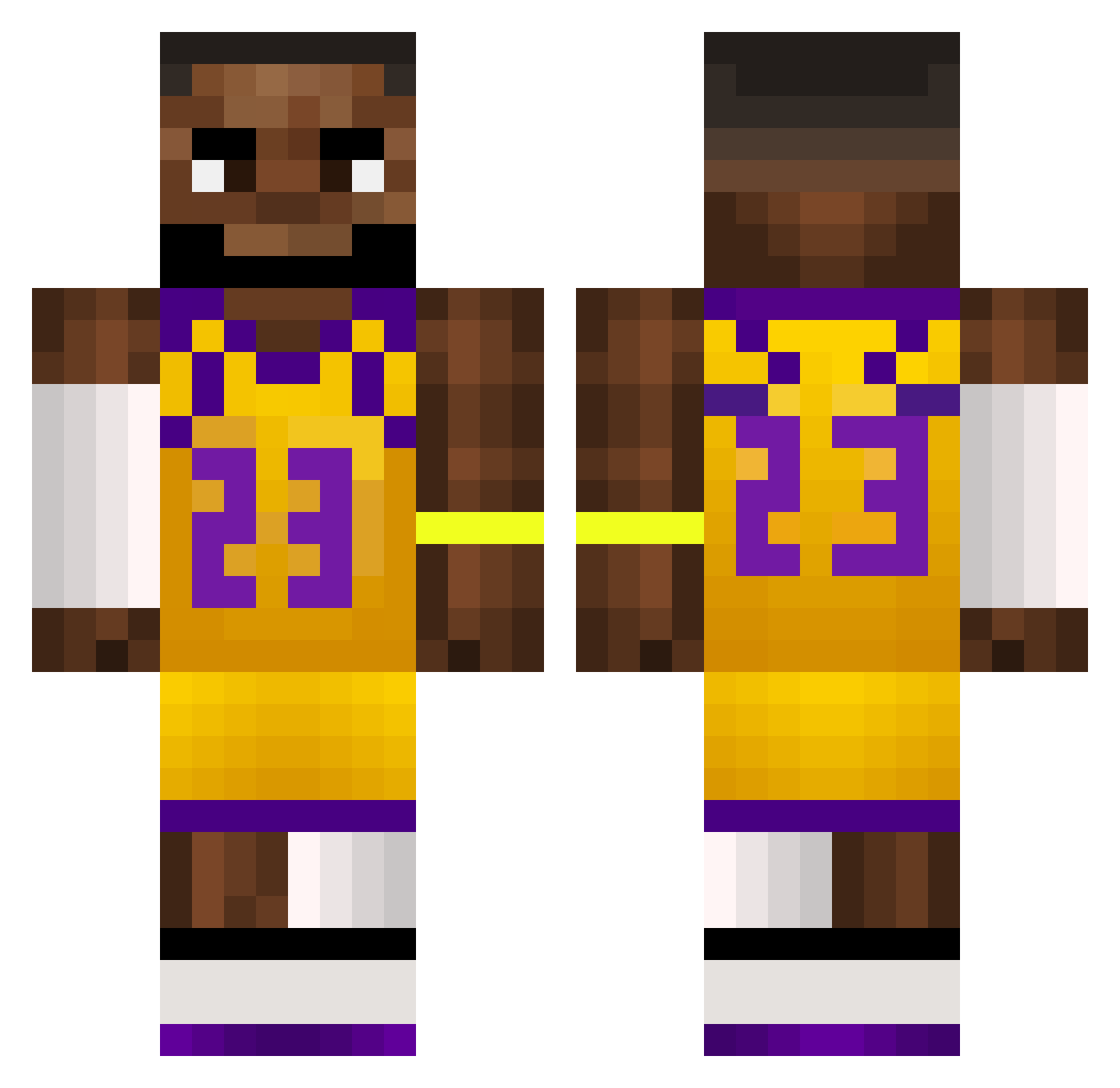
Current Minecraft skin of the player NITEFOR, loaded from the official Mojang API. Rotate the 3D model with your mouse or finger, then download the skin as a PNG file and use it in Minecraft: Bedrock Edition or Java Edition for free. When NITEFOR changes their skin, this page updates automatically and the old skin stays in the history below.
Other players with this skin (660)
NITEFOR was the 637th player we have seen with this skin, first spotted on 09.11.2026. The same skin was seen on these players. Open a nickname to see their current skin and skin history.
 Talia1125 DatGuyBub samuSir7 c_haste Aquac14 MoreDucksCK Hubooz uncle_zoggs al3ze idanmamann SomethingCorgi KinkerKonker MasterASO6 wow_im_short xstral thghostofthegoon AverageJokerxX Amaruski Lime223 iamKuni Akipatiki_TT HotrodBear FiscallLime2 Kotsios_1948 Ricardo938 Colin66666 landobando_ AndrewYang2028 Smewch Bokash10 FME98 DmitriyUtkin52 shimpanze12 Cheek39 PexkzX JTIDUDE321 caandaal F34Rz1 ParowkiBerlinki Labronmyking MrAwsome481 aiss369 AntW_an RiceeisGood shortylxrd dragonbreath0_0 Galaxy4900 NahueelH BlockedByBron Medelian Rattailzz kazq_ ticcioo dsamina marquitos0621 uciekaaj mishuh_ Bebi404 Jjakeman joaco2602
More Lakers Minecraft skins
How to install the NITEFOR skin
- Press the Download button above to save the skin as a PNG file.
- Minecraft: Bedrock Edition (PE): open the Dressing Room from the main menu (or tap your character → Edit Character), go to Classic Skins → Owned, press the + (new skin) button, choose the downloaded PNG and pick the Classic (Steve) model. Works on PC and mobile; consoles cannot import custom skins.
- Minecraft: Java Edition: open the Minecraft Launcher, go to the Skins tab, click New Skin, load the PNG, pick the Classic (Steve) model and press Save & Use. You can also upload it at minecraft.net → Profile → Change Skin.
The skin does not show up after import - what should I do?
Restart Minecraft and open the Dressing Room again - imported skins sometimes appear only after a restart. Also make sure you selected the imported skin and picked the Classic (Steve) model.
Which model should I choose, Classic or Slim?
This skin is designed for the Classic (Steve) model. If you pick the wrong model, the arms of the skin will look stretched or squeezed.
Is the skin of NITEFOR free to download?
Yes. Press Download, save the PNG file and use it in Minecraft: Bedrock Edition or Java Edition - no payment or registration needed. The skin also works on multiplayer servers and Realms.
More skins
Looking for more? Go back to all Minecraft skins and check the top skins of the week, month and all time, or find any player's skin by nickname.