
Mosdal2 - Minecraft Skins & Skin History
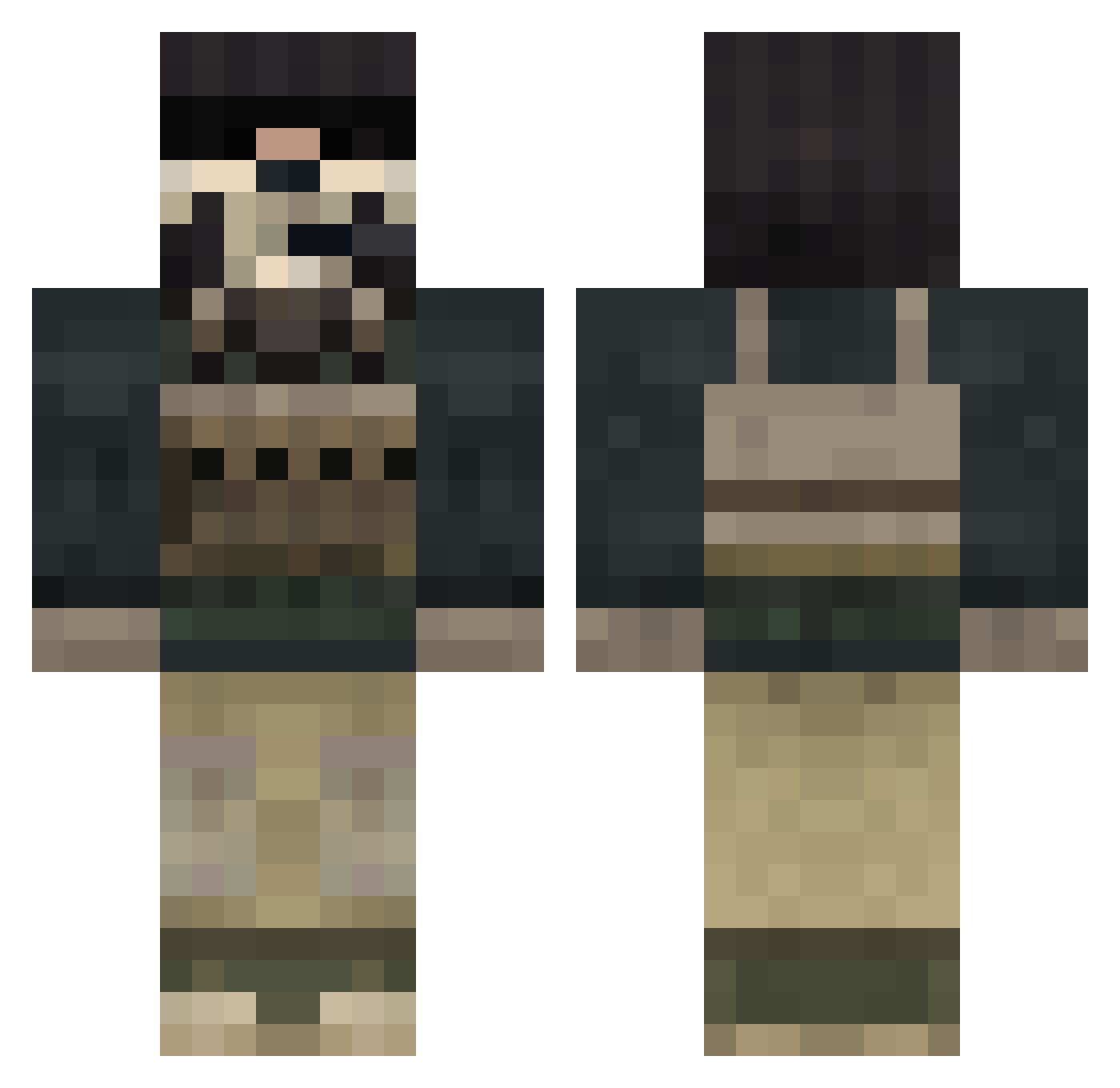
Current Minecraft skin of the player Mosdal2, loaded from the official Mojang API. Rotate the 3D model with your mouse or finger, then download the skin as a PNG file and use it in Minecraft: Bedrock Edition or Java Edition for free. When Mosdal2 changes their skin, this page updates automatically and the old skin stays in the history below.
Other players with this skin (848)
Mosdal2 was the 711th player we have seen with this skin, first spotted on 23.10.2026. The same skin was seen on these players. Open a nickname to see their current skin and skin history.
 linger85 MiRBehraM 20snake2 Brother_Rain SIN830 siesee22 magoo11 Xxghost72xX Zilla_Senpai TheMaru hakata919 xSniiper997 jackal1113 zumbie85 13lackPlaya difphilip Monkmanxx PuuureFranchise xUSMCx lemonlord5 TheRandomKid88 Zikari0 Matrix560p jogunn doomdoll36 Balls_Mahony Ponneke Omnisci3nt SquareBear2 FastFlashX Evotics Rougehunt stifmyster1 Kristyle jonesythebest watsons17 Plankbong Ladas125 holymackeral manowar15 tobinator333 chief1221 ktownWARRIOR AxelGhost Catsforthewin jakearmi MilitaryEX kapiteinvik ImEar Flakcon BLucier vCrossfire VITAMINp98 John18804 raa0815 SpawnKiller789 tails1589 whiteskins Liamshea2003 batmanrobin10
More Call Of Duty Minecraft skins
See all 174 Call Of Duty skins
How to install the Mosdal2 skin
- Press the Download button above to save the skin as a PNG file.
- Minecraft: Bedrock Edition (PE): open the Dressing Room from the main menu (or tap your character → Edit Character), go to Classic Skins → Owned, press the + (new skin) button, choose the downloaded PNG and pick the Classic (Steve) model. Works on PC and mobile; consoles cannot import custom skins.
- Minecraft: Java Edition: open the Minecraft Launcher, go to the Skins tab, click New Skin, load the PNG, pick the Classic (Steve) model and press Save & Use. You can also upload it at minecraft.net → Profile → Change Skin.
The skin does not show up after import - what should I do?
Restart Minecraft and open the Dressing Room again - imported skins sometimes appear only after a restart. Also make sure you selected the imported skin and picked the Classic (Steve) model.
Which model should I choose, Classic or Slim?
This skin is designed for the Classic (Steve) model. If you pick the wrong model, the arms of the skin will look stretched or squeezed.
Is the skin of Mosdal2 free to download?
Yes. Press Download, save the PNG file and use it in Minecraft: Bedrock Edition or Java Edition - no payment or registration needed. The skin also works on multiplayer servers and Realms.
More skins
Looking for more? Go back to all Minecraft skins and check the top skins of the week, month and all time, or find any player's skin by nickname.