
Montropolis - Minecraft Skins & Skin History
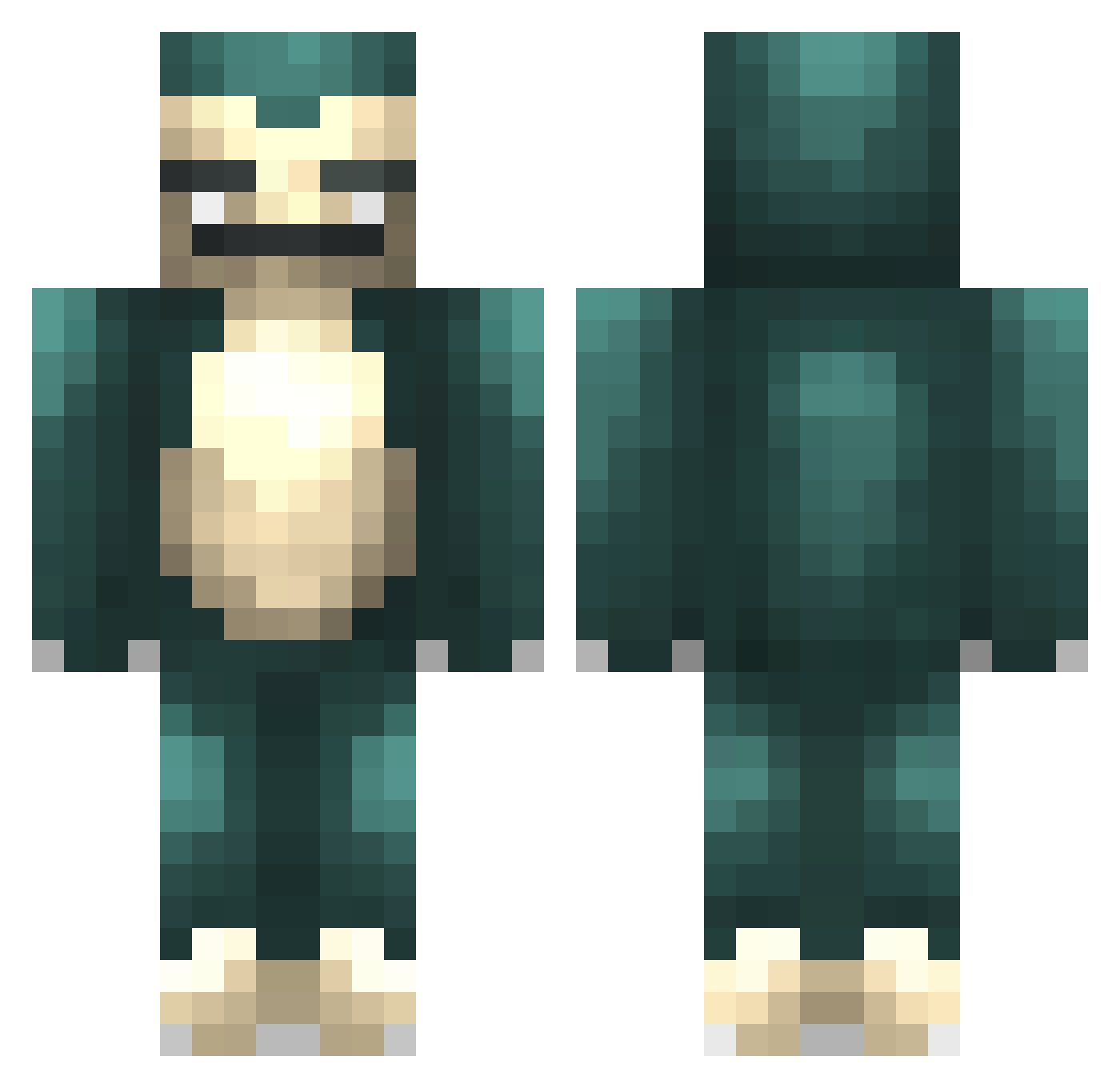
Current Minecraft skin of the player Montropolis, loaded from the official Mojang API. Rotate the 3D model with your mouse or finger, then download the skin as a PNG file and use it in Minecraft: Bedrock Edition or Java Edition for free. When Montropolis changes their skin, this page updates automatically and the old skin stays in the history below.
Other players with this skin (479)
Montropolis was the 414th player we have seen with this skin, first spotted on 25.10.2026. The same skin was seen on these players. Open a nickname to see their current skin and skin history.
 frostynuggets peteraski pb_crox Chase88B LilLushi theheidibear Kendall_CR mcalisha Killingpain2 DaEagle54321 MoneyMakerMuzza DYN4MiK Ramoose Lauzi fedepoul omuraisu1059 Gr1zzly_Adams Lizard_Kid kkinc PutensohnPvP BoxWithLegs GriffinnnXD GridRaven BamItzNina Scoopinator lilgrenny Th3Littl3On3 gaatoux ShavingRyansPVTS JilKo12 eiffel133 Captain_Cri Zuulbar layAbrick MyNameIsBlurry barnieboy123 AttractiveBeav Footz8 _Snormax_ AkimboTacos hideo_t QuietKnight LILAUTIST Twanaldo123 rutmer2003 GuacamoleMan1234 Delade tinymax steve_unicorn spudsterz StokeCity riley1601 JLProductions coolguy888jet Timboo_ Kippax CallXD PrettyThug IHaveGonorrhea Admonisher25
More Snorlax Minecraft skins
How to install the Montropolis skin
- Press the Download button above to save the skin as a PNG file.
- Minecraft: Bedrock Edition (PE): open the Dressing Room from the main menu (or tap your character → Edit Character), go to Classic Skins → Owned, press the + (new skin) button, choose the downloaded PNG and pick the Classic (Steve) model. Works on PC and mobile; consoles cannot import custom skins.
- Minecraft: Java Edition: open the Minecraft Launcher, go to the Skins tab, click New Skin, load the PNG, pick the Classic (Steve) model and press Save & Use. You can also upload it at minecraft.net → Profile → Change Skin.
The skin does not show up after import - what should I do?
Restart Minecraft and open the Dressing Room again - imported skins sometimes appear only after a restart. Also make sure you selected the imported skin and picked the Classic (Steve) model.
Which model should I choose, Classic or Slim?
This skin is designed for the Classic (Steve) model. If you pick the wrong model, the arms of the skin will look stretched or squeezed.
Is the skin of Montropolis free to download?
Yes. Press Download, save the PNG file and use it in Minecraft: Bedrock Edition or Java Edition - no payment or registration needed. The skin also works on multiplayer servers and Realms.
More skins
Looking for more? Go back to all Minecraft skins and check the top skins of the week, month and all time, or find any player's skin by nickname.