
Miloskys - Minecraft Skins & Skin History
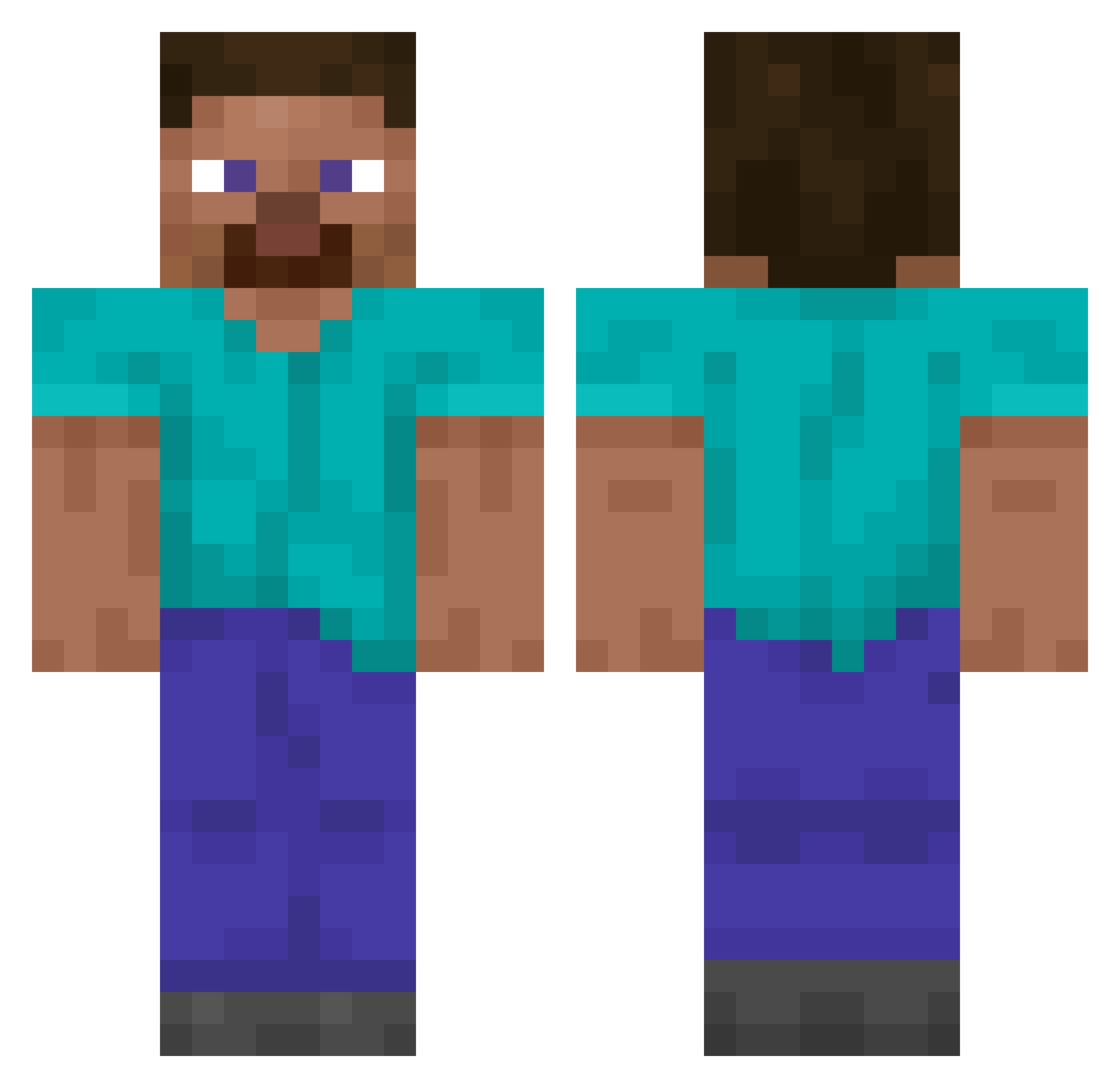
Current Minecraft skin of the player Miloskys, loaded from the official Mojang API. Rotate the 3D model with your mouse or finger, then download the skin as a PNG file and use it in Minecraft: Bedrock Edition or Java Edition for free. When Miloskys changes their skin, this page updates automatically and the old skin stays in the history below.
Other players with this skin (14849)
Miloskys was the 13554th player we have seen with this skin, first spotted on 02.11.2026. The same skin was seen on these players. Open a nickname to see their current skin and skin history.
 Dylan82009 helenavi Halitx__ AntonioCgg PL3X0 GusmanGG Jihoo524 ztls FortniteBus24 lambently HolmesUK GOROGONJOLLA Basrety apartable Pr0bablyDead bocchi_joestar MaxiProfil Reidisabot Valya_Nik Viizous16 IronECO snowstorm135 caps777 Groomy bob1321321321321 epicNinja4005 LaurinhaS2 dreint POTELOTE xMarcDDD lamaboy czxczxx More_Beer uzzuzu M00nyl00ny_TW Iforeim ErroR_Chruti ThLegendt z1nov XenoviaLover23 eyestrings I_GOT_100 Gyckiuus Madiccc mistflower KurRikko drearies Convolution yo_on07 benni_ty Candescently amajikis kendricklomar Sir_williamson51 Akea_a VFrancis Soggy_Toze HenzoMC Szwagierexe flseely
Previous skins of Miloskys
Skins that Miloskys wore before, newest first. Click a skin to open its page and download it.
How to install the Miloskys skin
- Press the Download button above to save the skin as a PNG file.
- Minecraft: Bedrock Edition (PE): open the Dressing Room from the main menu (or tap your character → Edit Character), go to Classic Skins → Owned, press the + (new skin) button, choose the downloaded PNG and pick the Classic (Steve) model. Works on PC and mobile; consoles cannot import custom skins.
- Minecraft: Java Edition: open the Minecraft Launcher, go to the Skins tab, click New Skin, load the PNG, pick the Classic (Steve) model and press Save & Use. You can also upload it at minecraft.net → Profile → Change Skin.
The skin does not show up after import - what should I do?
Restart Minecraft and open the Dressing Room again - imported skins sometimes appear only after a restart. Also make sure you selected the imported skin and picked the Classic (Steve) model.
Which model should I choose, Classic or Slim?
This skin is designed for the Classic (Steve) model. If you pick the wrong model, the arms of the skin will look stretched or squeezed.
Is the skin of Miloskys free to download?
Yes. Press Download, save the PNG file and use it in Minecraft: Bedrock Edition or Java Edition - no payment or registration needed. The skin also works on multiplayer servers and Realms.
More skins
Looking for more? Go back to all Minecraft skins and check the top skins of the week, month and all time, or find any player's skin by nickname.