
Mavri - Minecraft Skins & Skin History
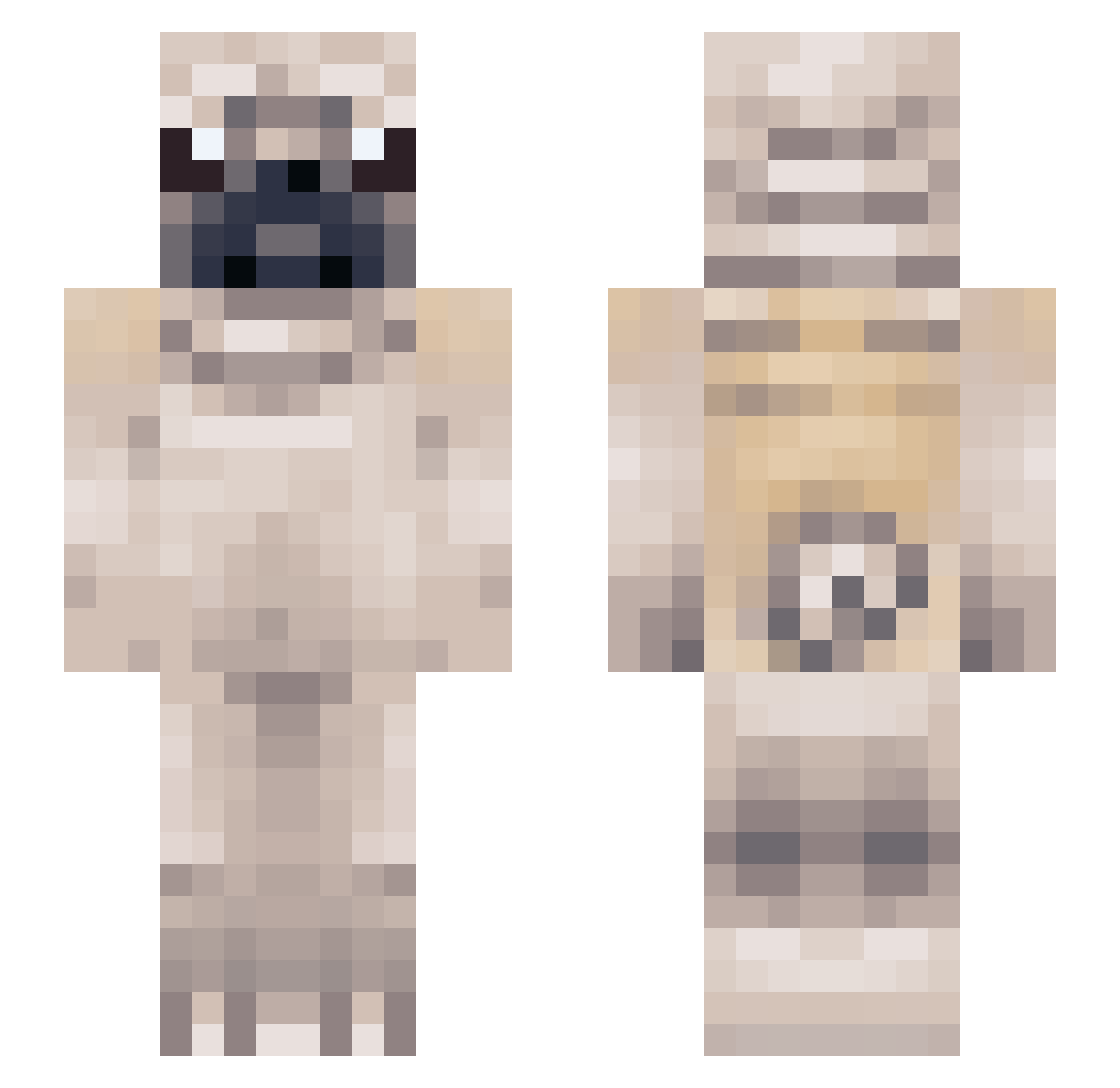
Current Minecraft skin of the player Mavri, loaded from the official Mojang API. Rotate the 3D model with your mouse or finger, then download the skin as a PNG file and use it in Minecraft: Bedrock Edition or Java Edition for free. When Mavri changes their skin, this page updates automatically and the old skin stays in the history below.
Other players with this skin (150)
Mavri was the 122nd player we have seen with this skin, first spotted on 23.10.2026. The same skin was seen on these players. Open a nickname to see their current skin and skin history.
 bennybianko bluebird6969 klaudia_bball AzziiiE DrAfroDog Budgieacc EshayCat crazycatdancin Jswaizzle Shinni8414 _DOGAMER_ snoochmama BreadDoggers Ebob5709 Lenchenh2005 Fujitsu_ LzPugs LoganBlocks3 Ta1ler7 llMinkoll JamesBuckets Pokepug1 m0racle HellaWeeds Freddy_ThePug night_wolf04 IVBartender watermelonlarry Hollooww ChickenRocky13 Iengy2025 clarkeriksson LakshaYT_ ShadsYourDad lastielll fl9me Izzbel slightlymadjade Tellabahhalbahjr barelylex Biigy Frenggie Chockrath Pugscz Jackmynuts teegootheking CocretaVoladora Durdz Stupid_Maj0r PugPug_333 SmrtKoopa Banfuzi Olliemops_ PesVegan OobeleyDoobeley ItsvSlam Pieska_ h4son TimTDN melvinblock
More Pug Minecraft skins
How to install the Mavri skin
- Press the Download button above to save the skin as a PNG file.
- Minecraft: Bedrock Edition (PE): open the Dressing Room from the main menu (or tap your character → Edit Character), go to Classic Skins → Owned, press the + (new skin) button, choose the downloaded PNG and pick the Slim (Alex) model. Works on PC and mobile; consoles cannot import custom skins.
- Minecraft: Java Edition: open the Minecraft Launcher, go to the Skins tab, click New Skin, load the PNG, pick the Slim (Alex) model and press Save & Use. You can also upload it at minecraft.net → Profile → Change Skin.
The skin does not show up after import - what should I do?
Restart Minecraft and open the Dressing Room again - imported skins sometimes appear only after a restart. Also make sure you selected the imported skin and picked the Slim (Alex) model.
Which model should I choose, Classic or Slim?
This skin is designed for the Slim (Alex) model. If you pick the wrong model, the arms of the skin will look stretched or squeezed.
Is the skin of Mavri free to download?
Yes. Press Download, save the PNG file and use it in Minecraft: Bedrock Edition or Java Edition - no payment or registration needed. The skin also works on multiplayer servers and Realms.
More skins
Looking for more? Go back to all Minecraft skins and check the top skins of the week, month and all time, or find any player's skin by nickname.