
Current Minecraft skin of the player MR_Borrego, loaded from the official Mojang API. Rotate the 3D model with your mouse or finger, then download the skin as a PNG file and use it in Minecraft: Bedrock Edition or Java Edition for free. When MR_Borrego changes their skin, this page updates automatically and the old skin stays in the history below.
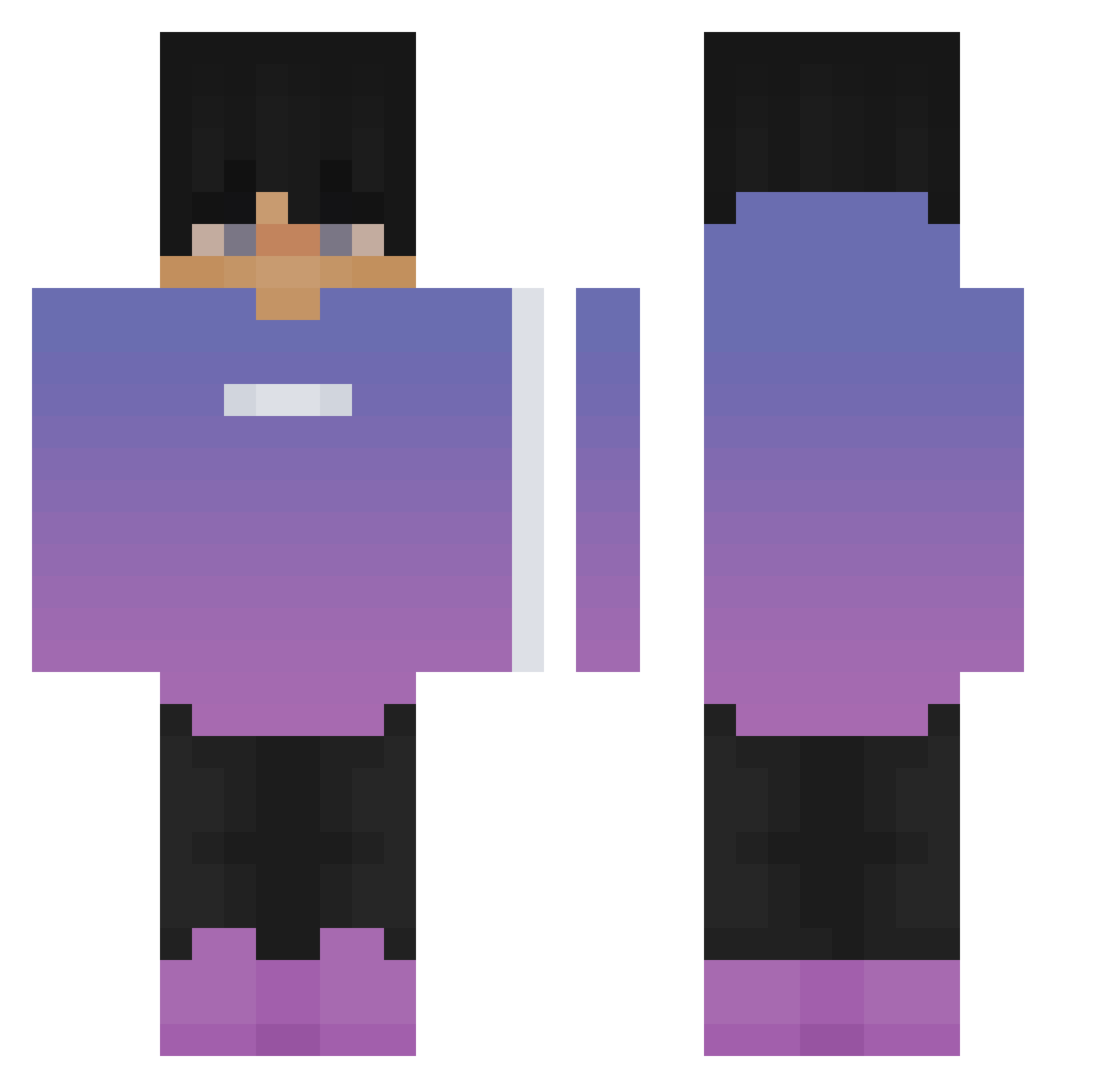
Other players with this skin (64)
The same skin was seen on these players. Open a nickname to see their current skin and skin history.
 Aliardi L4Flame Ricaaado OFw_Aal ignWhite LogiixVNM ZiomekFC Ultra3913 tommmin Adrian10a1 KPopSong JeyHomer awesome_Rawrsome Dakottah ItzSyth3 Hyllx GG_Neko Verstappenpro33 1Brahim_ Tiptop00 Stach53 Inakari_ psycho_nolan Coldwie Gearrz k4_y_ BunzyTV iiMoDy_GaMinG Endy404 dktt1234 1hib BlakingGHOST zhxrtnoob CRooA Creirr mostafa_games_yt esatkocu TarZzz WONBBB ItzOrbit BienenLP alvxx Kjellongo123 ItzErcan NormalGame1 ignColor GriffonC2020 _XEJL3_ OST0 Antoni880 LamasteTR randomuser2701 ELBASTIII conticent Nicht_Der_Echte_ Stansey09 criki06 chk_jk Oskarae_2115 Berryquell
How to install the MR_Borrego skin
- Press the Download button above to save the skin as a PNG file.
- Minecraft: Bedrock Edition (PE): open the Dressing Room from the main menu (or tap your character → Edit Character), go to Classic Skins → Owned, press the + (new skin) button, choose the downloaded PNG and pick the Classic (Steve) model. Works on PC and mobile; consoles cannot import custom skins.
- Minecraft: Java Edition: open the Minecraft Launcher, go to the Skins tab, click New Skin, load the PNG, pick the Classic (Steve) model and press Save & Use. You can also upload it at minecraft.net → Profile → Change Skin.
The skin does not show up after import - what should I do?
Restart Minecraft and open the Dressing Room again - imported skins sometimes appear only after a restart. Also make sure you selected the imported skin and picked the Classic (Steve) model.
Which model should I choose, Classic or Slim?
This skin is designed for the Classic (Steve) model. If you pick the wrong model, the arms of the skin will look stretched or squeezed.
Is the skin of MR_Borrego free to download?
Yes. Press Download, save the PNG file and use it in Minecraft: Bedrock Edition or Java Edition - no payment or registration needed. The skin also works on multiplayer servers and Realms.
More skins
Looking for more? Go back to all Minecraft skins and check the top skins of the week, month and all time, or find any player's skin by nickname.