
LowerCampsss - Minecraft Skins & Skin History
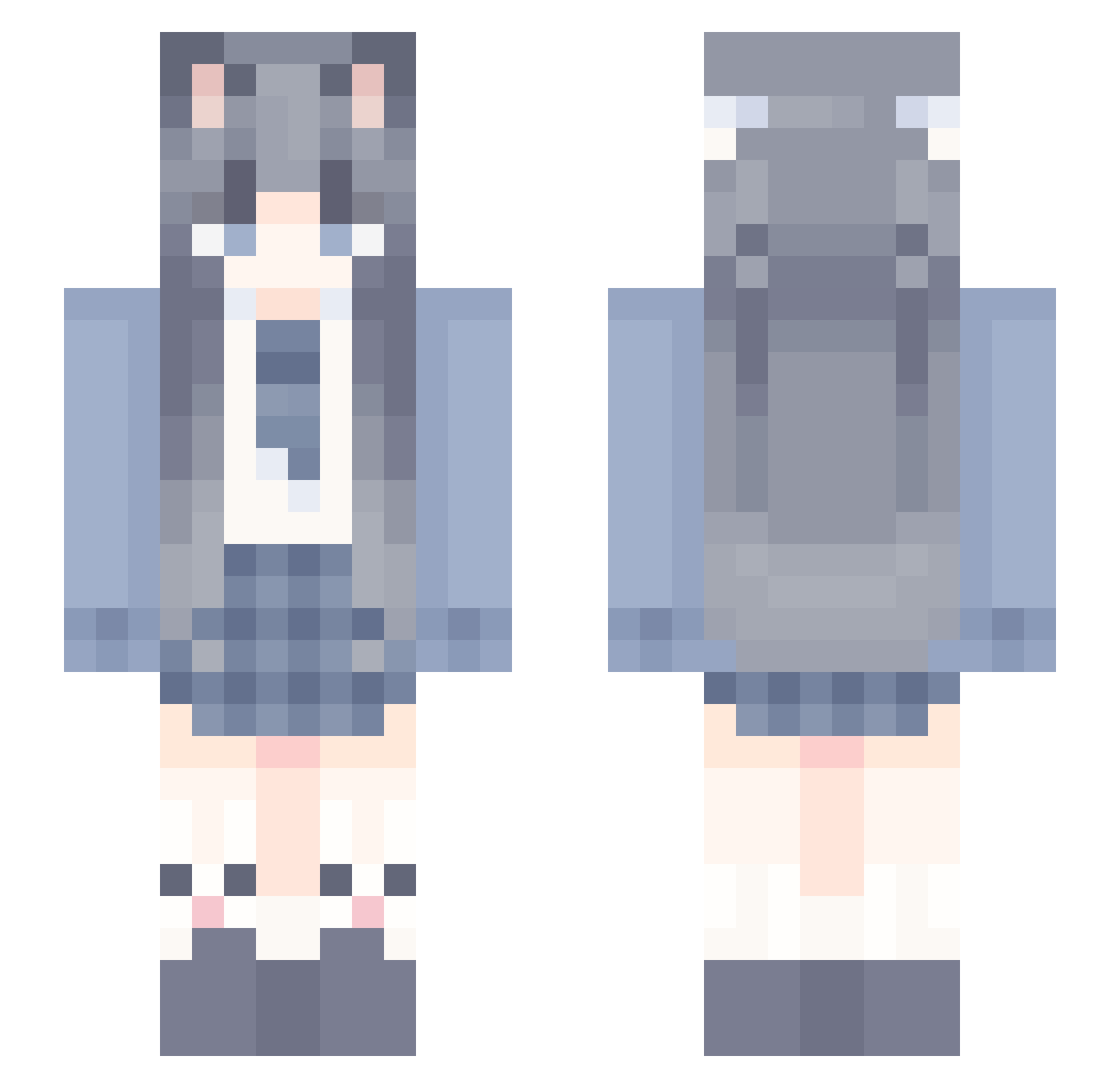
Current Minecraft skin of the player LowerCampsss, loaded from the official Mojang API. Rotate the 3D model with your mouse or finger, then download the skin as a PNG file and use it in Minecraft: Bedrock Edition or Java Edition for free. When LowerCampsss changes their skin, this page updates automatically and the old skin stays in the history below.
Other players with this skin (1247)
LowerCampsss was the 709th player we have seen with this skin, first spotted on 30.09.2026. The same skin was seen on these players. Open a nickname to see their current skin and skin history.
 yuji777 xiayike Minya1022 BloopBloop3 yangvg Nasalek iChen54 maozeyuanhaosuai xun_zi jacintho 114514512345 DD_SKD_520 SHMILYic fatesg Leaf17v QarYang osea0 Luoxii 696ovo JianbingGuoziovo taffyT_T syc08 lbc11 tianyuanran jiejiezs666 Duqingqiu NevMad shenyi_sui youki_61 aitaotao mcalts_JzRdp puppycc Wevese123 432423423 CAICAIJI MaxSquire Axzai Alpitate1 zinlin1 MianTuan_ GrimeFox thegoodyouth1 Smile_Evil Luoyu_520 DouPolaris Sily_Jay eirei2 JROY4299 crosteran mcalts_SUP8Q xhvg MOMO4218 SYOUKO_awa Xuezi1022 s3nshine Piacevole1 Akattsuru _Cybernetic_ MC_BiAn RockAthlete1852
More School Uniform Minecraft skins
See all 7166 School Uniform skins
How to install the LowerCampsss skin
- Press the Download button above to save the skin as a PNG file.
- Minecraft: Bedrock Edition (PE): open the Dressing Room from the main menu (or tap your character → Edit Character), go to Classic Skins → Owned, press the + (new skin) button, choose the downloaded PNG and pick the Slim (Alex) model. Works on PC and mobile; consoles cannot import custom skins.
- Minecraft: Java Edition: open the Minecraft Launcher, go to the Skins tab, click New Skin, load the PNG, pick the Slim (Alex) model and press Save & Use. You can also upload it at minecraft.net → Profile → Change Skin.
The skin does not show up after import - what should I do?
Restart Minecraft and open the Dressing Room again - imported skins sometimes appear only after a restart. Also make sure you selected the imported skin and picked the Slim (Alex) model.
Which model should I choose, Classic or Slim?
This skin is designed for the Slim (Alex) model. If you pick the wrong model, the arms of the skin will look stretched or squeezed.
Is the skin of LowerCampsss free to download?
Yes. Press Download, save the PNG file and use it in Minecraft: Bedrock Edition or Java Edition - no payment or registration needed. The skin also works on multiplayer servers and Realms.
More skins
Looking for more? Go back to all Minecraft skins and check the top skins of the week, month and all time, or find any player's skin by nickname.