
LMeyer718 - Minecraft Skins & Skin History
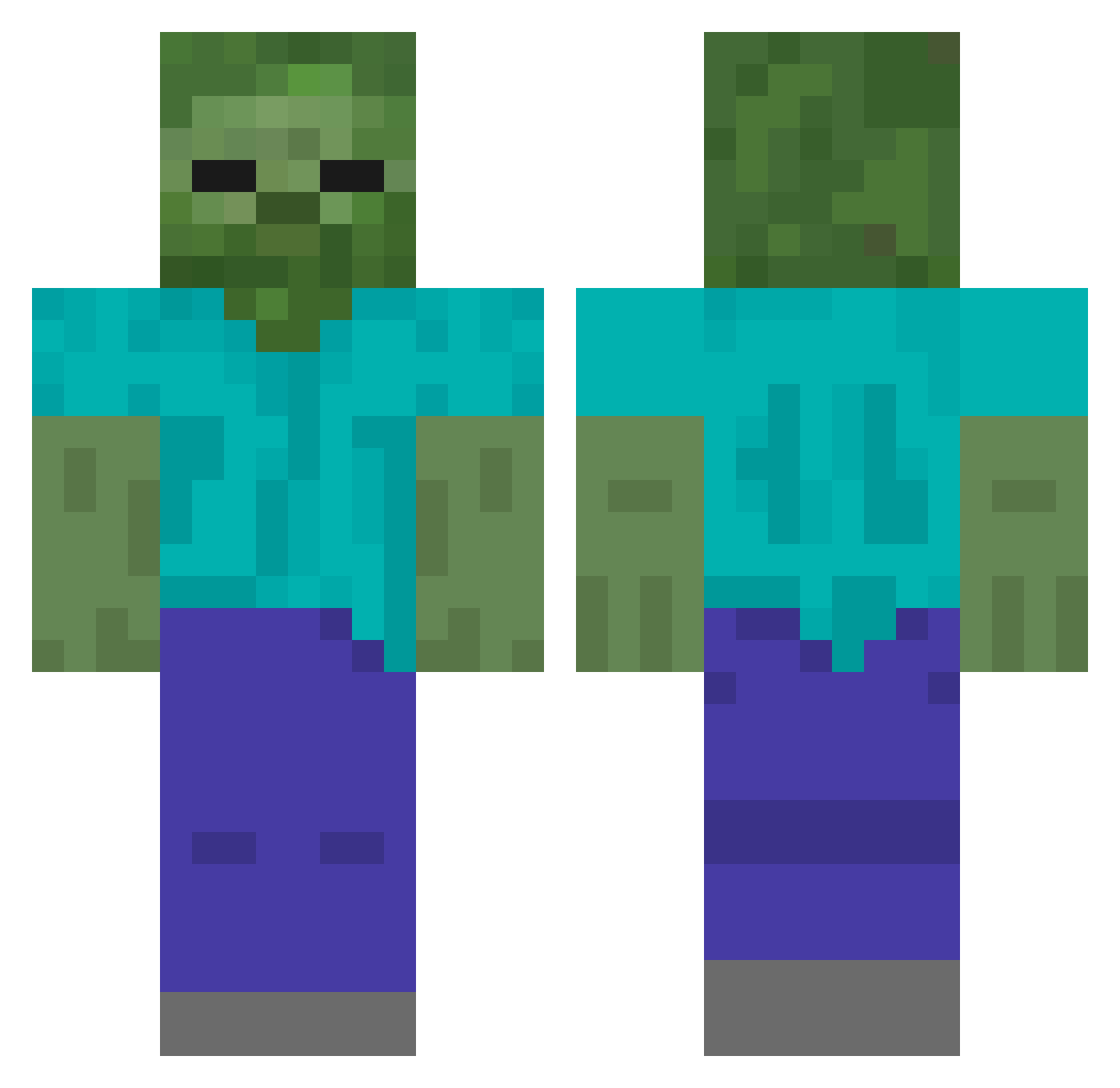
Current Minecraft skin of the player LMeyer718, loaded from the official Mojang API. Rotate the 3D model with your mouse or finger, then download the skin as a PNG file and use it in Minecraft: Bedrock Edition or Java Edition for free. When LMeyer718 changes their skin, this page updates automatically and the old skin stays in the history below.
Other players with this skin (434)
LMeyer718 was the 331st player we have seen with this skin, first spotted on 16.10.2026. The same skin was seen on these players. Open a nickname to see their current skin and skin history.
 ArcereDorato DL_SN L4IDER_ Trentonmax laerteshijo444 deadkyo patogeno92 kaan4288 Panda3004 Xamon404 Cyphix_ Soczekmc Nathanieloe Bic_MacDaddy Siddham Dynamic_Figure powderbanana rokuzyuuni boxerIShashary chucrut29 Stropeder Link5936 yasumin1009 Akito1202 D403 Nyckelpigan2 niwel04 kkon9 SoldierMineKraft JopaRar_ e5ql Druhar PAPPMARCIROBLOX4 aidenito07 miksnox17 B011nk SORA_Horizon_Sky Manhani MineMasterKN bluetriad Shepard16Pub yoonicap ragg00n iMustafaEr ORGULHOSO0 ash444_ Faabow Sirius_0711 MaoMaoPiPi pluie3 Vedhahari kryex360 Immuneartist GABEZinn ryousin PURICHU DHKwak MultiGamePlayGey futa1218 DerEckigeKopf
More Undead Minecraft skins
How to install the LMeyer718 skin
- Press the Download button above to save the skin as a PNG file.
- Minecraft: Bedrock Edition (PE): open the Dressing Room from the main menu (or tap your character → Edit Character), go to Classic Skins → Owned, press the + (new skin) button, choose the downloaded PNG and pick the Classic (Steve) model. Works on PC and mobile; consoles cannot import custom skins.
- Minecraft: Java Edition: open the Minecraft Launcher, go to the Skins tab, click New Skin, load the PNG, pick the Classic (Steve) model and press Save & Use. You can also upload it at minecraft.net → Profile → Change Skin.
The skin does not show up after import - what should I do?
Restart Minecraft and open the Dressing Room again - imported skins sometimes appear only after a restart. Also make sure you selected the imported skin and picked the Classic (Steve) model.
Which model should I choose, Classic or Slim?
This skin is designed for the Classic (Steve) model. If you pick the wrong model, the arms of the skin will look stretched or squeezed.
Is the skin of LMeyer718 free to download?
Yes. Press Download, save the PNG file and use it in Minecraft: Bedrock Edition or Java Edition - no payment or registration needed. The skin also works on multiplayer servers and Realms.
More skins
Looking for more? Go back to all Minecraft skins and check the top skins of the week, month and all time, or find any player's skin by nickname.