
Blackstar102 - Minecraft Skins & Skin History
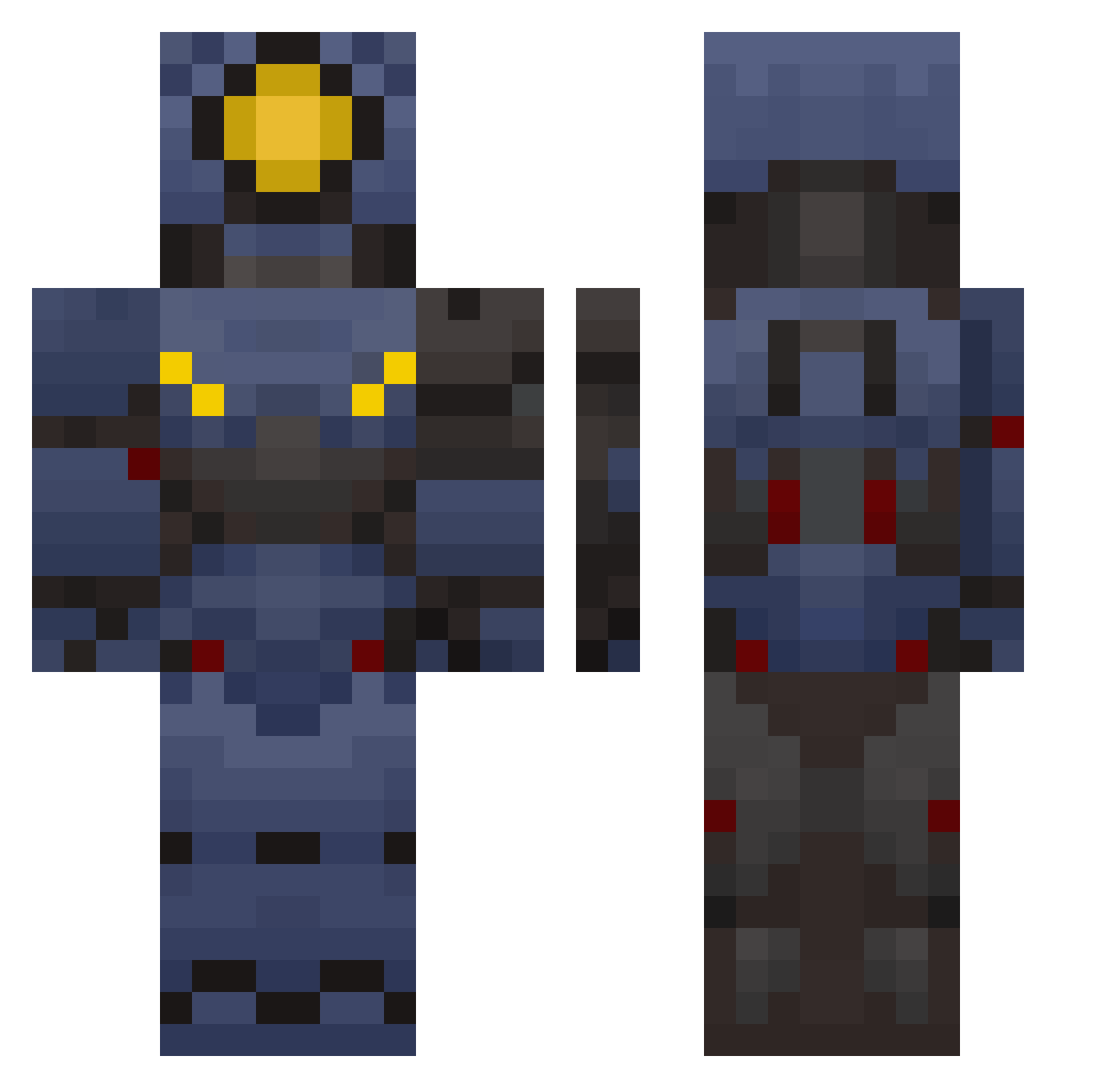
Current Minecraft skin of the player Blackstar102, loaded from the official Mojang API. Rotate the 3D model with your mouse or finger, then download the skin as a PNG file and use it in Minecraft: Bedrock Edition or Java Edition for free. When Blackstar102 changes their skin, this page updates automatically and the old skin stays in the history below.
Other players with this skin (102)
Blackstar102 was the 75th player we have seen with this skin, first spotted on 08.10.2026. The same skin was seen on these players. Open a nickname to see their current skin and skin history.
 RingDedede FilthyFlipp Rob123f riDuLs_ Sparkfire_322 ninjadabwil ItsnotalwaysEZ Ultrakiller12 S1lkyboi LNoggus Wackdak Bikoniko koshkaIL Yamahaboy828 Wetty_buddy 000Braincells Deno_2a7 Galaxy_Gamer3 Dreadseak miloersssss NomadGaia _Skyrim_NPC Davibig10 Tropicwarrior360 HashtagCrashtag BananaStryker Pacheco77 Raserdragon disobey_fan webi_wabo90 selfcheckoutgoat Keev_88 CoyotaTorolla Destroyer777_ M1N0T4UR_ thesaturngamer2 TorSkyyy ToastyAnimations Groblockia_ Big_Peter55 GoldMichalYT IceColdChud zeaphr GamingWizard1888 JeffOfMarketing Kokosnussely
 lale1234 Ethan9541 TheGoofyV1 Millie86 WarCriminal3556 Wakanami inuuuuuuuuuuuuuu Phandom535 LaPizzaVoladora smg7606 Magmaved swagman543 iptis voidchronics
More V1 Minecraft skins
How to install the Blackstar102 skin
- Press the Download button above to save the skin as a PNG file.
- Minecraft: Bedrock Edition (PE): open the Dressing Room from the main menu (or tap your character → Edit Character), go to Classic Skins → Owned, press the + (new skin) button, choose the downloaded PNG and pick the Classic (Steve) model. Works on PC and mobile; consoles cannot import custom skins.
- Minecraft: Java Edition: open the Minecraft Launcher, go to the Skins tab, click New Skin, load the PNG, pick the Classic (Steve) model and press Save & Use. You can also upload it at minecraft.net → Profile → Change Skin.
The skin does not show up after import - what should I do?
Restart Minecraft and open the Dressing Room again - imported skins sometimes appear only after a restart. Also make sure you selected the imported skin and picked the Classic (Steve) model.
Which model should I choose, Classic or Slim?
This skin is designed for the Classic (Steve) model. If you pick the wrong model, the arms of the skin will look stretched or squeezed.
Is the skin of Blackstar102 free to download?
Yes. Press Download, save the PNG file and use it in Minecraft: Bedrock Edition or Java Edition - no payment or registration needed. The skin also works on multiplayer servers and Realms.
More skins
Looking for more? Go back to all Minecraft skins and check the top skins of the week, month and all time, or find any player's skin by nickname.