
BiliOldEight - Minecraft Skins & Skin History
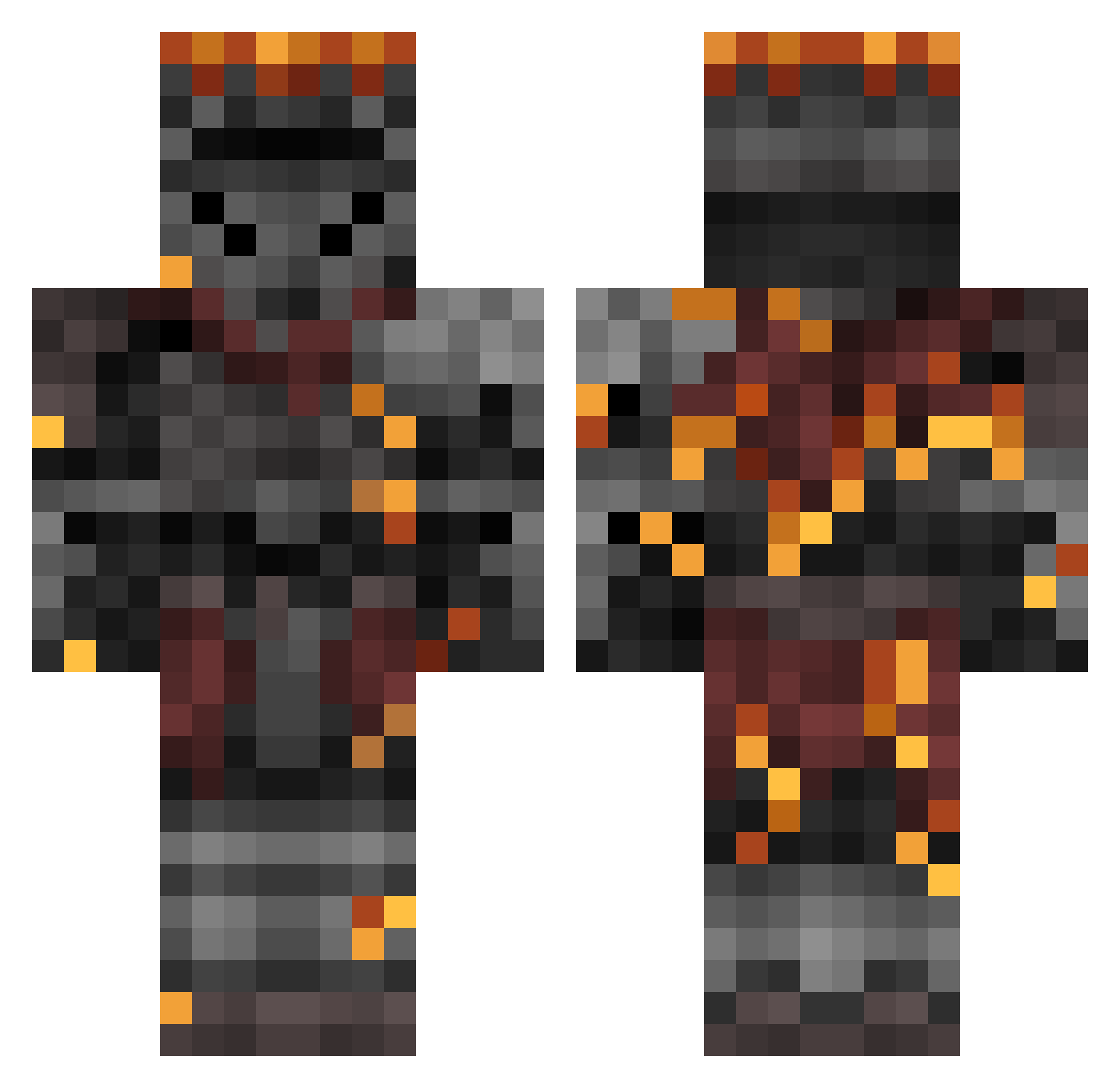
Current Minecraft skin of the player BiliOldEight, loaded from the official Mojang API. Rotate the 3D model with your mouse or finger, then download the skin as a PNG file and use it in Minecraft: Bedrock Edition or Java Edition for free. When BiliOldEight changes their skin, this page updates automatically and the old skin stays in the history below.
Other players with this skin (460)
BiliOldEight was the 395th player we have seen with this skin, first spotted on 28.10.2026. The same skin was seen on these players. Open a nickname to see their current skin and skin history.
 Spartakus112 Krongred SainCK CiaranH OverborneKnight PetatVu YinDiAnLaoBanJiu elderwatch Jrock90749 Arcticu Chuckle ChiefSlayer Thraudyr The_LazyTitan orepitaya antonio_verab Sushi_Rider Monanthous Deathstar27885 DragonKeeper8 DSFRTES MED_USA Straix76_ G1lk4 hOwl79 Chuletarex777 AngeloAx DungLover ManoMaximo991 SuccMyWaffles091 4Moons Xonen365 TTB40_A ThePanther543 Chuckys1 BLOCKHEAD_ZORO FPbrisk FerrumTyrannis Hollow_Core ZazaGoblino avano24 SrSejo Ilya2002 Wiscord3 AjaxTheDishSoap villager8898 Senor_Stalebread dressedlizrd C9caliber PlasticNugget Fulma Xaergon CharlesVonKlunt FrostedOcean772 Thornsvoice Cursed8 AStupidFNDog DungeonRunn3r Daz3warm Portelah
More Netherite Armor Minecraft skins
See all 94 Netherite Armor skins
How to install the BiliOldEight skin
- Press the Download button above to save the skin as a PNG file.
- Minecraft: Bedrock Edition (PE): open the Dressing Room from the main menu (or tap your character → Edit Character), go to Classic Skins → Owned, press the + (new skin) button, choose the downloaded PNG and pick the Classic (Steve) model. Works on PC and mobile; consoles cannot import custom skins.
- Minecraft: Java Edition: open the Minecraft Launcher, go to the Skins tab, click New Skin, load the PNG, pick the Classic (Steve) model and press Save & Use. You can also upload it at minecraft.net → Profile → Change Skin.
The skin does not show up after import - what should I do?
Restart Minecraft and open the Dressing Room again - imported skins sometimes appear only after a restart. Also make sure you selected the imported skin and picked the Classic (Steve) model.
Which model should I choose, Classic or Slim?
This skin is designed for the Classic (Steve) model. If you pick the wrong model, the arms of the skin will look stretched or squeezed.
Is the skin of BiliOldEight free to download?
Yes. Press Download, save the PNG file and use it in Minecraft: Bedrock Edition or Java Edition - no payment or registration needed. The skin also works on multiplayer servers and Realms.
More skins
Looking for more? Go back to all Minecraft skins and check the top skins of the week, month and all time, or find any player's skin by nickname.