
ethan2212 - Minecraft Skins & Skin History
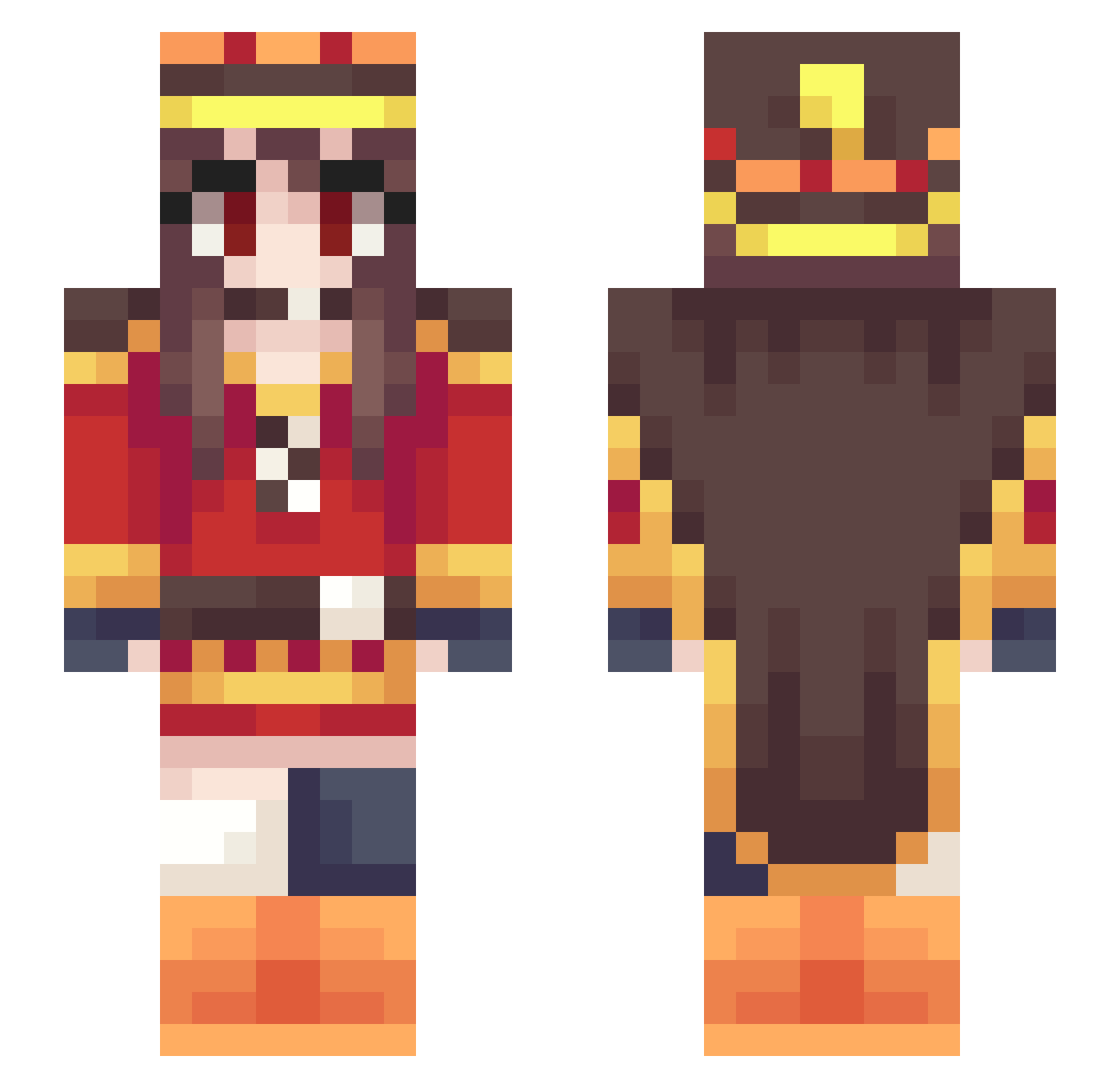
Current Minecraft skin of the player ethan2212, loaded from the official Mojang API. Rotate the 3D model with your mouse or finger, then download the skin as a PNG file and use it in Minecraft: Bedrock Edition or Java Edition for free. When ethan2212 changes their skin, this page updates automatically and the old skin stays in the history below.
Other players with this skin (388)
ethan2212 was the 297th player we have seen with this skin, first spotted on 20.10.2026. The same skin was seen on these players. Open a nickname to see their current skin and skin history.
 smilerider Nemo1113 Okamiwaza ludwiknmsis OwO611 momotora PhantomGam3r Lagrato Rykos714 Flaming_Guava jfhawke Ambrldk Azahros666 RealPandaWWW raRuto19 Okay5880 Fibyan Ethiels ariellekim Se1F1sh 3XH6R Iythou Winlight_ KyoshiroSUN userr666 Valyrie97 NinEvan_ yukiyami Tofu_Jay FishYeet_ ZombieBzy Bandeo69 AI_nine MontyoIo shan0521 Akameka Pillzhasser EllenBees renavlt Poliki0 bayuezzz Avaruuu nizunizu LordTheWoof Iceman__b RinHosh1zora Maki_II Jorgini44 IntenseOldMan chu_0425 Zhenphis ttaakkaahs WRidA4 bastoune14 Mr_AxZik r88mcc ShionOGC SAMZEROX hiruandon Mixplosion
More Royalty Minecraft skins
How to install the ethan2212 skin
- Press the Download button above to save the skin as a PNG file.
- Minecraft: Bedrock Edition (PE): open the Dressing Room from the main menu (or tap your character → Edit Character), go to Classic Skins → Owned, press the + (new skin) button, choose the downloaded PNG and pick the Slim (Alex) model. Works on PC and mobile; consoles cannot import custom skins.
- Minecraft: Java Edition: open the Minecraft Launcher, go to the Skins tab, click New Skin, load the PNG, pick the Slim (Alex) model and press Save & Use. You can also upload it at minecraft.net → Profile → Change Skin.
The skin does not show up after import - what should I do?
Restart Minecraft and open the Dressing Room again - imported skins sometimes appear only after a restart. Also make sure you selected the imported skin and picked the Slim (Alex) model.
Which model should I choose, Classic or Slim?
This skin is designed for the Slim (Alex) model. If you pick the wrong model, the arms of the skin will look stretched or squeezed.
Is the skin of ethan2212 free to download?
Yes. Press Download, save the PNG file and use it in Minecraft: Bedrock Edition or Java Edition - no payment or registration needed. The skin also works on multiplayer servers and Realms.
More skins
Looking for more? Go back to all Minecraft skins and check the top skins of the week, month and all time, or find any player's skin by nickname.