
a_m06 - Minecraft Skins & Skin History
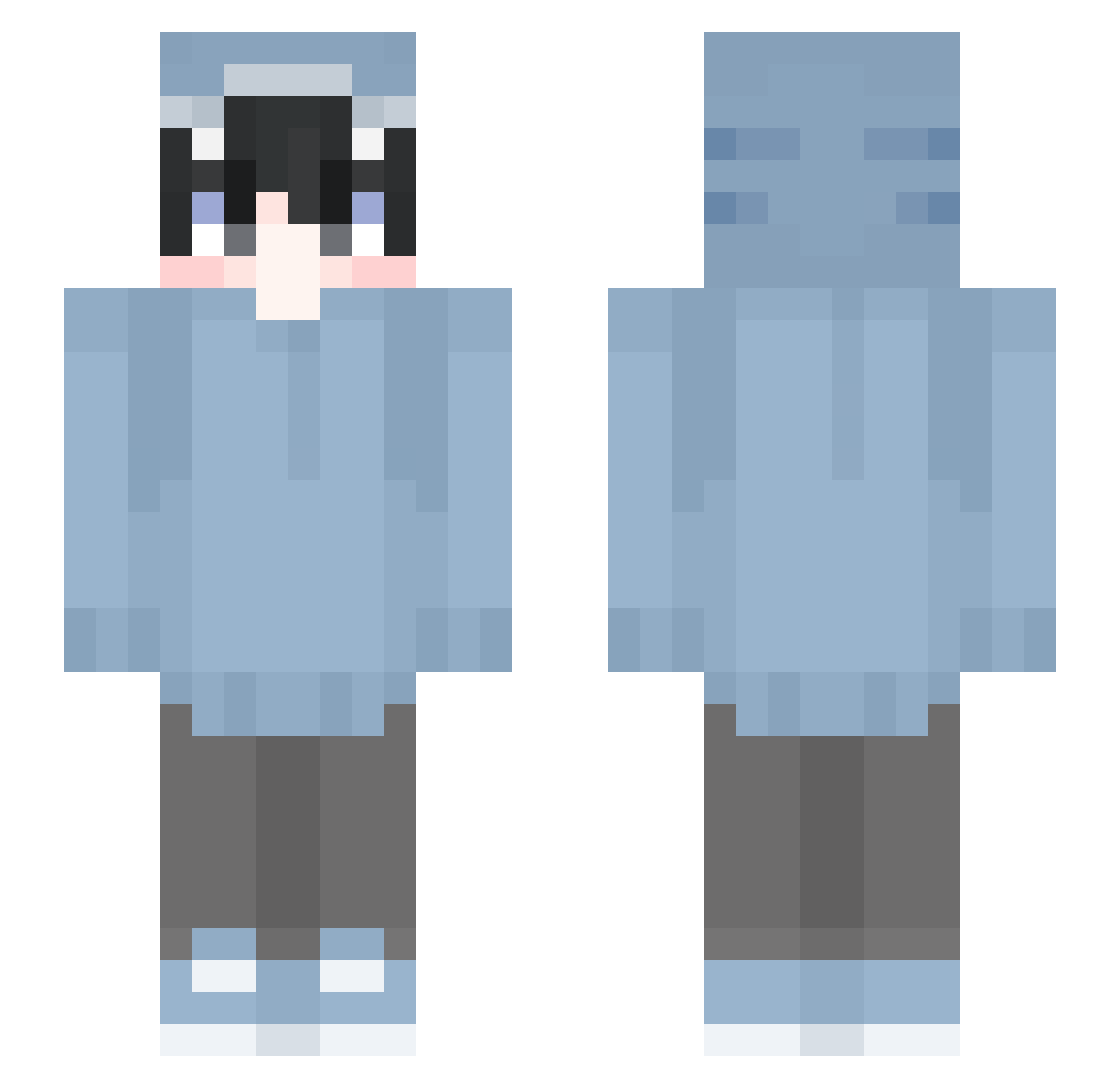
Current Minecraft skin of the player a_m06, loaded from the official Mojang API. Rotate the 3D model with your mouse or finger, then download the skin as a PNG file and use it in Minecraft: Bedrock Edition or Java Edition for free. When a_m06 changes their skin, this page updates automatically and the old skin stays in the history below.
Other players with this skin (681)
a_m06 was the 660th player we have seen with this skin, first spotted on 08.11.2026. The same skin was seen on these players. Open a nickname to see their current skin and skin history.
 iiTzCoro A_raki Marshmellow_111 lVlilViON TheRXY d_gibraltar DeathNTJ AKaRiMeiTo BurnDemonSpawn Loaerie YTAssassin kakiataru stone981114 tonra8 160cm_ SaschaU3 k0urier Sharkheu RyzoxOnCw Aqures menhit_08 Monstera87 JakubPog reoreo200 Kylan__ Daniel0911 ilyshark WRwolf_ akino2486 nahiru rBrazz TheWrizard og_enes Night762 LiL_pheeb zxc2435 konakona4 RaZeX2 MisakiTheSenpai Nghia2k9 KyonKyon8243 LavaMaster_MC Muto_610_ bhani bilbo8000 Nur66 DragoKingOfBeast xiaoju0306 wqui FlameisNoob JANOM_ zyx1101 SASAKI0000 Sirius895 Senmoh Yume8765 w1ntasomaru panda_fk Creeper9874 a_to4
More Shark Onesie Minecraft skins
See all 199 Shark Onesie skins
How to install the a_m06 skin
- Press the Download button above to save the skin as a PNG file.
- Minecraft: Bedrock Edition (PE): open the Dressing Room from the main menu (or tap your character → Edit Character), go to Classic Skins → Owned, press the + (new skin) button, choose the downloaded PNG and pick the Slim (Alex) model. Works on PC and mobile; consoles cannot import custom skins.
- Minecraft: Java Edition: open the Minecraft Launcher, go to the Skins tab, click New Skin, load the PNG, pick the Slim (Alex) model and press Save & Use. You can also upload it at minecraft.net → Profile → Change Skin.
The skin does not show up after import - what should I do?
Restart Minecraft and open the Dressing Room again - imported skins sometimes appear only after a restart. Also make sure you selected the imported skin and picked the Slim (Alex) model.
Which model should I choose, Classic or Slim?
This skin is designed for the Slim (Alex) model. If you pick the wrong model, the arms of the skin will look stretched or squeezed.
Is the skin of a_m06 free to download?
Yes. Press Download, save the PNG file and use it in Minecraft: Bedrock Edition or Java Edition - no payment or registration needed. The skin also works on multiplayer servers and Realms.
More skins
Looking for more? Go back to all Minecraft skins and check the top skins of the week, month and all time, or find any player's skin by nickname.