
Zerliia - Minecraft Skins & Skin History
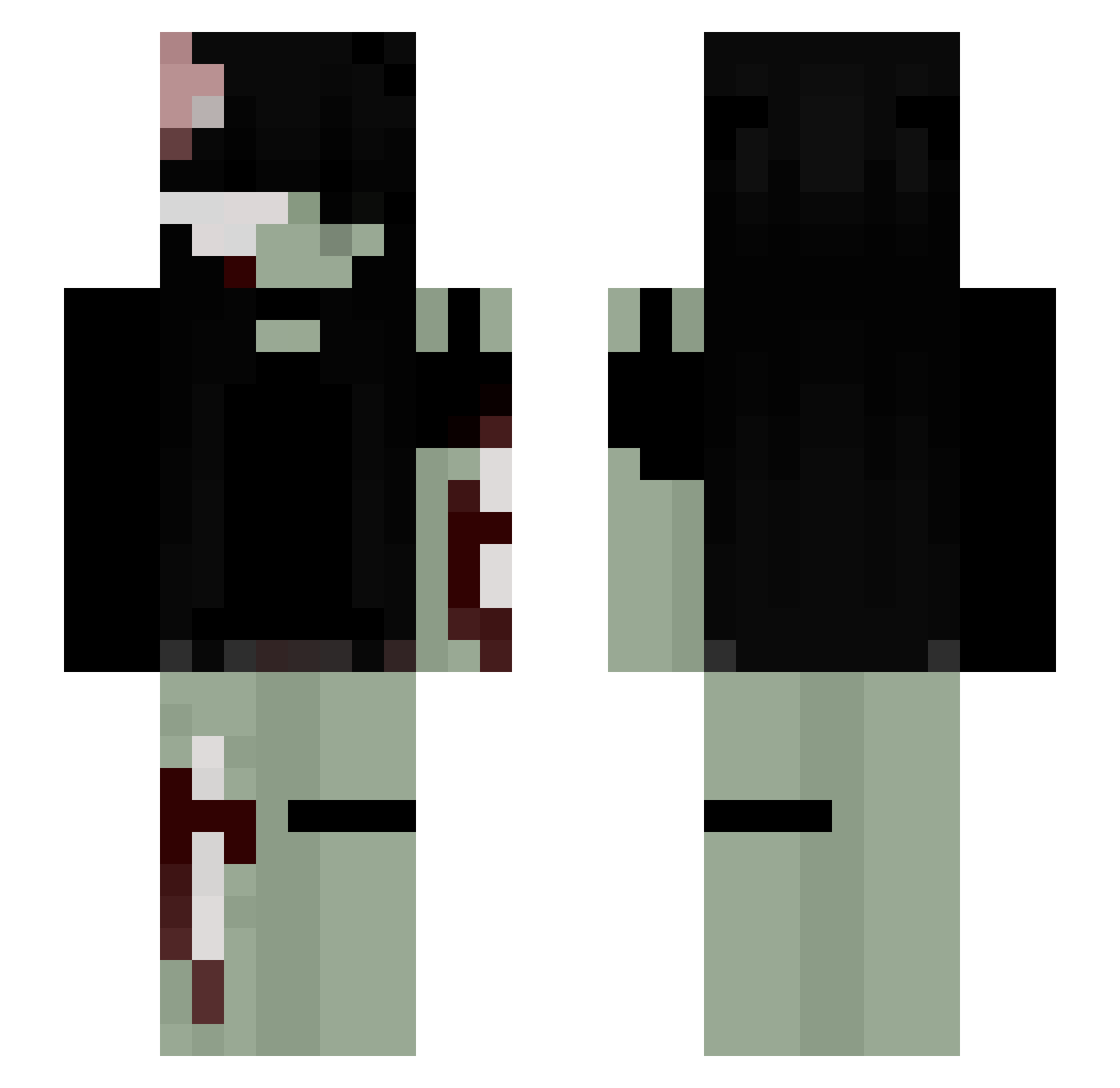
Current Minecraft skin of the player Zerliia, loaded from the official Mojang API. Rotate the 3D model with your mouse or finger, then download the skin as a PNG file and use it in Minecraft: Bedrock Edition or Java Edition for free. When Zerliia changes their skin, this page updates automatically and the old skin stays in the history below.
Other players with this skin (297)
Zerliia was the 266th player we have seen with this skin, first spotted on 29.10.2026. The same skin was seen on these players. Open a nickname to see their current skin and skin history.
 bugamanda nnhh667757 Quarinite CookieExtremee bunnii1111 CorrodeMe tinolka p0iuyo solokelly kaechew Fr0st1880 iheartsamara dizzylama30 selenelene1 eepwalker SomewhereSeraph n3tsuki Idiot_Ashh kisperal GiveBrain StarryHammerhead neskuchay DinoNuggets1023 koriwakkuma NaamiVT Naichus SalmonPilot8480 21iconic l0ver_67 iZumbi heidili livvicle mllepixe Fro_ggy tefitaaa CovenGwen ShiroNex42 0OobubblesoO0 theamazingiu sleepizoeyyy BreadBear9 werkaaxe raspberryrat_ PBBIBBI glumdum Nanita5 P1CL3S MxViolence Inkyyboo njxxph EveDLuffy just_sary17 KeiraExe CamIsDizzy Aakiiko SignVan Decime Joci1998 dadcorpse loveizzie
More Gore Minecraft skins
How to install the Zerliia skin
- Press the Download button above to save the skin as a PNG file.
- Minecraft: Bedrock Edition (PE): open the Dressing Room from the main menu (or tap your character → Edit Character), go to Classic Skins → Owned, press the + (new skin) button, choose the downloaded PNG and pick the Slim (Alex) model. Works on PC and mobile; consoles cannot import custom skins.
- Minecraft: Java Edition: open the Minecraft Launcher, go to the Skins tab, click New Skin, load the PNG, pick the Slim (Alex) model and press Save & Use. You can also upload it at minecraft.net → Profile → Change Skin.
The skin does not show up after import - what should I do?
Restart Minecraft and open the Dressing Room again - imported skins sometimes appear only after a restart. Also make sure you selected the imported skin and picked the Slim (Alex) model.
Which model should I choose, Classic or Slim?
This skin is designed for the Slim (Alex) model. If you pick the wrong model, the arms of the skin will look stretched or squeezed.
Is the skin of Zerliia free to download?
Yes. Press Download, save the PNG file and use it in Minecraft: Bedrock Edition or Java Edition - no payment or registration needed. The skin also works on multiplayer servers and Realms.
More skins
Looking for more? Go back to all Minecraft skins and check the top skins of the week, month and all time, or find any player's skin by nickname.