
YoItsMatty3685 - Minecraft Skins & Skin History
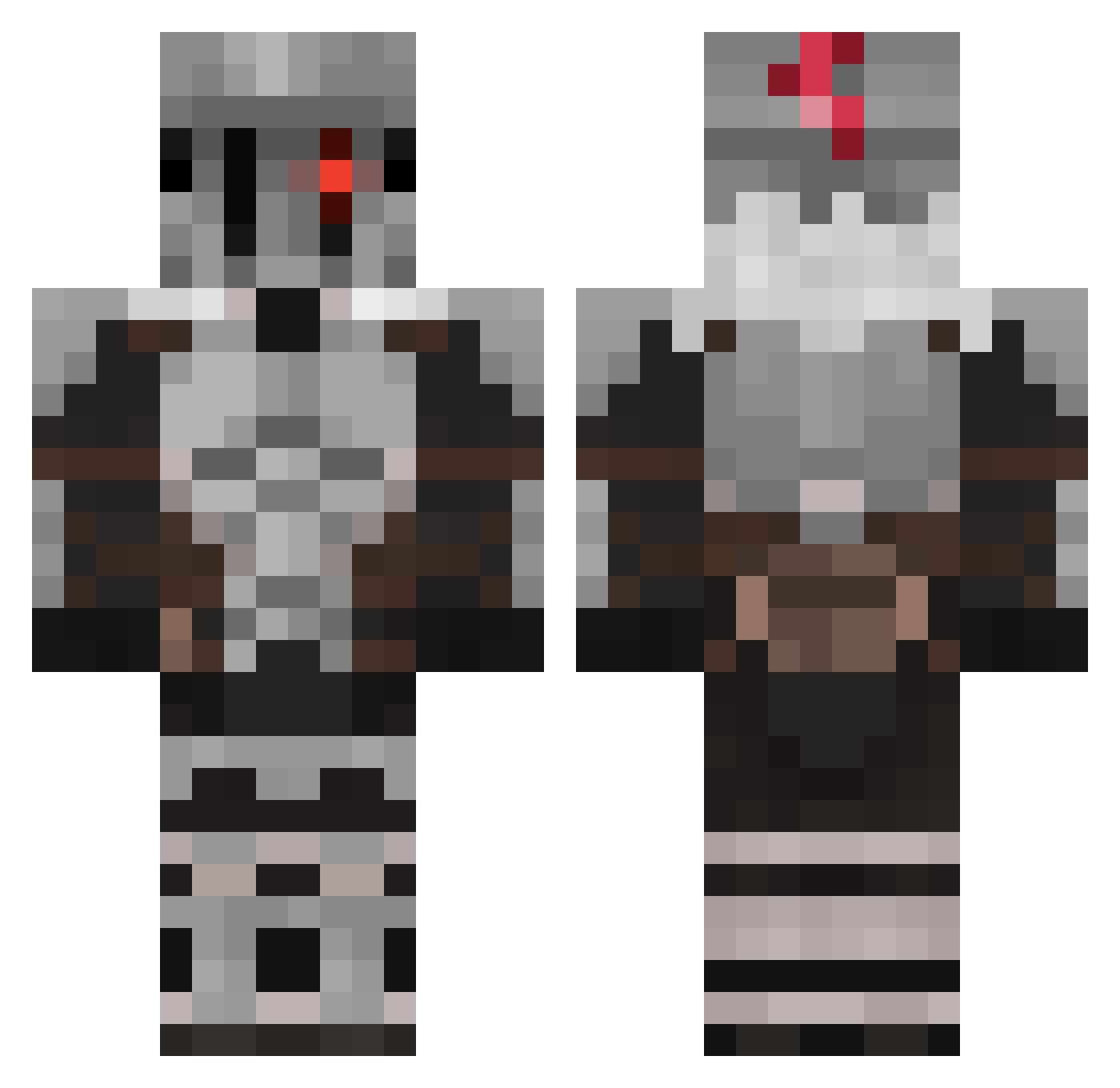
Current Minecraft skin of the player YoItsMatty3685, loaded from the official Mojang API. Rotate the 3D model with your mouse or finger, then download the skin as a PNG file and use it in Minecraft: Bedrock Edition or Java Edition for free. When YoItsMatty3685 changes their skin, this page updates automatically and the old skin stays in the history below.
Other players with this skin (643)
YoItsMatty3685 was the 615th player we have seen with this skin, first spotted on 04.11.2026. The same skin was seen on these players. Open a nickname to see their current skin and skin history.
 oR00Ko URI_08 AlyBaba40 MarbleDig Aetherexp WIntERwoLF4835 YasserPro Kunigam1 RB25GTR Hanhyel MotteTheOmen jdawg6615 SaNBaTaS IlSaTorulI JDiez01 hugo976932 KediKot_ AtBad Ale_04 VampireLayer Zaraki1597 Comet_Lonk Siwus96 adz2149 PersonaErrante saterKo MonkyAdix gonzaloperazzone CwithpyCthulhu GSlayer_ Daniel3089 ulovegoblin FilthyMongrels HDStarLord Orukuborugu xSL4Y3Rx Takeshibre BinaryZoul Koolaidmonke Kahnak NEIL0624 Millerires Elarisjv PufosenyX Mobydick0212 MechaKirby N00T__N00T _Mc_BigBoss_ snowwhitemittens AraAraSama VigGamerr RoamingBlocks22 Nahuel751 JustRakun CowWhy Donsaidgratis HexisHexy woklywoBR Dovahkiin__101 notmuchwbu
More Goblin Slayer Minecraft skins
See all 37 Goblin Slayer skins
How to install the YoItsMatty3685 skin
- Press the Download button above to save the skin as a PNG file.
- Minecraft: Bedrock Edition (PE): open the Dressing Room from the main menu (or tap your character → Edit Character), go to Classic Skins → Owned, press the + (new skin) button, choose the downloaded PNG and pick the Classic (Steve) model. Works on PC and mobile; consoles cannot import custom skins.
- Minecraft: Java Edition: open the Minecraft Launcher, go to the Skins tab, click New Skin, load the PNG, pick the Classic (Steve) model and press Save & Use. You can also upload it at minecraft.net → Profile → Change Skin.
The skin does not show up after import - what should I do?
Restart Minecraft and open the Dressing Room again - imported skins sometimes appear only after a restart. Also make sure you selected the imported skin and picked the Classic (Steve) model.
Which model should I choose, Classic or Slim?
This skin is designed for the Classic (Steve) model. If you pick the wrong model, the arms of the skin will look stretched or squeezed.
Is the skin of YoItsMatty3685 free to download?
Yes. Press Download, save the PNG file and use it in Minecraft: Bedrock Edition or Java Edition - no payment or registration needed. The skin also works on multiplayer servers and Realms.
More skins
Looking for more? Go back to all Minecraft skins and check the top skins of the week, month and all time, or find any player's skin by nickname.