
Wallabooga - Minecraft Skins & Skin History
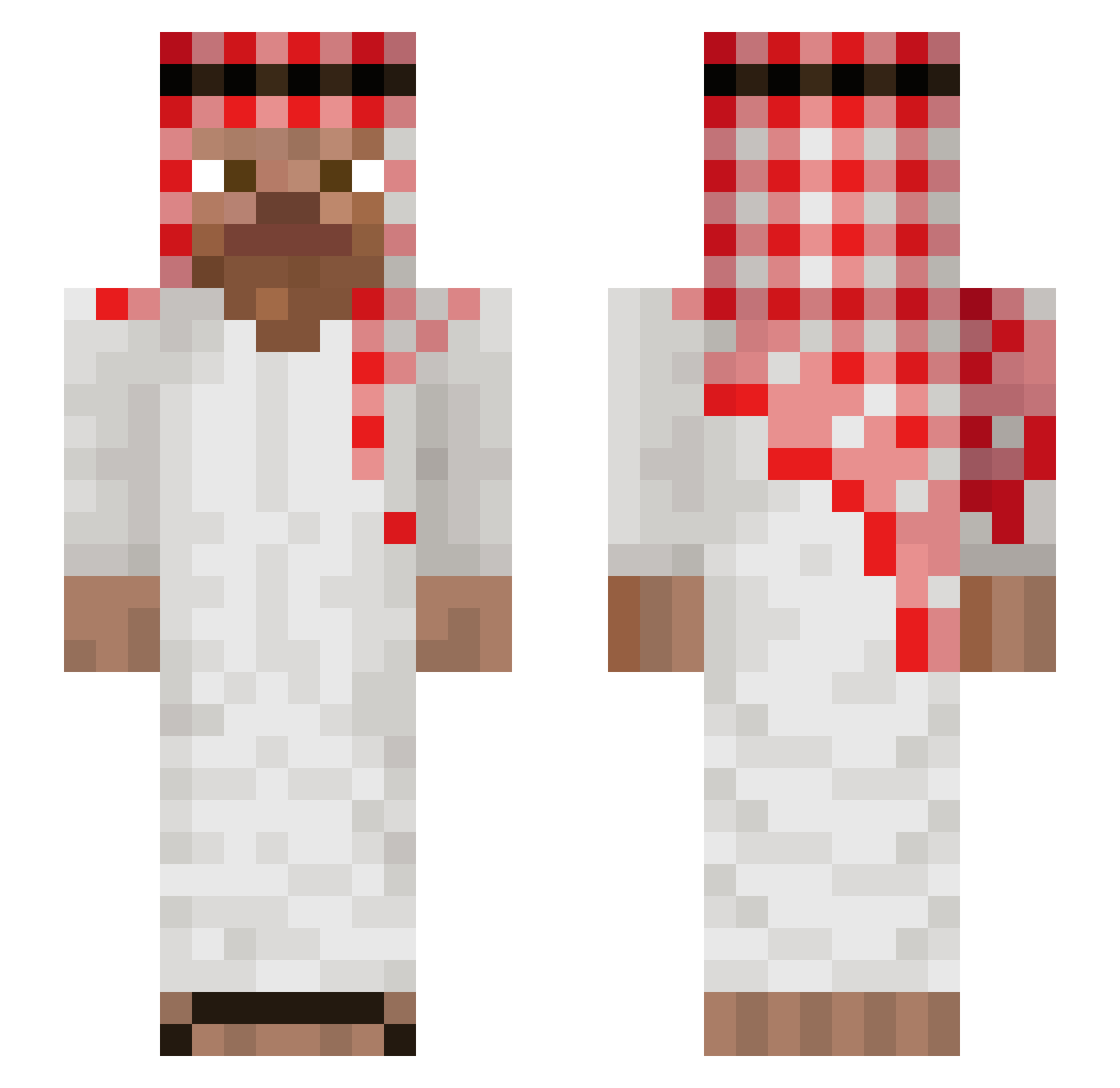
Current Minecraft skin of the player Wallabooga, loaded from the official Mojang API. Rotate the 3D model with your mouse or finger, then download the skin as a PNG file and use it in Minecraft: Bedrock Edition or Java Edition for free. When Wallabooga changes their skin, this page updates automatically and the old skin stays in the history below.
Other players with this skin (1148)
Wallabooga was the 1051st player we have seen with this skin, first spotted on 02.11.2026. The same skin was seen on these players. Open a nickname to see their current skin and skin history.
 icoww Giblartar77 SasaBoy960 KaiTheCup cmcg1 qBaCHa1 Edgarmuz osmanpapaa IO_147 CLEMDU77 RichhCodeinn 46st CMghusto KindredJam20659 dev_01 ThisIsWhat Cpepa Arisych clement3149 0rdinary__ Frigiel_et_Flufy FelipeCS08 Swedish1 zwirek_oio_ Tatwan Lofiqtr4 Megolino Lilshugga_ vicas765 AntiToxi BearGryllsDoHG KyAn070 Trashplayer102 spaceman6492 hals112 MRPAROLI RIKETE456 EddwinCraftPM perejil47 MrMuzamel MichouleBG takuad RickOnno GabePollito25 Eotto0 PereMarcel0 LNNXjustKICKS taggenmike atii123 Komotre123 Toxikan zubnubb Akira_234 Vci3nz_ noobjuno KONYALIMEHMETUST jacobjacobjacob1 SwedenxXsniperXx Remii6 Droped__by_kubus
More Arabic Minecraft skins
How to install the Wallabooga skin
- Press the Download button above to save the skin as a PNG file.
- Minecraft: Bedrock Edition (PE): open the Dressing Room from the main menu (or tap your character → Edit Character), go to Classic Skins → Owned, press the + (new skin) button, choose the downloaded PNG and pick the Slim (Alex) model. Works on PC and mobile; consoles cannot import custom skins.
- Minecraft: Java Edition: open the Minecraft Launcher, go to the Skins tab, click New Skin, load the PNG, pick the Slim (Alex) model and press Save & Use. You can also upload it at minecraft.net → Profile → Change Skin.
The skin does not show up after import - what should I do?
Restart Minecraft and open the Dressing Room again - imported skins sometimes appear only after a restart. Also make sure you selected the imported skin and picked the Slim (Alex) model.
Which model should I choose, Classic or Slim?
This skin is designed for the Slim (Alex) model. If you pick the wrong model, the arms of the skin will look stretched or squeezed.
Is the skin of Wallabooga free to download?
Yes. Press Download, save the PNG file and use it in Minecraft: Bedrock Edition or Java Edition - no payment or registration needed. The skin also works on multiplayer servers and Realms.
More skins
Looking for more? Go back to all Minecraft skins and check the top skins of the week, month and all time, or find any player's skin by nickname.