
UrJustDead - Minecraft Skins & Skin History
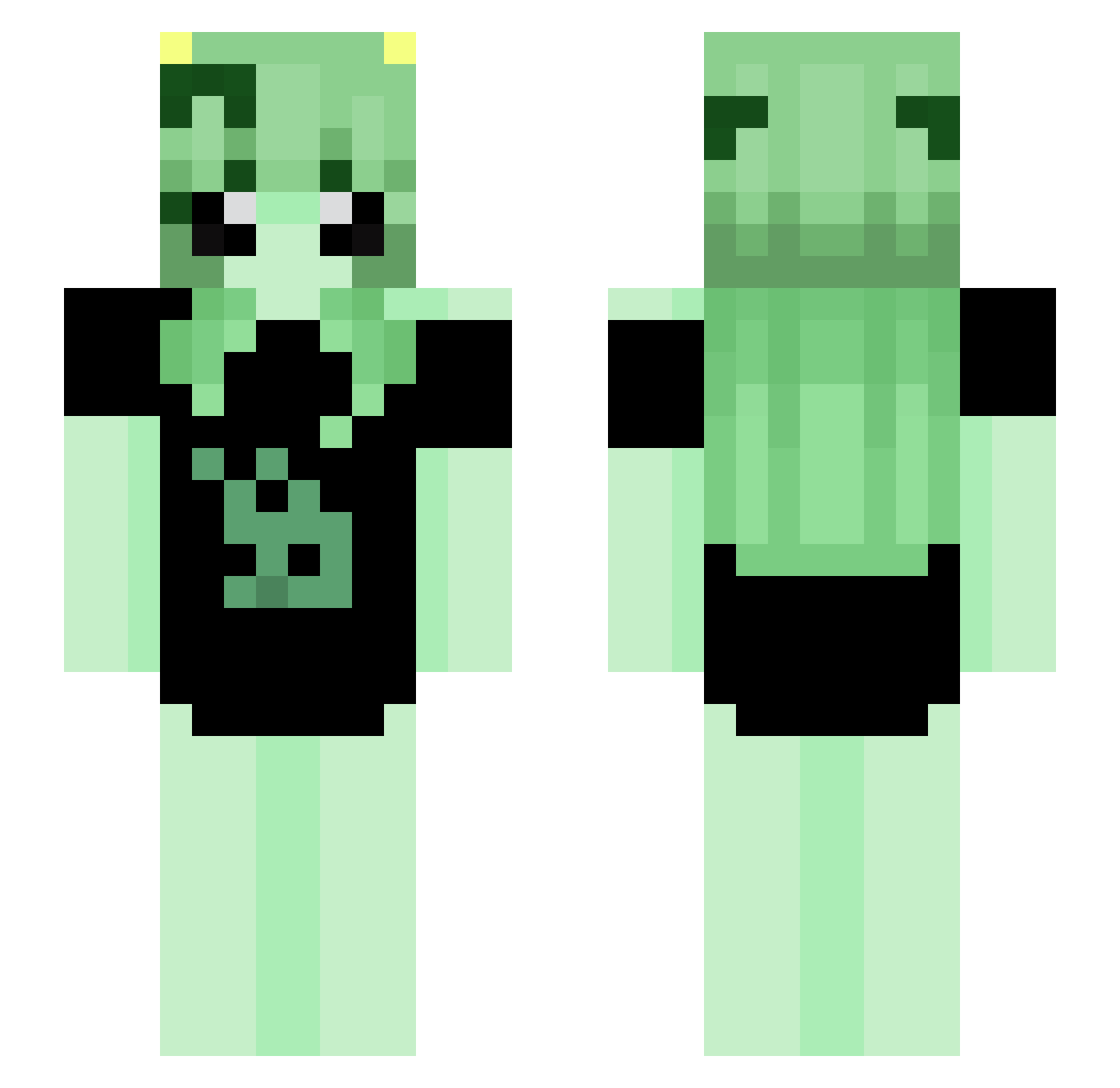
Current Minecraft skin of the player UrJustDead, loaded from the official Mojang API. Rotate the 3D model with your mouse or finger, then download the skin as a PNG file and use it in Minecraft: Bedrock Edition or Java Edition for free. When UrJustDead changes their skin, this page updates automatically and the old skin stays in the history below.
Other players with this skin (74)
UrJustDead was the 51st player we have seen with this skin, first spotted on 21.10.2026. The same skin was seen on these players. Open a nickname to see their current skin and skin history.
 yDy_ Jakubinio2015 Truly_Athena Noryaki Asrteralesa tohruzu Washedburrito topxsz WorthLizz Pesses BLOZYS 0h_MINT PurliMint curo1d N0luh p__5 Cleo_2 Esnupi__ whoispomnua Voidplaice OrgeRex Projetos KittenElis NELBROXian omn1a_ AHEGAO_PLAYER UnKownYamato Niko_onest Yes_Avk HoshiJei PIMD007 Pawern ivneys Mialczymir Miola0_0 Noty0u544 Pantsumi murderousness Kuuraaii_ ashriis swxngyou Azure4005 liyold Koyomi__ solaresolace SM0uwse Lodexz DAIM0NT BLACSKY9 weissted eoosa ssnag MEMIREI hsshs_ catamese oatmilk02 cuwddly nico4589 tonotata itsL1a_
More Alien Minecraft skins
How to install the UrJustDead skin
- Press the Download button above to save the skin as a PNG file.
- Minecraft: Bedrock Edition (PE): open the Dressing Room from the main menu (or tap your character → Edit Character), go to Classic Skins → Owned, press the + (new skin) button, choose the downloaded PNG and pick the Slim (Alex) model. Works on PC and mobile; consoles cannot import custom skins.
- Minecraft: Java Edition: open the Minecraft Launcher, go to the Skins tab, click New Skin, load the PNG, pick the Slim (Alex) model and press Save & Use. You can also upload it at minecraft.net → Profile → Change Skin.
The skin does not show up after import - what should I do?
Restart Minecraft and open the Dressing Room again - imported skins sometimes appear only after a restart. Also make sure you selected the imported skin and picked the Slim (Alex) model.
Which model should I choose, Classic or Slim?
This skin is designed for the Slim (Alex) model. If you pick the wrong model, the arms of the skin will look stretched or squeezed.
Is the skin of UrJustDead free to download?
Yes. Press Download, save the PNG file and use it in Minecraft: Bedrock Edition or Java Edition - no payment or registration needed. The skin also works on multiplayer servers and Realms.
More skins
Looking for more? Go back to all Minecraft skins and check the top skins of the week, month and all time, or find any player's skin by nickname.