
SvenR3101 - Minecraft Skins & Skin History
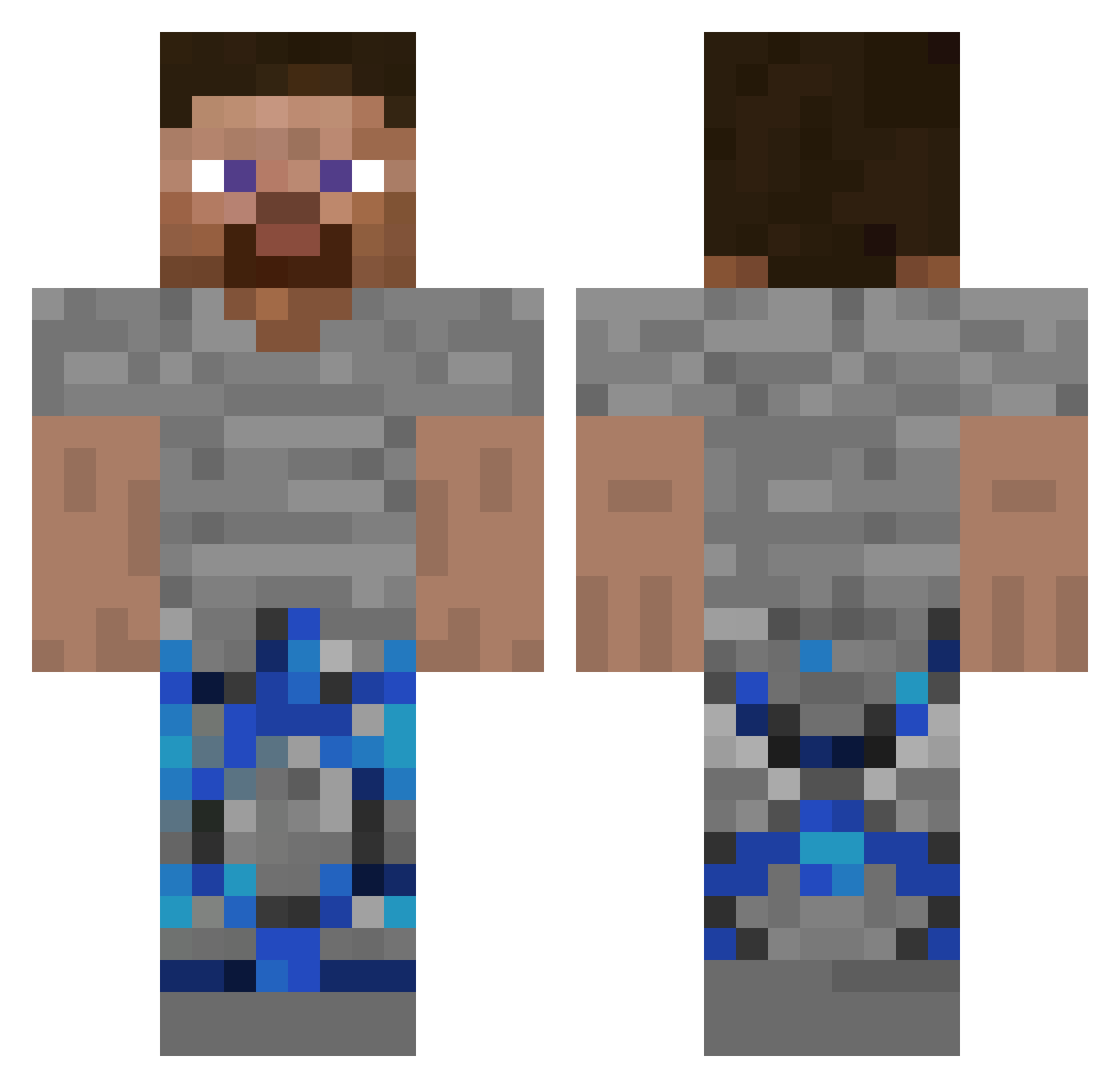
Current Minecraft skin of the player SvenR3101, loaded from the official Mojang API. Rotate the 3D model with your mouse or finger, then download the skin as a PNG file and use it in Minecraft: Bedrock Edition or Java Edition for free. When SvenR3101 changes their skin, this page updates automatically and the old skin stays in the history below.
Other players with this skin (305)
SvenR3101 was the 289th player we have seen with this skin, first spotted on 01.11.2026. The same skin was seen on these players. Open a nickname to see their current skin and skin history.
 SAM_RONALDO12 QuartzX__ soIutions _DrDonuttFan DrDocnutt Matskenator KloPutzer3500 xk_ghraW_0127 Steamyyt6367 larpstermacedu_ LUCKYTYT VoicingMold7145 TheCrazySword Nguyenquocvn drdrountt ItzMoshie MareskaKreska titanicballss cwnv IGotHacked676767 NoToesTony69 Yanjun1050817 xX_SEBA_Xx twischmomo 99DESTROYER100 TM093 Legend_Destroyer Jaytato45 bushyzak baramettin DragonHunter498 oddortunity HUDBOXEDYOU _1_AM_ Donutsmp_net matisosa shingboa AcridFamous chrisvoids FrostXplayz Ben12217 Kyleedits thamng insaneffx Krisas69 A2P4E Drdonutt_alt Joe_man55 DrCiambella SheLuvSyro cpvpdiddy1 FkUrGeNre Sven_Meister woodaffles xolepaltggbg IIIIIIIIIIIII__ TheHonouredOne45 MAL_aKpOul Dexter7866 pxl_mc
How to install the SvenR3101 skin
- Press the Download button above to save the skin as a PNG file.
- Minecraft: Bedrock Edition (PE): open the Dressing Room from the main menu (or tap your character → Edit Character), go to Classic Skins → Owned, press the + (new skin) button, choose the downloaded PNG and pick the Classic (Steve) model. Works on PC and mobile; consoles cannot import custom skins.
- Minecraft: Java Edition: open the Minecraft Launcher, go to the Skins tab, click New Skin, load the PNG, pick the Classic (Steve) model and press Save & Use. You can also upload it at minecraft.net → Profile → Change Skin.
The skin does not show up after import - what should I do?
Restart Minecraft and open the Dressing Room again - imported skins sometimes appear only after a restart. Also make sure you selected the imported skin and picked the Classic (Steve) model.
Which model should I choose, Classic or Slim?
This skin is designed for the Classic (Steve) model. If you pick the wrong model, the arms of the skin will look stretched or squeezed.
Is the skin of SvenR3101 free to download?
Yes. Press Download, save the PNG file and use it in Minecraft: Bedrock Edition or Java Edition - no payment or registration needed. The skin also works on multiplayer servers and Realms.
More skins
Looking for more? Go back to all Minecraft skins and check the top skins of the week, month and all time, or find any player's skin by nickname.