
SteveeXd - Minecraft Skins & Skin History
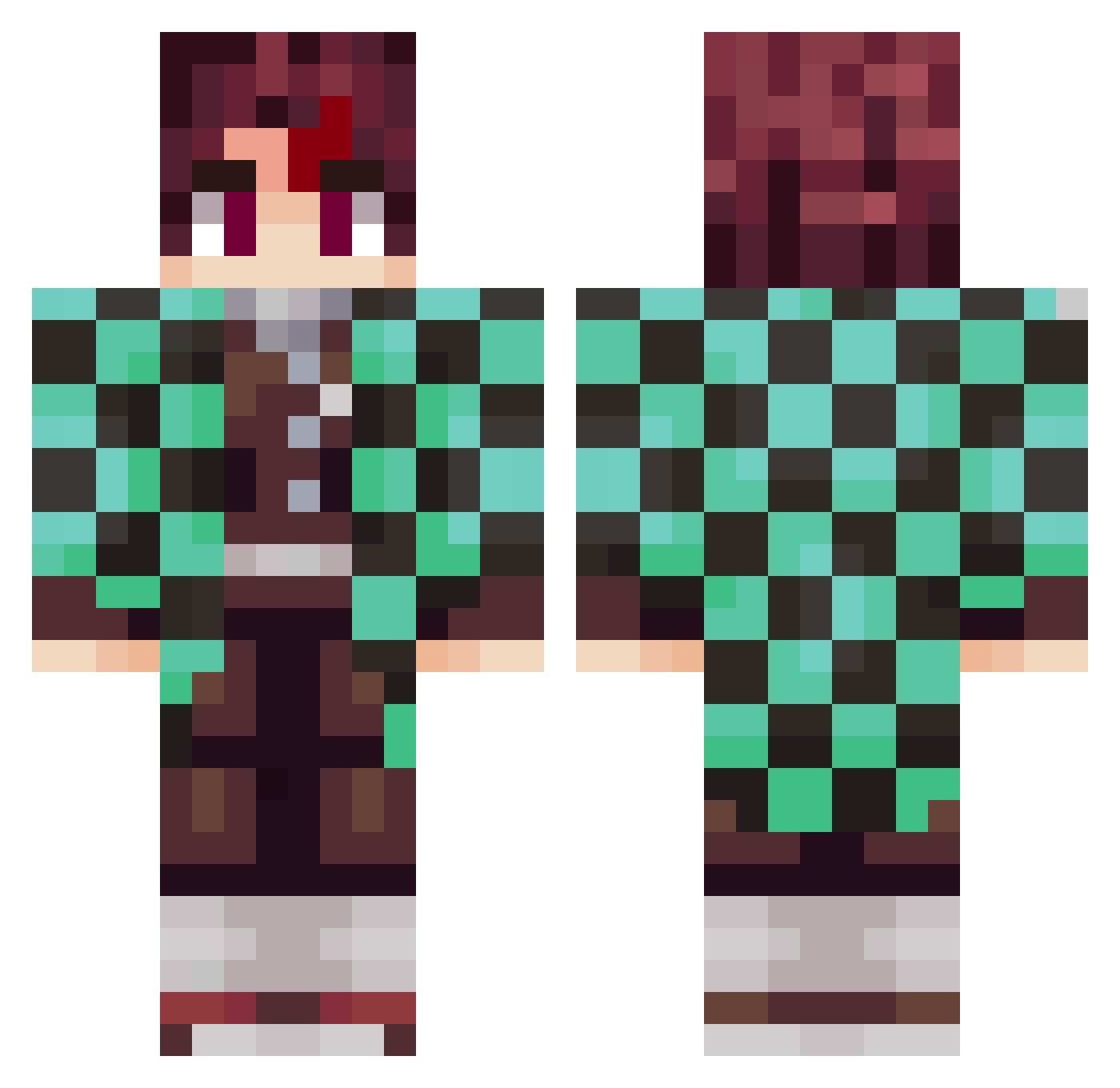
Current Minecraft skin of the player SteveeXd, loaded from the official Mojang API. Rotate the 3D model with your mouse or finger, then download the skin as a PNG file and use it in Minecraft: Bedrock Edition or Java Edition for free. When SteveeXd changes their skin, this page updates automatically and the old skin stays in the history below.
Other players with this skin (1015)
SteveeXd was the 964th player we have seen with this skin, first spotted on 05.11.2026. The same skin was seen on these players. Open a nickname to see their current skin and skin history.
 Cyks__ In__cent Kinui Ethernal2004 HUIGA DillyDally666 Rengoku___ Dakitoo finallydipa11 gomezruc RexBruv KidZappy ELITEJIMHITTER SeUqRaM2710 MisterMacDonald8 FRC25020 Anuma_ TrevorFingler Gingercat86 PHenri17 fengwenxin Hoy6 oada_batzn donze80 spyxfam iRaa_ MFuXin tagdev Tethysi JulietteBurgos yrm_628 Maxewe3124 SagarOG Kira891 PetitBou 4445xd Yokai38 naginata_ LacouilleHD Erinsyler12 CallMeItachI marce77 saitam201 _Zal MANARAKU Mottinhaaa Buldii GWiddy HelloJordyy Papucho26 FinnLuca2412 nezuko888 XyRoqS RAMlNO xDom77x Naniv12 DistacLoy_ I_Flex_You HeartThief i_mxl
More Tanjiro Kamado Minecraft skins
See all 464 Tanjiro Kamado skins
How to install the SteveeXd skin
- Press the Download button above to save the skin as a PNG file.
- Minecraft: Bedrock Edition (PE): open the Dressing Room from the main menu (or tap your character → Edit Character), go to Classic Skins → Owned, press the + (new skin) button, choose the downloaded PNG and pick the Classic (Steve) model. Works on PC and mobile; consoles cannot import custom skins.
- Minecraft: Java Edition: open the Minecraft Launcher, go to the Skins tab, click New Skin, load the PNG, pick the Classic (Steve) model and press Save & Use. You can also upload it at minecraft.net → Profile → Change Skin.
The skin does not show up after import - what should I do?
Restart Minecraft and open the Dressing Room again - imported skins sometimes appear only after a restart. Also make sure you selected the imported skin and picked the Classic (Steve) model.
Which model should I choose, Classic or Slim?
This skin is designed for the Classic (Steve) model. If you pick the wrong model, the arms of the skin will look stretched or squeezed.
Is the skin of SteveeXd free to download?
Yes. Press Download, save the PNG file and use it in Minecraft: Bedrock Edition or Java Edition - no payment or registration needed. The skin also works on multiplayer servers and Realms.
More skins
Looking for more? Go back to all Minecraft skins and check the top skins of the week, month and all time, or find any player's skin by nickname.