
Spring_69 - Minecraft Skins & Skin History
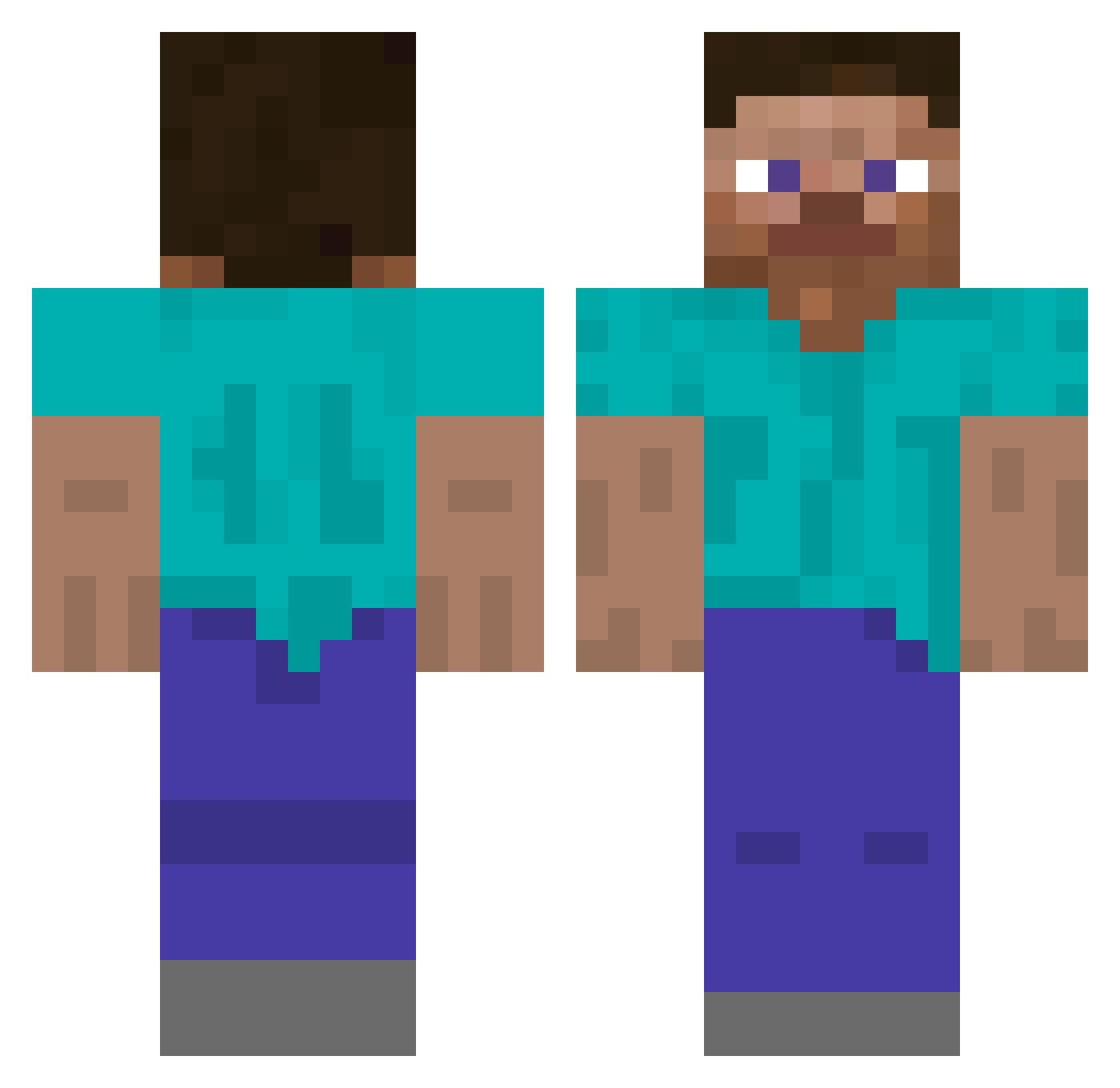
Current Minecraft skin of the player Spring_69, loaded from the official Mojang API. Rotate the 3D model with your mouse or finger, then download the skin as a PNG file and use it in Minecraft: Bedrock Edition or Java Edition for free. When Spring_69 changes their skin, this page updates automatically and the old skin stays in the history below.
Other players with this skin (642)
Spring_69 was the 590th player we have seen with this skin, first spotted on 03.11.2026. The same skin was seen on these players. Open a nickname to see their current skin and skin history.
 iceu__ ahmed4455666 GalacticDK O_nEVETs gsoull the_one_llama Mygglez KOREA_RG junseop0321 925046 NFD11 DayofDoom2000 KiritoKirigyaK gabbogallo playboifarti_2 hamlap43 dias72727 sainzz131 JayH_0119 abj218 RealGuyTheMan7 aeaeea iTsMonkey3 sanabi_1 SlightNight fartmunkle Jiaming666666 chrislin8765 zkk07 ljj1312 Lemoonade0121 yufong0214 JengJet DianXiii Yannro ge_ilo Jules_882 _GoZ BeckinBlack Pesslo SentientCube 1hippo leonardogiacint0 _sch_18 DVWarrior78 Merlinlesorcier PanBaguette25 Timmyjbone CHILDERR YusufKhoja69 Carps123 TheBlueStag zimerman fawamaka TommyBOOM PURITWO FaccioTekashi69 FhdnTheMoon Lucius_Omen DrekoWasted
How to install the Spring_69 skin
- Press the Download button above to save the skin as a PNG file.
- Minecraft: Bedrock Edition (PE): open the Dressing Room from the main menu (or tap your character → Edit Character), go to Classic Skins → Owned, press the + (new skin) button, choose the downloaded PNG and pick the Classic (Steve) model. Works on PC and mobile; consoles cannot import custom skins.
- Minecraft: Java Edition: open the Minecraft Launcher, go to the Skins tab, click New Skin, load the PNG, pick the Classic (Steve) model and press Save & Use. You can also upload it at minecraft.net → Profile → Change Skin.
The skin does not show up after import - what should I do?
Restart Minecraft and open the Dressing Room again - imported skins sometimes appear only after a restart. Also make sure you selected the imported skin and picked the Classic (Steve) model.
Which model should I choose, Classic or Slim?
This skin is designed for the Classic (Steve) model. If you pick the wrong model, the arms of the skin will look stretched or squeezed.
Is the skin of Spring_69 free to download?
Yes. Press Download, save the PNG file and use it in Minecraft: Bedrock Edition or Java Edition - no payment or registration needed. The skin also works on multiplayer servers and Realms.
More skins
Looking for more? Go back to all Minecraft skins and check the top skins of the week, month and all time, or find any player's skin by nickname.