
RoccatKonexdt - Minecraft Skins & Skin History
Current Minecraft skin of the player RoccatKonexdt, loaded from the official Mojang API. Rotate the 3D model with your mouse or finger, then download the skin as a PNG file and use it in Minecraft: Bedrock Edition or Java Edition for free. When RoccatKonexdt changes their skin, this page updates automatically and the old skin stays in the history below.
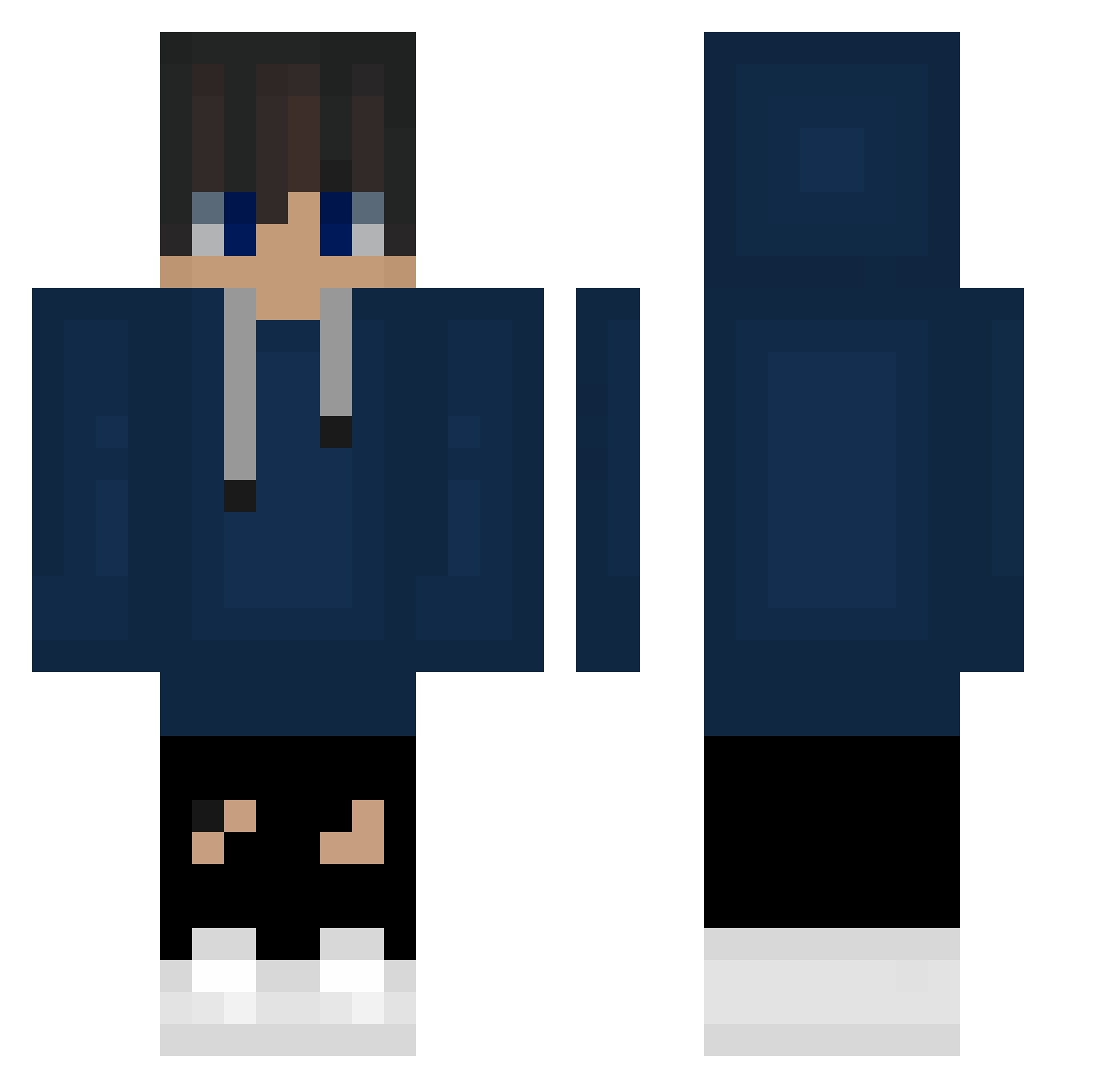
Other players with this skin (64)
RoccatKonexdt was the 33rd player we have seen with this skin, first spotted on 18.09.2026. The same skin was seen on these players. Open a nickname to see their current skin and skin history.
 NotGabesAlt copptm _sQubany__ yn_se01love souichika Sweatboy90 NightmareMC__ kamu2 Kamomma SoyCris24 XxKiller_BobxX jsgrimes sipurcup69 EndLuca ReviLOsHeEP iTeex24 kindeo9898 xBlaDee Og_Mlody_ Small_Neck PEACH2020 il_gandalf h4vc ManasPro22 lhb ForkSB ThatOneGamer04 MaickiChan Jiwoo0922 V57y_ Faruk_272 Osmanli_Yendi MI_MANG MoopXD TolgaGedik2 Isaackey jaeyoung1009 RnG_Hara Rexunas NDmq _Vooster_ Lagan_ EinfxchPascal
 BUCODELCUBO RobertoBDF__ assuringsmile ThaUnExpected TheStro GimmoMxm luckyblock2012 LORMAURIXVIII minseong2008 Leon_kjh NoFace1975 iiMUSTAFAxX Synergic Ibims6285 Michasiek664 Pepa161 Yuako_Flow
How to install the RoccatKonexdt skin
- Press the Download button above to save the skin as a PNG file.
- Minecraft: Bedrock Edition (PE): open the Dressing Room from the main menu (or tap your character → Edit Character), go to Classic Skins → Owned, press the + (new skin) button, choose the downloaded PNG and pick the Classic (Steve) model. Works on PC and mobile; consoles cannot import custom skins.
- Minecraft: Java Edition: open the Minecraft Launcher, go to the Skins tab, click New Skin, load the PNG, pick the Classic (Steve) model and press Save & Use. You can also upload it at minecraft.net → Profile → Change Skin.
The skin does not show up after import - what should I do?
Restart Minecraft and open the Dressing Room again - imported skins sometimes appear only after a restart. Also make sure you selected the imported skin and picked the Classic (Steve) model.
Which model should I choose, Classic or Slim?
This skin is designed for the Classic (Steve) model. If you pick the wrong model, the arms of the skin will look stretched or squeezed.
Is the skin of RoccatKonexdt free to download?
Yes. Press Download, save the PNG file and use it in Minecraft: Bedrock Edition or Java Edition - no payment or registration needed. The skin also works on multiplayer servers and Realms.
More skins
Looking for more? Go back to all Minecraft skins and check the top skins of the week, month and all time, or find any player's skin by nickname.