
LordDankula - Minecraft Skins & Skin History
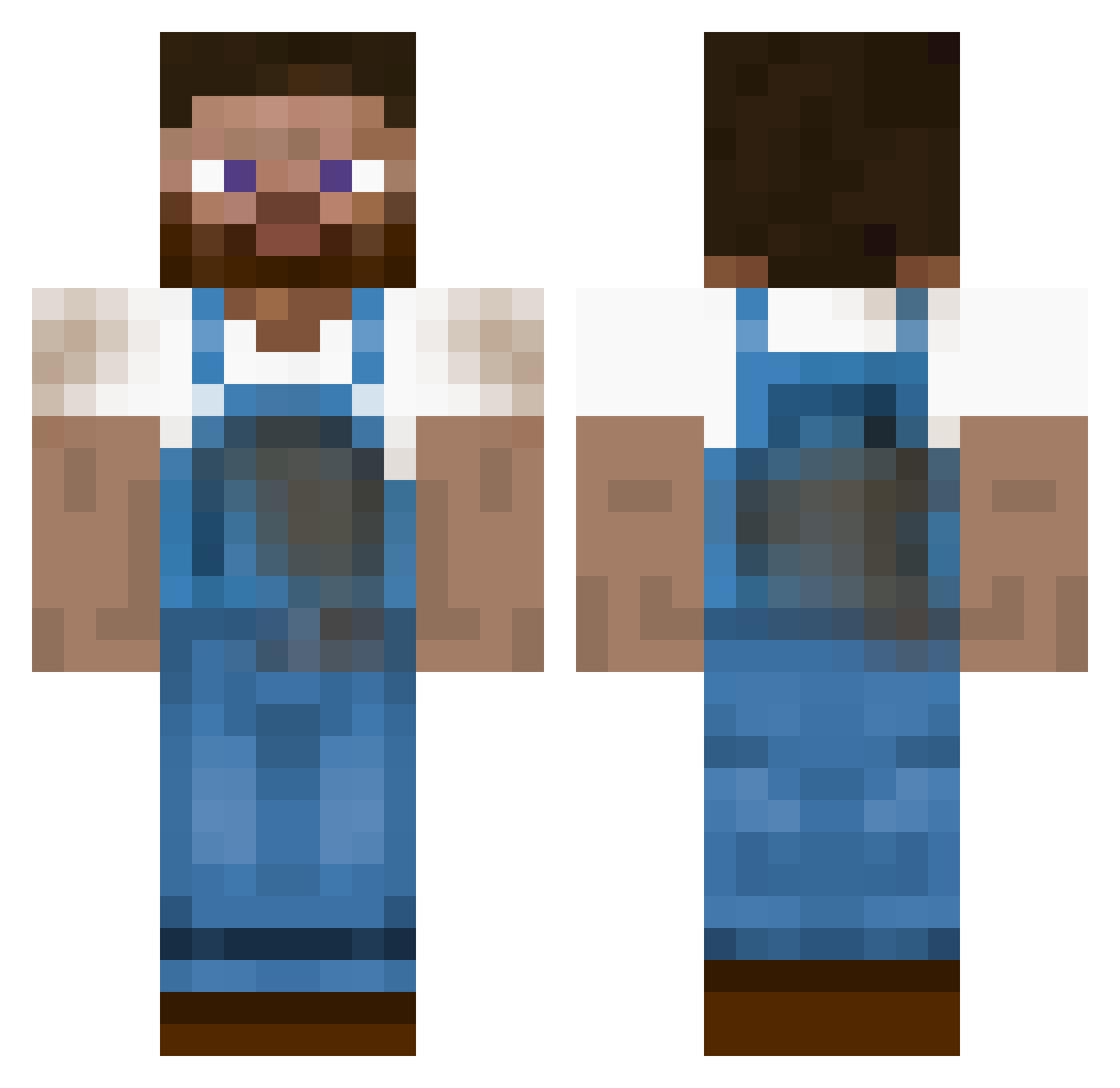
Current Minecraft skin of the player LordDankula, loaded from the official Mojang API. Rotate the 3D model with your mouse or finger, then download the skin as a PNG file and use it in Minecraft: Bedrock Edition or Java Edition for free. When LordDankula changes their skin, this page updates automatically and the old skin stays in the history below.
Other players with this skin (235)
LordDankula was the 172nd player we have seen with this skin, first spotted on 13.10.2026. The same skin was seen on these players. Open a nickname to see their current skin and skin history.
 CoorsLight93 Florian4016 _Kojimeme Slender2412 pmcnabb Minelexx_04 player771267779 Insulsealt4 Chen_Su Snowers76 budanzoe SimpinCK Francisco172 Minkey2020 LingeringLion715 jodl joshhuissen KinLam233 BabyFlow3r abedef Lerkrabban Harls_Barkley1 LordVanEdelweiss Z2030 lvmbdv bulancid SmokeHay twerknation47 Fr4GGer itzHYENA marviken Exarzz sem_in Tico3000 Eternalsoldier tijiang Chomik36011 sysfx anakinschroeder rrb4710 Bumadt GeaGul Irish_Farmer winterscene Cynodon lucky_user1 Kevoparody ThibautMecano boer_pol timzakk ADunnzo Satyr9420 StevoFisher JXVIE tuckeriscool123 neslee Mike_rowave_ Mrpartyzant Zoygun Ananassengert15
More Farmer Minecraft skins
How to install the LordDankula skin
- Press the Download button above to save the skin as a PNG file.
- Minecraft: Bedrock Edition (PE): open the Dressing Room from the main menu (or tap your character → Edit Character), go to Classic Skins → Owned, press the + (new skin) button, choose the downloaded PNG and pick the Classic (Steve) model. Works on PC and mobile; consoles cannot import custom skins.
- Minecraft: Java Edition: open the Minecraft Launcher, go to the Skins tab, click New Skin, load the PNG, pick the Classic (Steve) model and press Save & Use. You can also upload it at minecraft.net → Profile → Change Skin.
The skin does not show up after import - what should I do?
Restart Minecraft and open the Dressing Room again - imported skins sometimes appear only after a restart. Also make sure you selected the imported skin and picked the Classic (Steve) model.
Which model should I choose, Classic or Slim?
This skin is designed for the Classic (Steve) model. If you pick the wrong model, the arms of the skin will look stretched or squeezed.
Is the skin of LordDankula free to download?
Yes. Press Download, save the PNG file and use it in Minecraft: Bedrock Edition or Java Edition - no payment or registration needed. The skin also works on multiplayer servers and Realms.
More skins
Looking for more? Go back to all Minecraft skins and check the top skins of the week, month and all time, or find any player's skin by nickname.