
Kano1117 - Minecraft Skins & Skin History
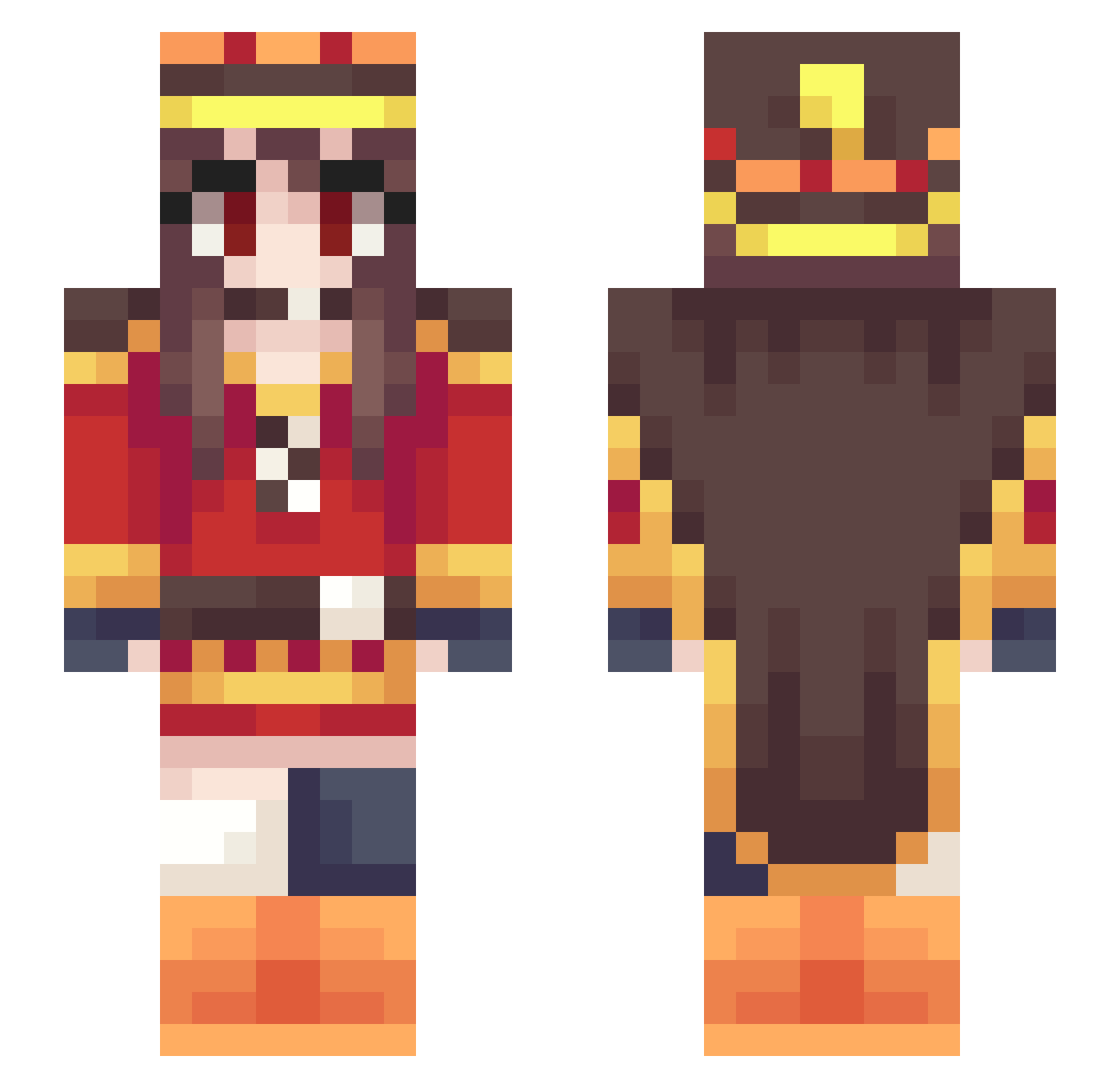
Current Minecraft skin of the player Kano1117, loaded from the official Mojang API. Rotate the 3D model with your mouse or finger, then download the skin as a PNG file and use it in Minecraft: Bedrock Edition or Java Edition for free. When Kano1117 changes their skin, this page updates automatically and the old skin stays in the history below.
Other players with this skin (388)
Kano1117 was the 341st player we have seen with this skin, first spotted on 30.10.2026. The same skin was seen on these players. Open a nickname to see their current skin and skin history.
 CavyBiceps JaeBinLee B3TA2 Co01Time ThePretenderKing sakurako177 bento95 LithiumBeryllium katekano Sondziak INachol Sora114514 Discoball69 hirotaka1225 Hollow_forge BanYa52 Weeby_chan lukeaacandler AyumiiHiruko Gustavain Bookman_416 Mixplosion Subversiver Taiyoroku SAMZEROX ShionOGC CAKE1215 urhotmom r88mcc Mr_AxZik BYDMMSD ttaakkaahs EurysOfTheNein DeathLoli Rodsfon Ksiazuk Sachou48 Jorgini44 TheForeverOff JesseGu Drake1Fan Salchichota11 Kirasekiro BakaJeff nizunizu Avaruuu nagareboshi1012 chihaya0241 Kedomi Ethardos EllenBees Teebeutelsauger pgab piextw mnminetti Akameka shan0521 1800EGIRL MontyoIo Yami_no_Hane
More Royalty Minecraft skins
How to install the Kano1117 skin
- Press the Download button above to save the skin as a PNG file.
- Minecraft: Bedrock Edition (PE): open the Dressing Room from the main menu (or tap your character → Edit Character), go to Classic Skins → Owned, press the + (new skin) button, choose the downloaded PNG and pick the Slim (Alex) model. Works on PC and mobile; consoles cannot import custom skins.
- Minecraft: Java Edition: open the Minecraft Launcher, go to the Skins tab, click New Skin, load the PNG, pick the Slim (Alex) model and press Save & Use. You can also upload it at minecraft.net → Profile → Change Skin.
The skin does not show up after import - what should I do?
Restart Minecraft and open the Dressing Room again - imported skins sometimes appear only after a restart. Also make sure you selected the imported skin and picked the Slim (Alex) model.
Which model should I choose, Classic or Slim?
This skin is designed for the Slim (Alex) model. If you pick the wrong model, the arms of the skin will look stretched or squeezed.
Is the skin of Kano1117 free to download?
Yes. Press Download, save the PNG file and use it in Minecraft: Bedrock Edition or Java Edition - no payment or registration needed. The skin also works on multiplayer servers and Realms.
More skins
Looking for more? Go back to all Minecraft skins and check the top skins of the week, month and all time, or find any player's skin by nickname.