
Java230 - Minecraft Skins & Skin History
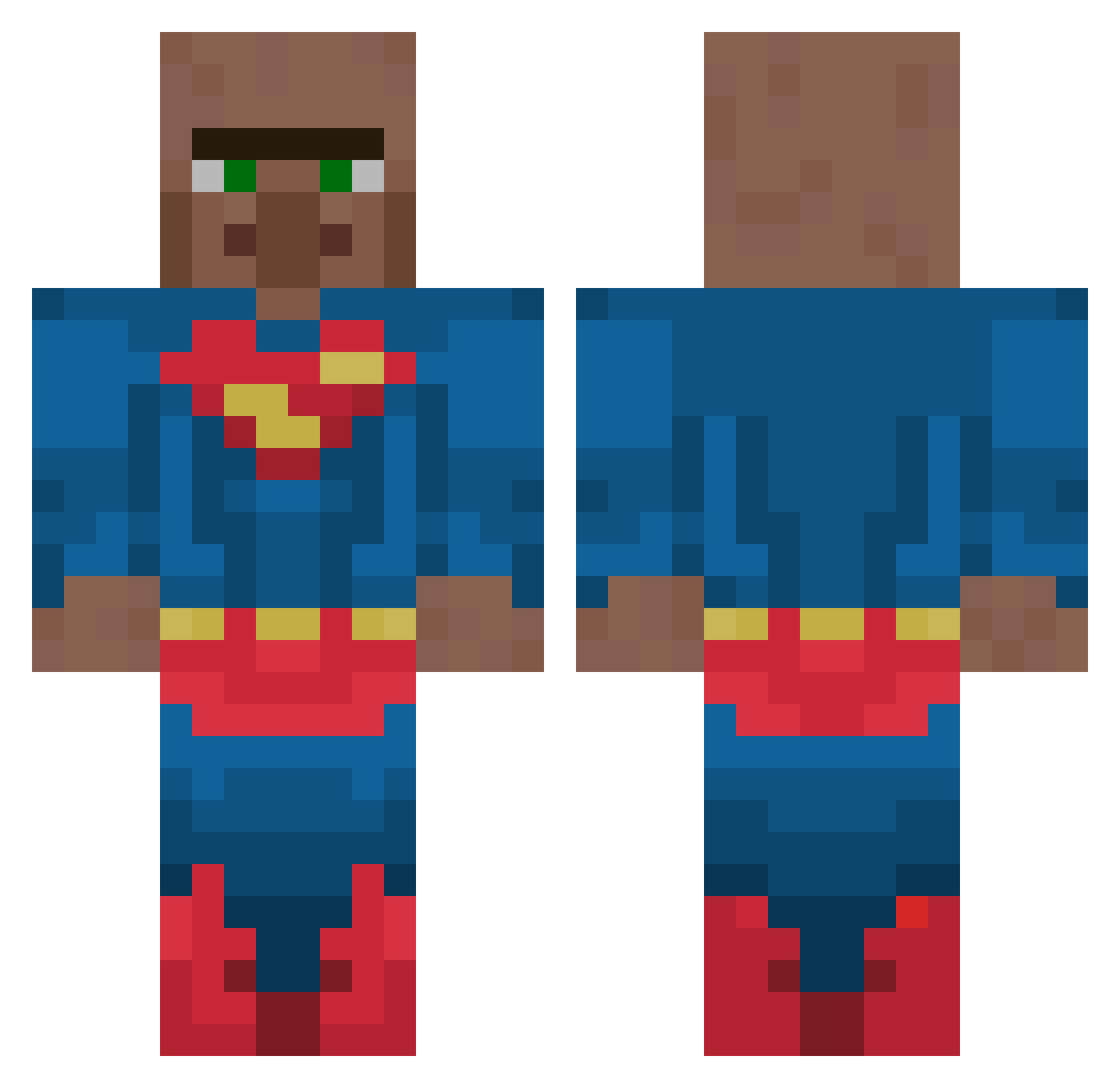
Current Minecraft skin of the player Java230, loaded from the official Mojang API. Rotate the 3D model with your mouse or finger, then download the skin as a PNG file and use it in Minecraft: Bedrock Edition or Java Edition for free. When Java230 changes their skin, this page updates automatically and the old skin stays in the history below.
Other players with this skin (152)
Java230 was the 107th player we have seen with this skin, first spotted on 13.10.2026. The same skin was seen on these players. Open a nickname to see their current skin and skin history.
 BOALI123 1600ELO Adi5_5K Syhhi Rimz99 Oh_KO kty5847 romanzinho Tevin4u ZetaDark NieWisnia _didoo_ BoredDiagram538 SULTANI0 _Unwanted trick1113 FuzzyNuts27 1421655 prollynotpolver Dukkheadjr tytancz Ksawer15 pvpkurier nopapusxd UnderWorldLiving qwerqwerrrrrr AriasGod 360yynoscope ML9I MrSim4o oskibeztroski TFBHugo Narth_Alos S0rensenXD goupil25 McRafinha bigpiggy11 coopsfam C_Shuai Smoozy06 malcoEM CrisInvictus BinBinMisosoup19 CAPTAINBORA THUNDER10K Anon214 ScifiMonkey7501 Naruto_52 bannanagaming tostyzdzieci Jeffhoward2002 Aldryxx_ PiotrSighma Burkie4 f5rrl KiksElPolo groki MILAD_IS_THE_B TheRealRush K0cham_Pepsi
More Superman Minecraft skins
How to install the Java230 skin
- Press the Download button above to save the skin as a PNG file.
- Minecraft: Bedrock Edition (PE): open the Dressing Room from the main menu (or tap your character → Edit Character), go to Classic Skins → Owned, press the + (new skin) button, choose the downloaded PNG and pick the Classic (Steve) model. Works on PC and mobile; consoles cannot import custom skins.
- Minecraft: Java Edition: open the Minecraft Launcher, go to the Skins tab, click New Skin, load the PNG, pick the Classic (Steve) model and press Save & Use. You can also upload it at minecraft.net → Profile → Change Skin.
The skin does not show up after import - what should I do?
Restart Minecraft and open the Dressing Room again - imported skins sometimes appear only after a restart. Also make sure you selected the imported skin and picked the Classic (Steve) model.
Which model should I choose, Classic or Slim?
This skin is designed for the Classic (Steve) model. If you pick the wrong model, the arms of the skin will look stretched or squeezed.
Is the skin of Java230 free to download?
Yes. Press Download, save the PNG file and use it in Minecraft: Bedrock Edition or Java Edition - no payment or registration needed. The skin also works on multiplayer servers and Realms.
More skins
Looking for more? Go back to all Minecraft skins and check the top skins of the week, month and all time, or find any player's skin by nickname.