
ItzSnipe1 - Minecraft Skins & Skin History
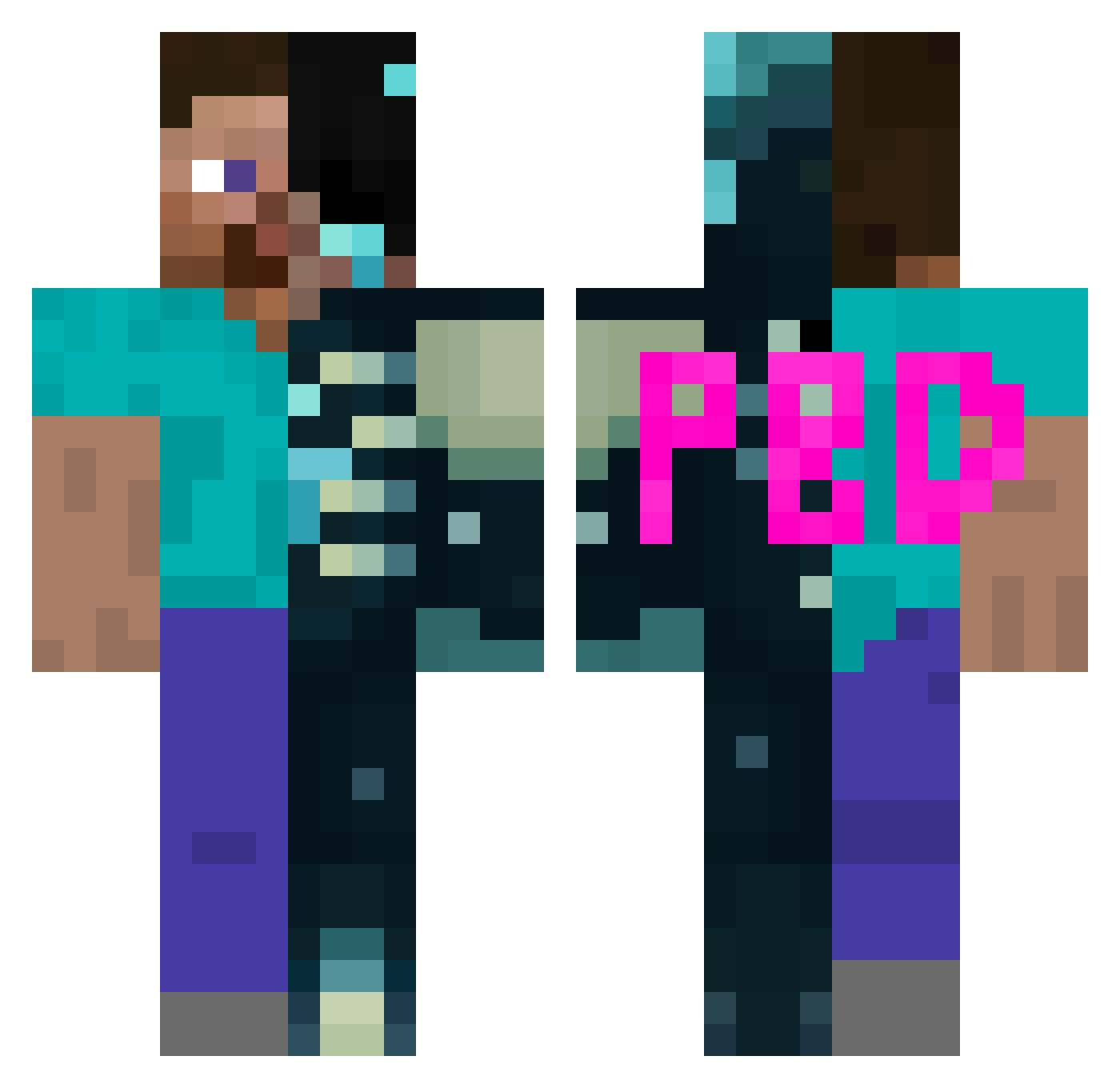
Current Minecraft skin of the player ItzSnipe1, loaded from the official Mojang API. Rotate the 3D model with your mouse or finger, then download the skin as a PNG file and use it in Minecraft: Bedrock Edition or Java Edition for free. When ItzSnipe1 changes their skin, this page updates automatically and the old skin stays in the history below.
Other players with this skin (142)
ItzSnipe1 was the 114th player we have seen with this skin, first spotted on 19.10.2026. The same skin was seen on these players. Open a nickname to see their current skin and skin history.
 CartTheBArt ShieldGod iamsotuffbuddy 6axo QuackzZMC Zorikos3 Shadow010120 AHTOH_2024 Vsync7 BMWDanix7 Own__ Dangerchesse mateo130 pratyushreenga rcgitd xylix13 Pyronn_x BastiPlayer100 NightmarebyKira Noofus_4000 L9ANAS Tiger2281 Son_sandia Compl6x Nightmare148 Skyyyring ItzKryonix moonlightextra1 saharat112 TheWu12 TuuyzZ Sv2kLQKAL9BaASv2 Sukuna203 itzreaImee katlamayageldim yuxn_b ItzRealMeSon VoidMoney_ TANUJ_XD Littleliam70 ericksan16 PolyLuvsDihabk qLawliet_ gabbepabbe12 Boxbya_ Richard27372 liskalbaska Relowt SidewaysSawfish PU1SARJ Switched_up HuinuiJ itzntrealme supersaturation echstacyyy GhostThunder_29 Re3zyy r3dra ARVM bentleg15
More Half And Half Minecraft skins
See all 123 Half And Half skins
How to install the ItzSnipe1 skin
- Press the Download button above to save the skin as a PNG file.
- Minecraft: Bedrock Edition (PE): open the Dressing Room from the main menu (or tap your character → Edit Character), go to Classic Skins → Owned, press the + (new skin) button, choose the downloaded PNG and pick the Classic (Steve) model. Works on PC and mobile; consoles cannot import custom skins.
- Minecraft: Java Edition: open the Minecraft Launcher, go to the Skins tab, click New Skin, load the PNG, pick the Classic (Steve) model and press Save & Use. You can also upload it at minecraft.net → Profile → Change Skin.
The skin does not show up after import - what should I do?
Restart Minecraft and open the Dressing Room again - imported skins sometimes appear only after a restart. Also make sure you selected the imported skin and picked the Classic (Steve) model.
Which model should I choose, Classic or Slim?
This skin is designed for the Classic (Steve) model. If you pick the wrong model, the arms of the skin will look stretched or squeezed.
Is the skin of ItzSnipe1 free to download?
Yes. Press Download, save the PNG file and use it in Minecraft: Bedrock Edition or Java Edition - no payment or registration needed. The skin also works on multiplayer servers and Realms.
More skins
Looking for more? Go back to all Minecraft skins and check the top skins of the week, month and all time, or find any player's skin by nickname.