
DualRob - Minecraft Skins & Skin History
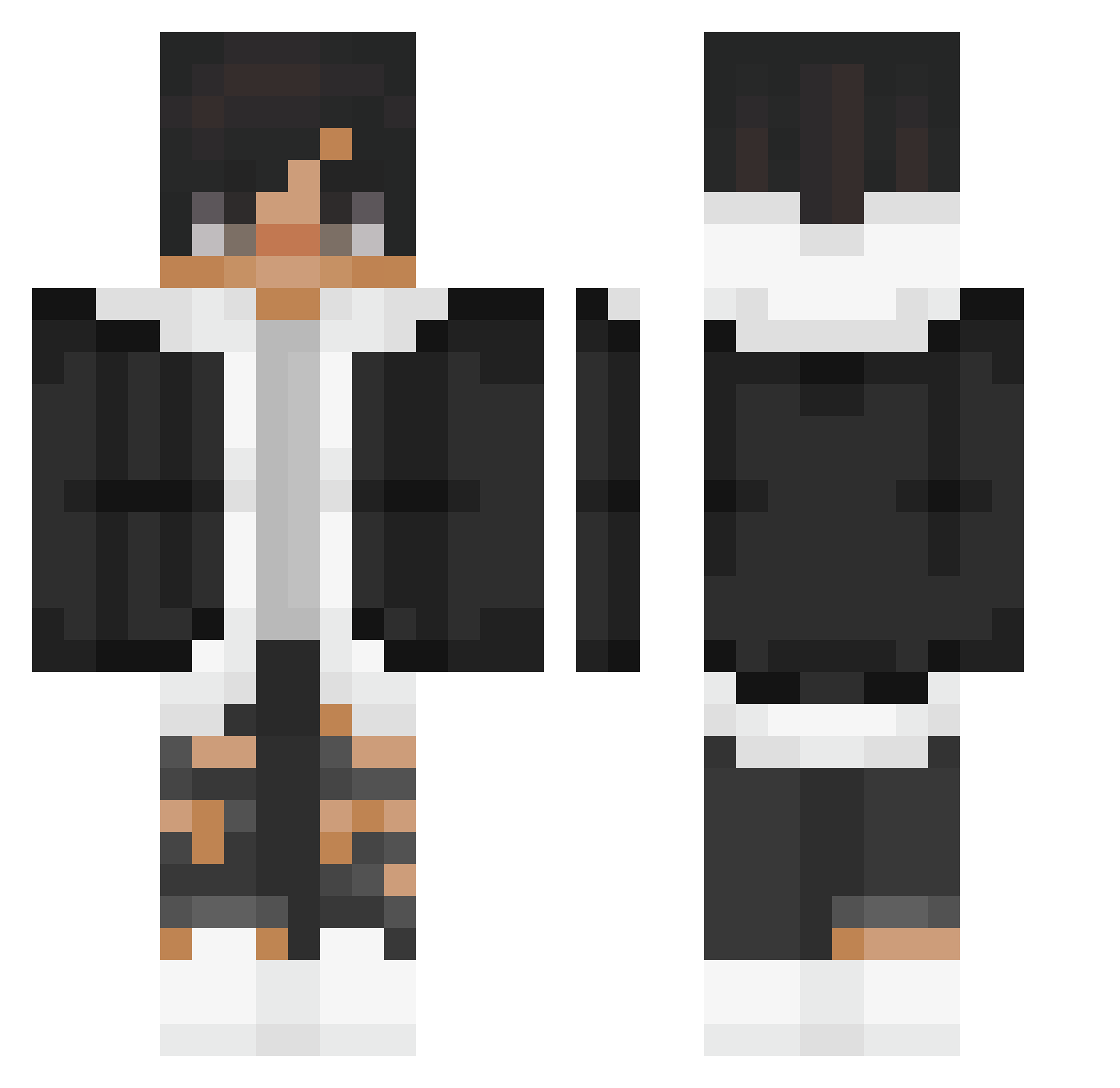
Current Minecraft skin of the player DualRob, loaded from the official Mojang API. Rotate the 3D model with your mouse or finger, then download the skin as a PNG file and use it in Minecraft: Bedrock Edition or Java Edition for free. When DualRob changes their skin, this page updates automatically and the old skin stays in the history below.
Other players with this skin (214)
DualRob was the 168th player we have seen with this skin, first spotted on 26.10.2026. The same skin was seen on these players. Open a nickname to see their current skin and skin history.
 Kenji_Oxydian Alpha77390 Aiden_FX offish Xiaoxin_1010 GutsyGecko nickblue00 Kitayami ministop24 Bud_Spncer_HD Aleco_Shadow Neoplex313 Brooke0717 Yahra almxndmilklatte Damage2009 amyu2503 itz_Animekid IN_D3BT txbey_ MikaylaFrankie dragonforest _siiwuha_ TRYPetrick AkoulDeLaTess Link_HG BLOCKHB IsmaelPoty SamusubiTV B8ez poposamaaa FishBombardieru Riuuji_ iwanlenin2 werlloop YouWinButImHere xxxzero_pro Giftting KLF_Pedrito Pekky9 SplitzUWU AperoMagik BBBFireBoy MelloWCartI Hillnr01 Heyitz_Zyphan KR_Dragon_ Emre1226 garura MayorVilla Wenhao1218 gabriel120 Yung_Boba Rauxys PJHCANDY HotSauceIRL Meliodic_Splosh YorshKillah Eymiiks zMoon_exe
How to install the DualRob skin
- Press the Download button above to save the skin as a PNG file.
- Minecraft: Bedrock Edition (PE): open the Dressing Room from the main menu (or tap your character → Edit Character), go to Classic Skins → Owned, press the + (new skin) button, choose the downloaded PNG and pick the Classic (Steve) model. Works on PC and mobile; consoles cannot import custom skins.
- Minecraft: Java Edition: open the Minecraft Launcher, go to the Skins tab, click New Skin, load the PNG, pick the Classic (Steve) model and press Save & Use. You can also upload it at minecraft.net → Profile → Change Skin.
The skin does not show up after import - what should I do?
Restart Minecraft and open the Dressing Room again - imported skins sometimes appear only after a restart. Also make sure you selected the imported skin and picked the Classic (Steve) model.
Which model should I choose, Classic or Slim?
This skin is designed for the Classic (Steve) model. If you pick the wrong model, the arms of the skin will look stretched or squeezed.
Is the skin of DualRob free to download?
Yes. Press Download, save the PNG file and use it in Minecraft: Bedrock Edition or Java Edition - no payment or registration needed. The skin also works on multiplayer servers and Realms.
More skins
Looking for more? Go back to all Minecraft skins and check the top skins of the week, month and all time, or find any player's skin by nickname.