
DestroyerMan - Minecraft Skins & Skin History
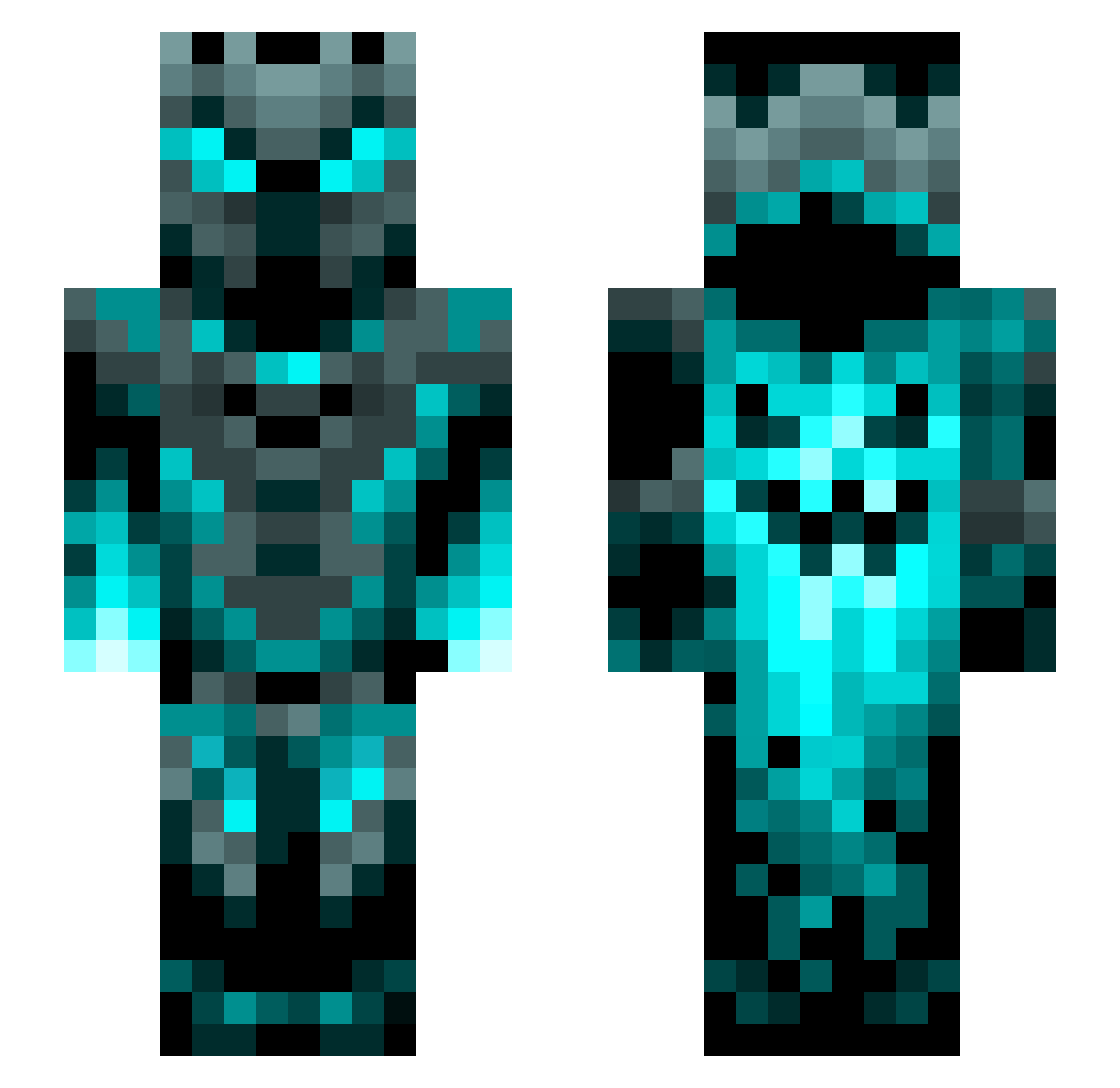
Current Minecraft skin of the player DestroyerMan, loaded from the official Mojang API. Rotate the 3D model with your mouse or finger, then download the skin as a PNG file and use it in Minecraft: Bedrock Edition or Java Edition for free. When DestroyerMan changes their skin, this page updates automatically and the old skin stays in the history below.
Other players with this skin (1315)
DestroyerMan was the 1235th player we have seen with this skin, first spotted on 04.11.2026. The same skin was seen on these players. Open a nickname to see their current skin and skin history.
 Alvin183 Meteor_Comet Workbench3D zfeazy Ihuntcreepers09 satusujin BlackSwan2007 Malorien Ivnx AzureKnight0326 MMMbangheadshot Mark76767 parka1234 karouto66754 MinecraftAMF _JayZee_ Arcane_Reaver Tleex Regamourn GoldenD3ath MDMattes Serpentine1234 Majn98 Sirzock Knotsurz HamburgerGreen Asierete MJ600300 ChinoGZ Matthew_plays109 DeathRaptoR2930 Ronsas JaguarStarlite FunBeast9756 OminousCircle58 AKnightOfPeace criss1922 saman_smh yuvalbarazani Chulimmm Omega9642 Unstoppablefin OmnidroxYT CuzBasti Wigardt 8787878787 DEHEISSIPAPI Soup445 TheBoyRaisin Kaisonova chanchan0070 Chaotic_MySt PH4NT0M2318 Diamond91 SHRK117 sebastianpl357 zweiBergarbeiter periodHOUSTON Sleepy_Boi117 goldenglades
More Phantom Minecraft skins
How to install the DestroyerMan skin
- Press the Download button above to save the skin as a PNG file.
- Minecraft: Bedrock Edition (PE): open the Dressing Room from the main menu (or tap your character → Edit Character), go to Classic Skins → Owned, press the + (new skin) button, choose the downloaded PNG and pick the Slim (Alex) model. Works on PC and mobile; consoles cannot import custom skins.
- Minecraft: Java Edition: open the Minecraft Launcher, go to the Skins tab, click New Skin, load the PNG, pick the Slim (Alex) model and press Save & Use. You can also upload it at minecraft.net → Profile → Change Skin.
The skin does not show up after import - what should I do?
Restart Minecraft and open the Dressing Room again - imported skins sometimes appear only after a restart. Also make sure you selected the imported skin and picked the Slim (Alex) model.
Which model should I choose, Classic or Slim?
This skin is designed for the Slim (Alex) model. If you pick the wrong model, the arms of the skin will look stretched or squeezed.
Is the skin of DestroyerMan free to download?
Yes. Press Download, save the PNG file and use it in Minecraft: Bedrock Edition or Java Edition - no payment or registration needed. The skin also works on multiplayer servers and Realms.
More skins
Looking for more? Go back to all Minecraft skins and check the top skins of the week, month and all time, or find any player's skin by nickname.