
DALHA8482 - Minecraft Skins & Skin History
Current Minecraft skin of the player DALHA8482, loaded from the official Mojang API. Rotate the 3D model with your mouse or finger, then download the skin as a PNG file and use it in Minecraft: Bedrock Edition or Java Edition for free. When DALHA8482 changes their skin, this page updates automatically and the old skin stays in the history below.
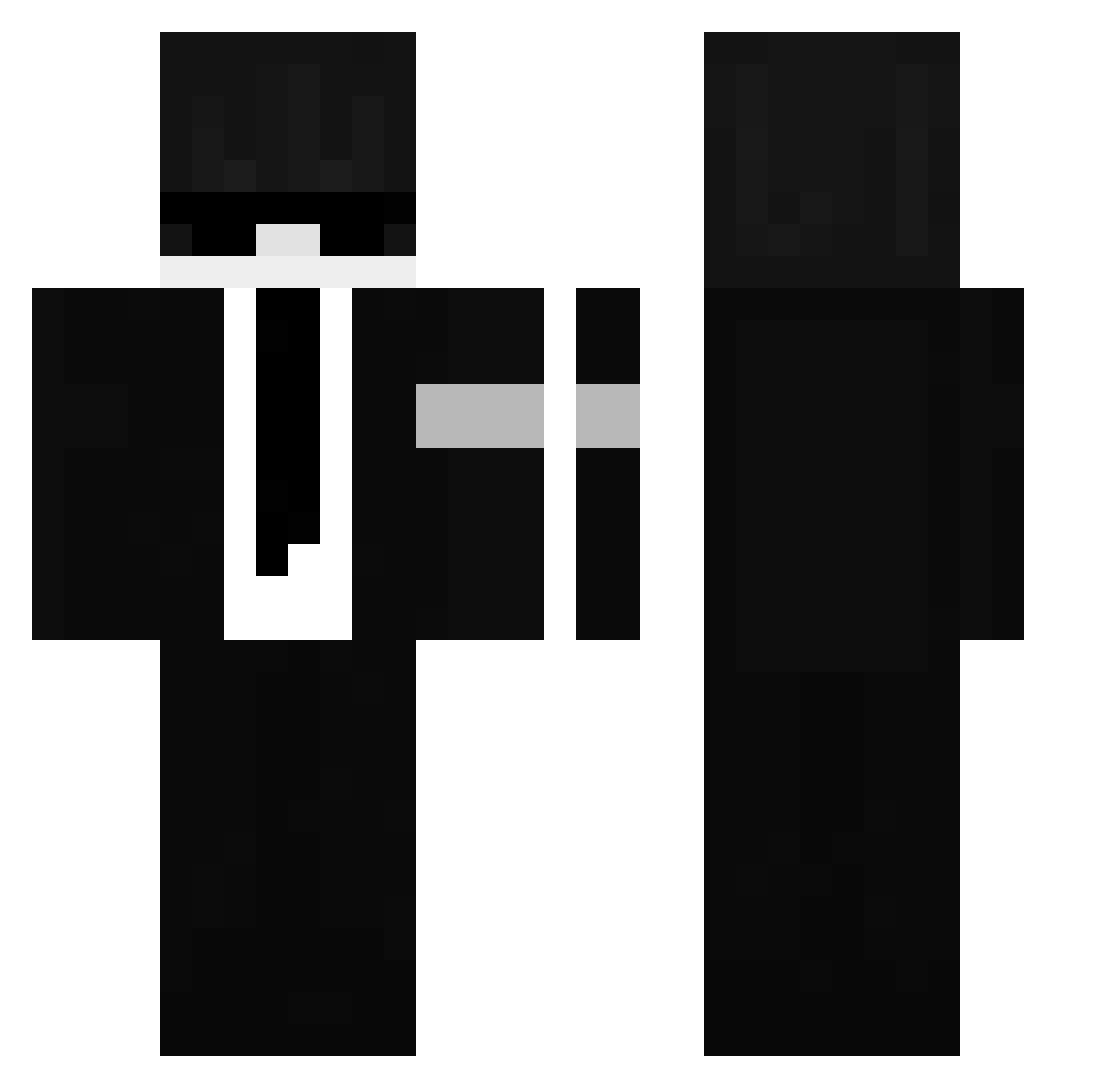
Other players with this skin (61)
DALHA8482 was the 52nd player we have seen with this skin, first spotted on 28.10.2026. The same skin was seen on these players. Open a nickname to see their current skin and skin history.
 Hyunn_W0o Adi2901 Deepan_69 KN1GHTSER DensifyX Amir_90 meredak podatek_VAT285 wuhnjpg XionexOwn Eastonz demonteez Nepharon ProMiracBaba Miixy17 Xephxz BedGambler labananita3000 Frostix_987xd RealRolveK Kspirit zNotFirewolf NulledGhost PooeyPoo123 KrzysiuZbysiu _Tebe_ Wintaly CIO_Kr Z3D4sC0uv3s PeLuRe Texasi_kiseger hvnjisxng vextoz Sm1t3_YT Argies00
 alexfido muskitopt DarKJohnny_ Lelisek_14 kshDDotty AmritJSingh KochamE__S mordecai456_ Minecrafter2236 Kotonoha711 bung33_ Mroczny_Shadow Borsuk9889 _LINU5_ brushless BlackyGlint shadow_zzzz
 KRYSTIAN1326
 Beast5588
 NikoJcraft WII2D MAXEDOODELL ndr45
 talhaselm7 redacted10z
More Security Minecraft skins
How to install the DALHA8482 skin
- Press the Download button above to save the skin as a PNG file.
- Minecraft: Bedrock Edition (PE): open the Dressing Room from the main menu (or tap your character → Edit Character), go to Classic Skins → Owned, press the + (new skin) button, choose the downloaded PNG and pick the Classic (Steve) model. Works on PC and mobile; consoles cannot import custom skins.
- Minecraft: Java Edition: open the Minecraft Launcher, go to the Skins tab, click New Skin, load the PNG, pick the Classic (Steve) model and press Save & Use. You can also upload it at minecraft.net → Profile → Change Skin.
The skin does not show up after import - what should I do?
Restart Minecraft and open the Dressing Room again - imported skins sometimes appear only after a restart. Also make sure you selected the imported skin and picked the Classic (Steve) model.
Which model should I choose, Classic or Slim?
This skin is designed for the Classic (Steve) model. If you pick the wrong model, the arms of the skin will look stretched or squeezed.
Is the skin of DALHA8482 free to download?
Yes. Press Download, save the PNG file and use it in Minecraft: Bedrock Edition or Java Edition - no payment or registration needed. The skin also works on multiplayer servers and Realms.
More skins
Looking for more? Go back to all Minecraft skins and check the top skins of the week, month and all time, or find any player's skin by nickname.