
Benjamin_Frankli - Minecraft Skins & Skin History
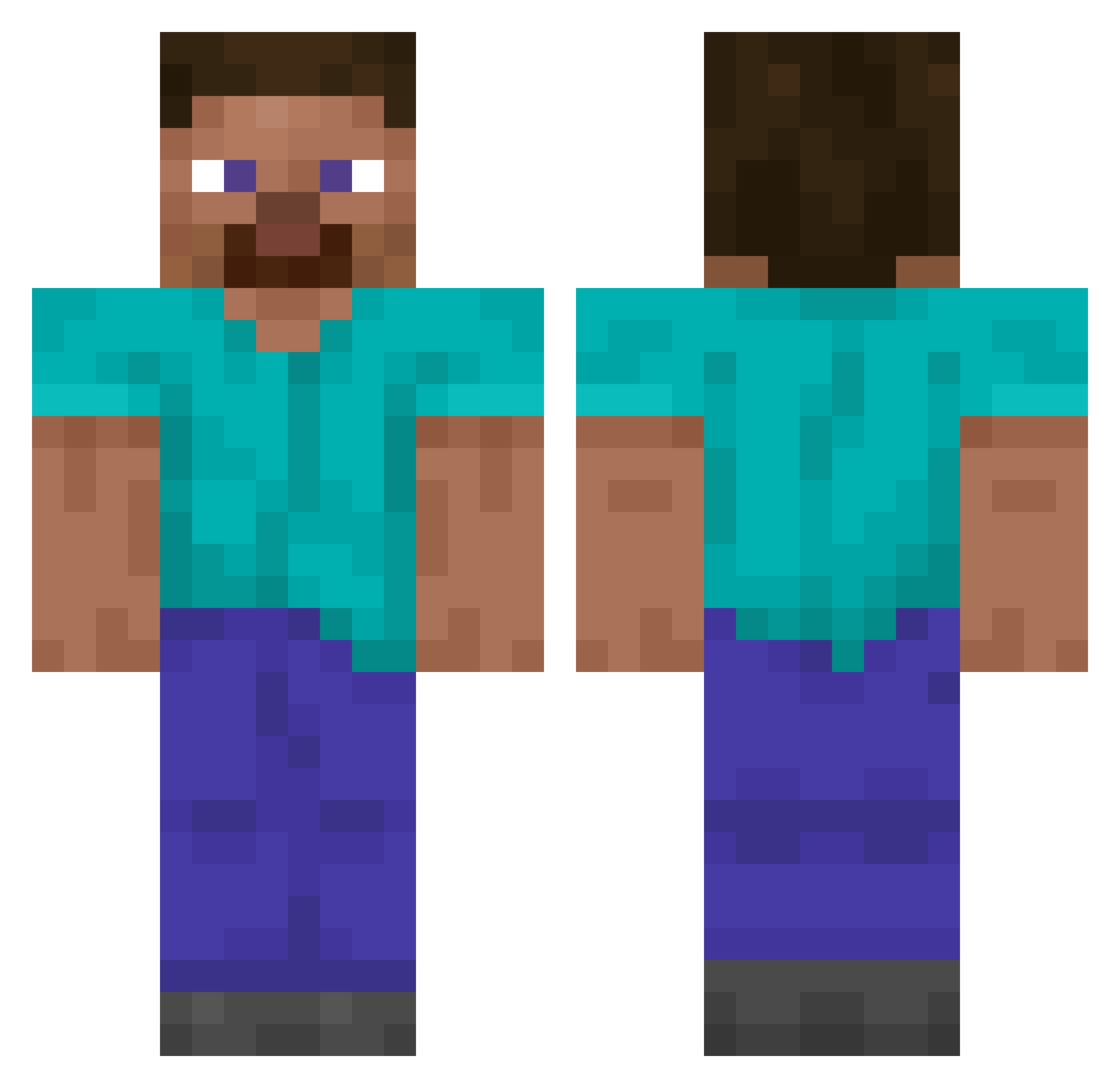
Current Minecraft skin of the player Benjamin_Frankli, loaded from the official Mojang API. Rotate the 3D model with your mouse or finger, then download the skin as a PNG file and use it in Minecraft: Bedrock Edition or Java Edition for free. When Benjamin_Frankli changes their skin, this page updates automatically and the old skin stays in the history below.
Other players with this skin (14843)
Benjamin_Frankli was the 11124th player we have seen with this skin, first spotted on 18.10.2026. The same skin was seen on these players. Open a nickname to see their current skin and skin history.
 GnAtEkOOO kwkksks77 Aquaticturtle07 KingRauru4Ever mayonnaise_mole kirby800nico I_conexion_I PsyKwak0926 StepinatorYS NeoN1128 Collat PandegaDe Rinovn CheaterMS S_5M cutehappy_ 741z joncas12 Mammamo123 JoeP259 kriskoo2011 Fabrizio2404 WitherIII Mikkkkkkkkkkkkka idsjdbdls J_0_K_ER qrfqekoqiwj Patruuna69 WavyPatato123 besterTim pintogaymes33333 kochan819 Wizern OvoshnoeRagu roli4563 alinso SleepyJah F0ksi KingCrimChin Stronggalaxy Rammu6780 Jamba1 Shaytani TeamRoedeo massi_c erpyk aitor173 purpaf Andrea_1301 jacoblikesbigbla Ford_femboy ShunNSK Speedhawk Je_wls ICEMASTER545090 Timeklof CactusBlad3 Outrolling ak47akwrh zNexyGamer
How to install the Benjamin_Frankli skin
- Press the Download button above to save the skin as a PNG file.
- Minecraft: Bedrock Edition (PE): open the Dressing Room from the main menu (or tap your character → Edit Character), go to Classic Skins → Owned, press the + (new skin) button, choose the downloaded PNG and pick the Classic (Steve) model. Works on PC and mobile; consoles cannot import custom skins.
- Minecraft: Java Edition: open the Minecraft Launcher, go to the Skins tab, click New Skin, load the PNG, pick the Classic (Steve) model and press Save & Use. You can also upload it at minecraft.net → Profile → Change Skin.
The skin does not show up after import - what should I do?
Restart Minecraft and open the Dressing Room again - imported skins sometimes appear only after a restart. Also make sure you selected the imported skin and picked the Classic (Steve) model.
Which model should I choose, Classic or Slim?
This skin is designed for the Classic (Steve) model. If you pick the wrong model, the arms of the skin will look stretched or squeezed.
Is the skin of Benjamin_Frankli free to download?
Yes. Press Download, save the PNG file and use it in Minecraft: Bedrock Edition or Java Edition - no payment or registration needed. The skin also works on multiplayer servers and Realms.
More skins
Looking for more? Go back to all Minecraft skins and check the top skins of the week, month and all time, or find any player's skin by nickname.