
Bartolini_123 - Minecraft Skins & Skin History
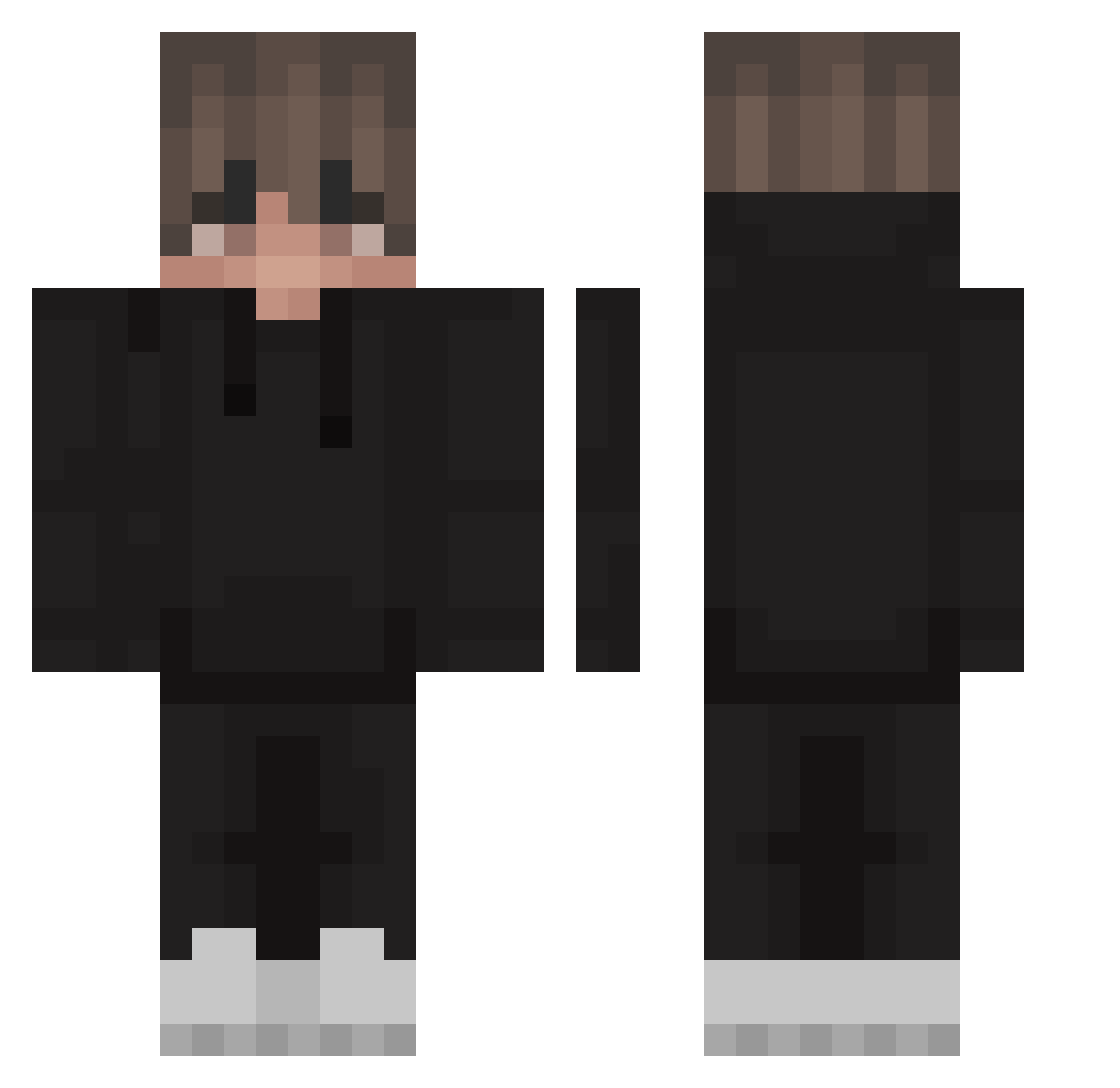
Current Minecraft skin of the player Bartolini_123, loaded from the official Mojang API. Rotate the 3D model with your mouse or finger, then download the skin as a PNG file and use it in Minecraft: Bedrock Edition or Java Edition for free. When Bartolini_123 changes their skin, this page updates automatically and the old skin stays in the history below.
Other players with this skin (298)
Bartolini_123 was the 264th player we have seen with this skin, first spotted on 02.11.2026. The same skin was seen on these players. Open a nickname to see their current skin and skin history.
 Damian_2178 vertriebener kubaobra123 Hamii69 Richi123456 DonELGalo AustinW05 Ckrone Alexorowskyy AlexusX green_neon xbyVodo Radias05 RageMonkeyMC ChiefMitchh Pika405 ReaperX_z _kcaj_ Kiremedic Luc_72 Mini_xd Veterek1337 reanadler Michal98 _SEKDOH _PlatyPu5_ kaptom _Apeman__ ixTomic dd7297 smootix neverfallinluv Mxttxs its_ya_girl Emodon Tutku1 Mnuyk poten247 _Monzi_ Aidan7161 dsbanpeel LawIV Ziinkz BlackH20Xe rusiuuuuuk Carter4716 Agrodolcee Tomix_VR Ale_009_ SirAlienx Flab_er Shadexz jaquba555 RamonVerhagen Mr_SweFish BisexualNinja12 PureIsntHere CodeNameSpiffin quanix13 hebri
How to install the Bartolini_123 skin
- Press the Download button above to save the skin as a PNG file.
- Minecraft: Bedrock Edition (PE): open the Dressing Room from the main menu (or tap your character → Edit Character), go to Classic Skins → Owned, press the + (new skin) button, choose the downloaded PNG and pick the Classic (Steve) model. Works on PC and mobile; consoles cannot import custom skins.
- Minecraft: Java Edition: open the Minecraft Launcher, go to the Skins tab, click New Skin, load the PNG, pick the Classic (Steve) model and press Save & Use. You can also upload it at minecraft.net → Profile → Change Skin.
The skin does not show up after import - what should I do?
Restart Minecraft and open the Dressing Room again - imported skins sometimes appear only after a restart. Also make sure you selected the imported skin and picked the Classic (Steve) model.
Which model should I choose, Classic or Slim?
This skin is designed for the Classic (Steve) model. If you pick the wrong model, the arms of the skin will look stretched or squeezed.
Is the skin of Bartolini_123 free to download?
Yes. Press Download, save the PNG file and use it in Minecraft: Bedrock Edition or Java Edition - no payment or registration needed. The skin also works on multiplayer servers and Realms.
More skins
Looking for more? Go back to all Minecraft skins and check the top skins of the week, month and all time, or find any player's skin by nickname.