
Baaleksa11 - Minecraft Skins & Skin History
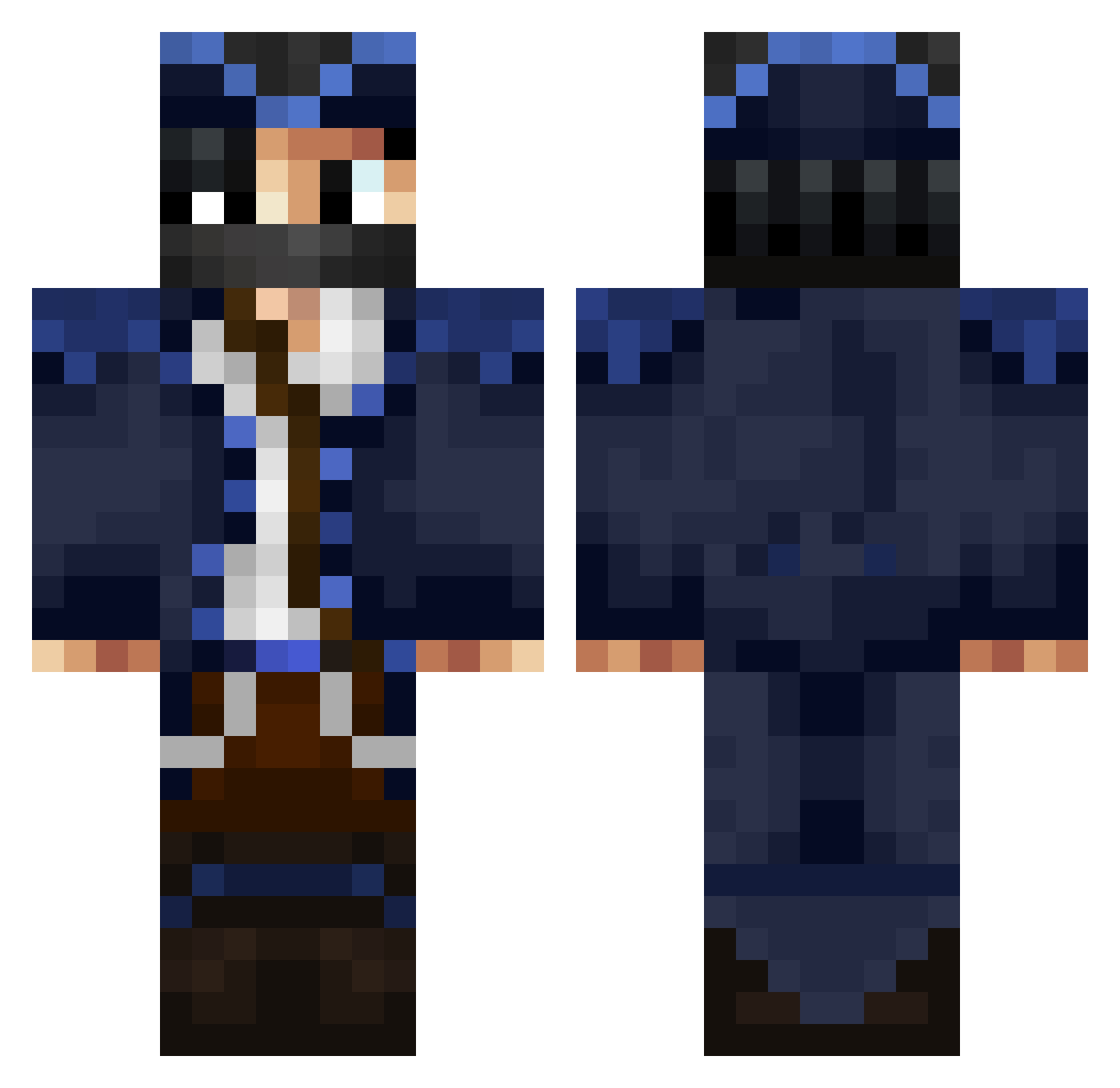
Current Minecraft skin of the player Baaleksa11, loaded from the official Mojang API. Rotate the 3D model with your mouse or finger, then download the skin as a PNG file and use it in Minecraft: Bedrock Edition or Java Edition for free. When Baaleksa11 changes their skin, this page updates automatically and the old skin stays in the history below.
Other players with this skin (86)
Baaleksa11 was the 63rd player we have seen with this skin, first spotted on 12.10.2026. The same skin was seen on these players. Open a nickname to see their current skin and skin history.
 Techzero0 CarterByte Goofygubert Philippchen2013 Superads123 wemmbuxx2 Scyte_ krxzykay itzvictoryz Zophyq EmilPro44 Kazxjizo EiSoulless sakunoh_W0hAOWQe wojcieszqu w1ndzxc xXLettreXx Lukas_Koenitz Lordofthetemple ossi2335 Shapified praiserula BogdanProMC PacmantheBird PstragPL Real_Rapture nosku26 Leon_RL69 HappyDewyears SammyJammer mikizafryki76 Kripster_69 Necromant1102 illotox blue752 Adiii121 NaesAlex LukyBBB Nox_ever LuhPatchyyy Osiris13 RILX1 Finn_isDutch jaydenplayz77 JxstDxmis MkError _Swiftal_ Naudster0611 Racerpat26 Nateski07 aaaaa777111 jonas_234 mist_ral DustiCZ foxz123 Speedsiillver alpturktr affe799 ABOODI1111 AnGeL2k4
More Captain Minecraft skins
How to install the Baaleksa11 skin
- Press the Download button above to save the skin as a PNG file.
- Minecraft: Bedrock Edition (PE): open the Dressing Room from the main menu (or tap your character → Edit Character), go to Classic Skins → Owned, press the + (new skin) button, choose the downloaded PNG and pick the Classic (Steve) model. Works on PC and mobile; consoles cannot import custom skins.
- Minecraft: Java Edition: open the Minecraft Launcher, go to the Skins tab, click New Skin, load the PNG, pick the Classic (Steve) model and press Save & Use. You can also upload it at minecraft.net → Profile → Change Skin.
The skin does not show up after import - what should I do?
Restart Minecraft and open the Dressing Room again - imported skins sometimes appear only after a restart. Also make sure you selected the imported skin and picked the Classic (Steve) model.
Which model should I choose, Classic or Slim?
This skin is designed for the Classic (Steve) model. If you pick the wrong model, the arms of the skin will look stretched or squeezed.
Is the skin of Baaleksa11 free to download?
Yes. Press Download, save the PNG file and use it in Minecraft: Bedrock Edition or Java Edition - no payment or registration needed. The skin also works on multiplayer servers and Realms.
More skins
Looking for more? Go back to all Minecraft skins and check the top skins of the week, month and all time, or find any player's skin by nickname.